9 Best USB Gaming Headset of 2026: Match Your PC or Console Setup

The best USB gaming headsets for PC, PS5, and Xbox? Match your setup and avoid 7.1 marketing that doesn't work where you play.

Most USB gaming headsets lean on 7.1 surround and noise-cancelling mic language, but what determines whether a headset actually fits your setup is far less exciting: how it connects, how it fits, and whether the mic keeps working after a few months. Virtual surround is software-dependent, and noise cancellation is usually just a mic pickup pattern, not real isolation. That mismatch between marketing and real use is why the best choice for one gamer can feel like a miss for another.

There is also a genuine trade-off in this category between proven consistency and modern convenience. An older design with a dedicated USB sound card may offer a longer track record and 7.1 on PC, while a newer USB-C model adds flexible pairing across PC and console but carries less long-term evidence. Neither is objectively better — the right one depends on where you play and what you can tolerate.

USB-C alone does not guarantee console compatibility: PlayStation accepts USB audio when connected directly, while Xbox blocks it entirely unless the headset also has a 3.5mm jack. That platform check matters more than any driver size or RGB glow.

About the Sound Score: This comparative score is calculated from a product's published customer rating and review volume. It is not a laboratory measurement or a hands-on test result.

1

Best Overall

HyperX Cloud II

91 /100
Sound Score Outstanding

Key details

Connection
USB-A + 3.5mm
Microphone
Detachable noise-cancelling
Driver Size
53mm
Spatial Audio
7.1 via USB sound card
View on Amazon

The HyperX Cloud II puts 53mm drivers, a USB 7.1 sound card, and memory-foam earcups into an aluminum frame. For PC gaming, that mix gives clear directional audio, built-in virtual surround, and a wired connection that does not need a separate amplifier or mixer. The USB sound card handles the 7.1 processing in one compact dongle, so a desktop or laptop with a free USB-A port is all you need for the full effect.

Game audio has good separation: footsteps and gunfire stay distinct from voice chat, and the closed-back earcups cut most room noise. The 53mm drivers have enough headroom for loud action without turning shrill, and the sound stage keeps its shape at lower volumes. The memory-foam pads and padded headband spread weight evenly, which matters more than the 7.1 label for sessions that run past two hours. The ear cushions seal around most head shapes without excessive clamping, so the headset stays comfortable for movie-length play.

When the boom mic is detached, the Cloud II becomes a simple closed-back stereo headset over the 3.5mm cable. That makes it easy to keep on the desk for music or video without the gamer look, and it also gives console owners a familiar way to connect without needing the USB sound card. The detachable mic also makes chat optional: leave it off for single-player nights and click it back in for squad play.

The target buyer is a PC player who wants a wired USB headset that works out of the box, and a first-time buyer who would rather have a forgiving fit than an aggressive tuning curve. The aluminum frame gives the earcups a sturdy anchor, and the mid-range price leaves room for the sound card, good padding, and a detachable mic without stepping into premium-priced territory. That balance is what keeps it relevant for the broadest group of PC gamers.

Mic/cable consistency varies by unit; the USB-A sound card favors PC, and consoles connect through 3.5mm in stereo. That makes the Cloud II a PC-first tool. A quick recording test and a once-over of the cable when it arrives is enough to catch any unit-level issues before the return window closes. On PC, the 7.1 effect adds space to game audio; over 3.5mm on a console, the stereo signal stays clean but does not get virtual surround. Buyers who need the same surround on PlayStation or Xbox should plan for a different model.

💡 Keep a USB-A adapter nearby if your laptop only has USB-C ports — the bundled sound card is USB-A.

Pros

  • Clear directional audio keeps footsteps and gunfire separated from voice chat.
  • Aluminum frame and tight assembly give the headset a sturdy feel for daily PC use.
  • Memory-foam earcups and padded headband distribute pressure evenly over long sessions.
  • Closed-back earcups reduce background noise without active noise cancellation.

Cons

  • Long-term durability can vary between units; frame stress has been noted after heavy daily use.
Our verdict

For a first wired USB gaming headset, the Cloud II is the safest recommendation in this group, and the one other USB models here are judged against.

Check Latest Price
2

Modern Multi-Platform Choice

HyperX Cloud III

88 /100
Sound Score Excellent

Key details

Connection
USB-C/A + 3.5mm
Microphone
Detachable 10mm
Driver Size
53mm angled
Spatial Audio
DTS spatial audio
View on Amazon

The HyperX Cloud III takes the wired multi-platform idea further than the older HyperX USB 7.1 pick in this comparison. Its angled 53mm drivers sit behind memory-foam earpads inside an aluminum frame, and the included cable splits between USB-C, USB-A, and 3.5mm outputs. That makes it the modern choice for anyone moving between a PC, a console, and a phone with one headset.

On a desktop, the Cloud III presents as a sturdy mid-range headset: the frame has a dense feel, the earpads seal well without squeezing, and the detachable boom with LED mute snaps into place cleanly. The angled drivers give game audio a clear front-to-back image, so footsteps and directional cues stay easy to follow. For players who keep DTS spatial audio active on PC, the soundstage opens up further without turning into a gimmick.

This is the right choice for gamers who need USB-C/A and 3.5mm flexibility and tend to run long sessions. The aluminum frame and memory-foam fit support that endurance, and the detachable mic covers chat. If your listening is centered on bass-heavy music or movie playback, the neutral tuning will leave you wanting more punch.

💡 Keep DTS spatial audio active on PC; consoles and mobile run standard stereo.

Pros

  • Memory-foam earpads and angled 53mm drivers keep long gaming sessions comfortable and clear.
  • USB-C, USB-A, and 3.5mm connections cover PC, console, and mobile in one wired kit.
  • Aluminum frame gives the headset a sturdy feel at a mid-range price.
  • Adjustable fit holds snugly across different head shapes.

Cons

  • Microphone output can be quiet or unusable on some units.
  • Right earcup connection and cable wear can surface over months of use.
Our verdict

For a gamer juggling PC, PlayStation, and mobile, the Cloud III is the wired HyperX that moves freely between USB-C and 3.5mm without the older unit's fixed USB-A setup.

Check Latest Price
3

Best for Competitive Comms

Logitech G PRO X

88 /100
Sound Score Excellent

Key details

Connection
USB + 3.5mm
Microphone
Detachable Blue VO!CE
Driver Size
50mm PRO-G
Spatial Audio
DTS Headphone:X
View on Amazon

The G PRO X is the comms-focused wired USB headset in Logitech's lineup, pairing a detachable Blue VO!CE mic with a USB sound card that saves EQ profiles through G HUB. The aluminum fork and steel headband give it a more deliberate esports frame than the entry-level Logitech USB model, and the included spare earpads and travel bag round out the kit. It does not chase the broader all-rounder appeal of the group's USB 7.1 leader.

Memory-foam earpads and low clamp pressure support long sessions, while the detachable boom keeps the headset usable for music or media between matches. The USB sound card preserves your EQ settings when you move to another G HUB-equipped PC, and the aluminum frame does not have the creaky flex of cheaper plastic builds.

This is a PC-first headset. Blue VO!CE processing and saved EQ profiles require the G HUB app, so console use through the 3.5mm cable drops those capabilities. Buyers should also expect some unit variance in mic hardware and long-term hinge wear; the frame feels sturdy at first, but occasional adjustment or earcup issues have been noted after months of use.

Pros

  • Detachable Blue VO!CE mic with G HUB processing gives chat a clear, processed sound.
  • Memory-foam earpads and low clamp pressure keep long sessions comfortable.
  • USB sound card stores EQ profiles, so competitive settings follow you across PCs.
  • Aluminum fork and steel headband, plus spare earpads and travel bag, reinforce the premium feel.

Cons

  • Bass-heavy music sounds thin through the default tuning.
  • The mid-forward tuning can leave in-game ambience feeling flat, so immersive soundtracks lose some depth.
Our verdict

The G PRO X fills the comms-first slot in this wired USB lineup without trying to be the broad-appeal all-rounder.

Check Latest Price
4

Best High-Fidelity USB

Corsair HS80 RGB USB

85 /100
Sound Score Excellent

Key details

Connection
USB
Microphone
Omni flip-up
Driver Size
50mm
Spatial Audio
Dolby Audio 7.1
View on Amazon

The HS80 RGB USB is the highest-fidelity wired USB headset in this group, with 24-bit/96kHz output and Dolby Audio 7.1. The 50mm drivers deliver enough low-end and treble separation for footsteps and directional audio to stay distinct. The flip-up omni microphone is clean and sensitive enough for game chat, Discord, or a stream without a separate desktop mic.

Unlike the lighter Corsair option in this set, the HS80 leans into desktop-grade sound rather than multi-platform flexibility. The USB connection keeps the audio channel stable, and the memory-foam pads create a sealed fit that helps positional cues pop. Corsair iCUE handles surround and EQ tuning, which suits gamers already using Corsair peripherals.

This is for PC gamers and streamers who want a wired USB headset for game audio and chat, and who value high-res sound over portability. Larger head sizes should treat the clamp as a boundary; this frame favors average fits. Cable and earpad durability can be weak points under heavy daily use, so keep it on a desk rather than treating it as a bag-toss daily beater.

💡 If your head is on the larger side, extend the headband fully and test the clamp before committing to long sessions.

Pros

  • Immersive Dolby Audio 7.1 with clear positional detail for game audio.
  • Solid build with a premium feel and memory-foam earpads.
  • Broadcast-grade flip-up mic is clean and sensitive for chat and streams.
  • Feature-rich USB package that reads as mid-range value.

Cons

  • The headband clamp can feel tight on larger head shapes.
  • The attached cable and earpads can wear out before the rest of the frame.
Our verdict

A wired USB headset that puts high-fidelity game audio and a usable broadcast mic ahead of portability — for desktop PC setups, not hard-travel use.

Check Latest Price
5

Best Lightweight USB-C Upgrade

Razer Kraken V4 X

88 /100
Sound Score Excellent

Key details

Connection
USB-C + USB-A
Microphone
Retractable cardioid
Driver Size
40mm TriForce
Spatial Audio
7.1 virtual
View on Amazon

The convertible USB-C/A cable is the headline: one wired connection covers current laptops, desktop towers, and PS5 without an adapter. The retractable HyperClear cardioid mic keeps the front clean when muted, while the 40mm TriForce drivers carry clear game audio and chat.

This is a wired USB headset for PC and PS5 players who want game audio and chat in one cable. PS5 support requires a direct USB connection to the console, and mic or USB connection behavior can vary between units, so it suits buyers who accept that boundary rather than looking for a universal console headset.

The lightweight frame and memory-foam cushions make longer sessions easy, and the retractable mic tucks away cleanly when you only need playback. The sound signature is clear in the highs and mids with enough low-end weight for footsteps and explosions without muddying chat.

Compared with the budget Razer in this set, the V4 X adds a convertible cable and a cleaner mic design. The top pick still holds the broader PC audience, but this is the more modern connector layout for players who value USB-C.

💡 Use Razer Synapse on PC to engage 7.1 virtual surround; PS5 output over USB is stereo.

Pros

  • Clear highs, mids, and lows make game audio and chat easy to follow.
  • Memory-foam cushions keep long sessions comfortable.
  • Convertible USB-C/A cable connects to modern laptops and older desktop ports without an adapter.
  • Retractable mic keeps the headset looking clean when chat isn't active.

Cons

  • Controller-dependent console players, including Xbox, are outside the USB feature set.
  • The frame can feel short or tight for larger heads even with the sliders extended.
Our verdict

For PC and PS5 players who want a current USB-C/A wired design with memory-foam comfort, the Kraken V4 X is a strong mid-range option.

Check Latest Price
6

Best Budget Surround

EKSA E1000

88 /100
Sound Score Excellent

Key details

Connection
USB
Microphone
Adjustable noise-cancelling
Driver Size
50mm
Spatial Audio
7.1 virtual
View on Amazon

The EKSA E1000 is a wired USB headset built around the basics that matter at this price: 50mm drivers, virtual 7.1, memory-foam earpads, and a 2.2m cable that reaches easily around a desk. The chassis has a dense, solid feel for a budget product, and the plush ear cushions make long gaming sessions comfortable. It is not a slim travel headset or a detachable-mic hybrid; it is a no-frills wired USB workhorse.

The 50mm drivers lean toward a warm, bass-friendly sound that suits action games, voice calls, and video meetings better than critical music listening. The long cable and plush pads make it easy to wear through a full shift or a long co-op session.

This works best for budget PC/PS4/PS5 gamers who want a long-cable USB headset with generous padding, plus work-from-home or call-center users who need a stable wired headset for calls. Mic reliability and noise-cancellation claims overpromise at this price; casual chat is fine, but competitive players who depend on consistent comms should look elsewhere, and Xbox users need a different connection method.

Pros

  • Build quality punches above the budget price.
  • Memory-foam earpads stay comfortable through long sessions.
  • Delivers a lot of value for a budget USB 7.1 headset.

Cons

  • Virtual 7.1 is a PC-side surround feature; on PS4/PS5 the USB connection provides standard stereo audio.
  • Long-term durability can vary; a unit may lose audio or show headband wear after months of heavy use.
Our verdict

For budget PC/PS4/PS5 gamers who need a comfortable wired USB headset with a generous cable, the E1000 covers the essentials and leaves room in the budget for a separate mic if chat becomes a priority.

Check Latest Price
7

PC-Only Gamers

Razer Kraken V3 X

84 /100
Sound Score Excellent

Key details

Connection
USB-A
Microphone
HyperClear cardioid
Driver Size
40mm TriForce
Spatial Audio
7.1 virtual
View on Amazon

The Kraken V3 X pairs a 285g frame, Razer TriForce 40mm drivers, 7.1 virtual surround, and RGB in one budget USB-A package. Game audio is clear with solid directional cues, and the cushioning stays comfortable through long sessions. The PC-only USB-A connection is the main boundary: no console or Mac support. Durability and fit can vary between units, which keeps this below Razer's convertible USB-C/A model and more flexible all-rounders. For a wired USB headset aimed at PC game audio and chat, it covers the basics at a friendly price.

Pros

  • Clear, balanced audio with distinct positional cues at a budget price.
  • Lightweight 285g build with plush cushions that stay comfortable in long sessions.
  • Strong entry-level value for PC gamers who want RGB and virtual surround.

Cons

  • Virtual 7.1 mode is limited to Windows 10 64-bit, so Windows 11 users are without surround.
  • Microphone output can sound quiet or inconsistent in some cases.
Our verdict

This is the right budget pick for a Windows PC gamer who wants a light frame, RGB, and clear positional audio in a wired headset.

Check Latest Price
8

Multi-Platform Gamers

Corsair HS65 Surround

86 /100
Sound Score Excellent

Key details

Connection
3.5mm + USB
Microphone
Omni flip-to-mute
Driver Size
50mm
Spatial Audio
Dolby Atmos
View on Amazon

At 282g, the HS65 Surround wraps 50mm drivers in a comfortably padded frame and uses both USB and 3.5mm connections, so PC players get Dolby Atmos while console owners can fall back to stereo. That flexibility, plus iCUE integration, makes it an easy fit for mixed-platform setups. The tradeoff is that long-term build consistency and unit-to-unit behavior have limits; earpads, cable, and audio continuity can vary between samples, which is why it sits below the premium USB Corsair and the category leaders. Buyers who prioritize lightweight comfort and platform reach over guaranteed longevity will still get a capable wired headset.

Pros

  • 282g frame with padded earcups keeps long play sessions comfortable
  • Dolby Atmos over USB and stereo through 3.5mm cover PC and consoles from one wired headset
  • Clean design and solid construction hold up for the mid-range asking price

Cons

  • Some units may sound low-volume or echoey over USB until the default EQ is adjusted
  • Mic pickup can vary by sample, with echo or weak voice pickup in some cases
Our verdict

For multi-platform players who want a light wired headset for PC Atmos and console stereo, the HS65 is a reasonable fit when paired with Corsair's software.

Check Latest Price
9

Budget Logitech Users

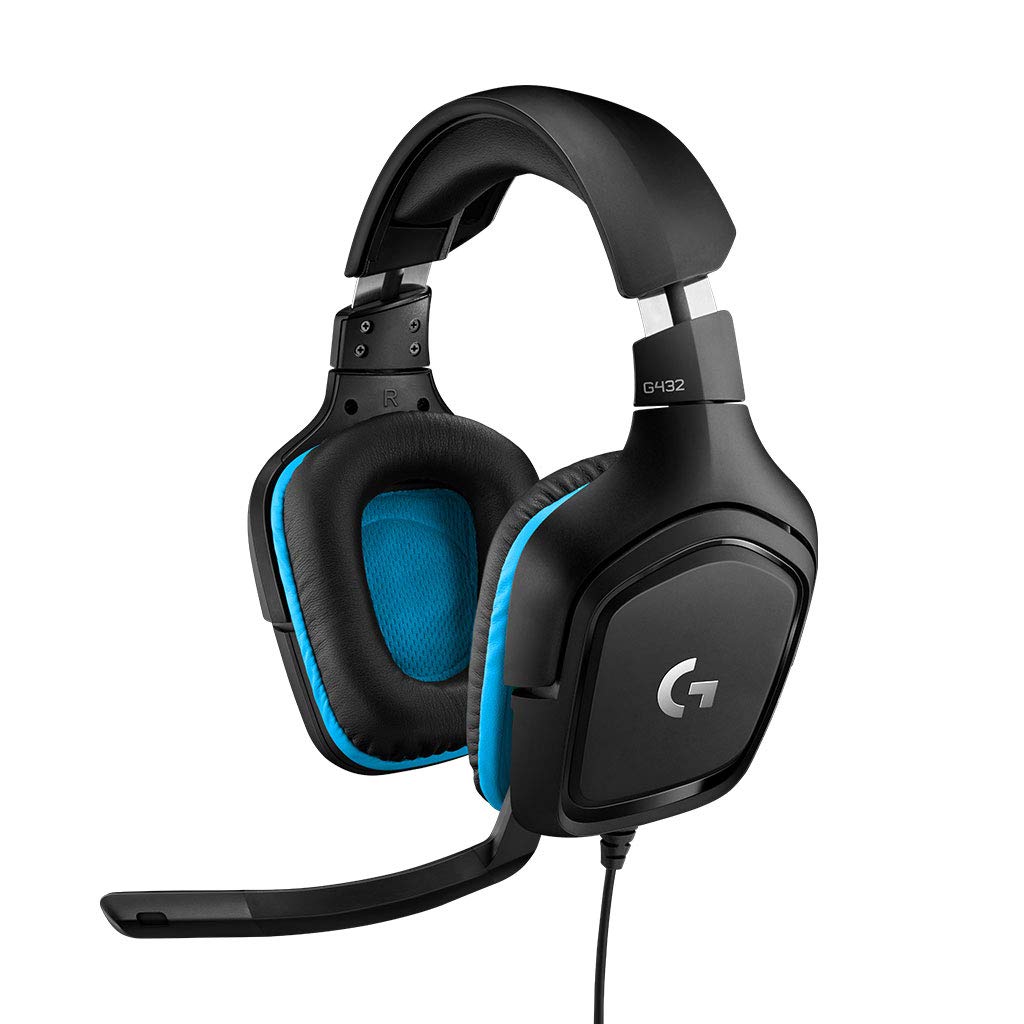
Logitech G432

88 /100
Sound Score Excellent

Key details

Connection
USB + 3.5mm
Microphone
6mm flip-to-mute
Driver Size
50mm
Spatial Audio
DTS Headphone:X
View on Amazon

The G432 gives budget PC gamers a combination that is uncommon at this price: 50mm drivers, DTS Headphone:X 2.0 virtual surround, and an included USB DAC. Swap the USB lead for the 3.5mm cable and the same headset also reaches consoles or mobile, which broadens its usefulness beyond the desktop. Long-term durability under heavy use is a known vulnerability, so this fits buyers who want entry-level DTS now and won't expect it to outlast the higher-ranked options.

Pros

  • DTS Headphone:X 2.0 via the included USB DAC brings virtual surround to a budget price.
  • One headset covers PC through USB and consoles/mobile through 3.5mm without an extra adapter.
  • 50mm drivers give the G432 fuller sound than typical entry-level gaming headsets.

Cons

  • The G432's 6mm flip-to-mute mic is entry-level; streaming and podcasting buyers will need a dedicated microphone.
  • DTS surround runs only through G HUB on PC; over 3.5mm the headset delivers stereo.
Our verdict

For budget PC gamers who want DTS surround on PC and occasional console use from one wired headset, the G432 is the entry-level compromise.

Check Latest Price

How to Choose

Driver Size and Tuning

Driver size influences headroom and bass weight, but tuning matters more. 50mm and 53mm drivers move more air than 40mm units, which typically gives larger soundstages and stronger low-end. A well-tuned 40mm can still sound clearer than a boomy 50mm.

For competitive play, pay attention to mid-range clarity and imaging rather than raw bass. Footstep cues live in the upper mids, and a headset that bloats the low end will mask them when gunfire and abilities overlap.

Spatial Audio

Virtual 7.1 and Dolby/DTS processing are software algorithms that create the illusion of height and direction through HRTF filtering. They do not add speakers, and they typically require PC software to run. The same USB headset may sound flat on a console if that software isn't available.

If you play mostly on PC, surround can help with directional awareness, but many users prefer stereo after A/B testing because spatial processing can make audio sound thin or washed out. Treat surround as a toggle, not a purchase justification.

Connection Type

USB-A sound cards are the traditional PC approach: they handle mic and audio in one dongle and often power 7.1 processing. USB-C connections matter if you want to plug into a PS5, Switch dock, or modern laptop without an adapter. 3.5mm fallback options extend the headset to Xbox controllers and mobile devices.

The catch is that USB ports on consoles are not equal. Most Xbox consoles block USB headsets entirely; PlayStation supports USB audio only when the headset is plugged directly into the console. If you need a single headset for both, check the connection method for each platform before buying.

Microphone Design

Mic quality comes from capsule type, pickup pattern, and placement. Cardioid mics reject background noise from the sides and rear; omni mics capture more room tone but can sound fuller. Flip-to-mute and detachable designs reduce the chance of accidental hot-mic moments in streaming or Discord.

Durability is where many USB headsets stumble. The cable harness and mic boom experience constant flexing, so a removable mic or replaceable cable can save a headset after a drop or yank. On-board LED mute indicators add a small but useful layer of confidence in long sessions.

Comfort and Build

Comfort is governed by clamp force, weight, and earpad material, not just padding thickness. A 300g headset with high clamp force can cause hotspots around the jaw, while a 280g headset with a loose clamp can shift during fast head movement. Memory foam conforms to glasses frames better than standard foam, but it retains heat.

If you play six-hour sessions, prioritize low clamp force and over-ear cushions that distribute pressure evenly. A heavier aluminum frame usually signals durability, but it also increases neck load during long sessions, so weight should stay below roughly 350g to avoid fatigue.

Frequently Asked Questions