7 Best Desktop Headphone Amp of 2026: Real Power, Real Fit

Find the right desktop headphone amp for your actual headphones — balanced output, clean power, and the inputs you need without overpaying for specs.

Most desktop headphone amp listings read like a chip-name contest. The more useful distinction is what happens after you connect your actual headphones: whether the amp stays quiet at low volume, holds a consistent input, and delivers enough current for the impedance you own. Those behaviors, not the DAC badge, decide if the purchase was worth it.

The market splits between budget USB-powered mini boxes and balanced desktop DAC/amps. The budget tier is genuinely useful for IEMs and mid-size headphones, but high-impedance dynamic and planar models need the 4.4mm balanced output and higher current that mid-range units bring. Matching that power to your headphone type matters more than the price tier itself.

This guide focuses on that fit: quiet operation, input reliability, usable volume, and enough balanced power for your headphones. Easy-to-drive headphones may need only a budget unit. At 250Ω or with planars, the choice shifts to the output stage and connection options.

About the Sound Score: This comparative score is calculated from a product's published customer rating and review volume. It is not a laboratory measurement or a hands-on test result.

1

Best Overall

FiiO K11

90 /100
Sound Score Outstanding

Key details

Inputs
USB, optical, coaxial
Output Power
1400mW
Tone Controls
None
Headphone Jacks
4.4mm, 6.35mm
View on Amazon

The K11 pairs a 4.4mm balanced output with 1400mW of clean power in a mid-range desktop chassis. That combination is uncommon at this price; cheaper boxes may only offer a single-ended output, while balanced-capable alternatives sit higher in the lineup. The DAC stage handles PCM up to 384kHz/24-bit and DSD256, which covers standard hi-fi libraries without extra complexity. Unlike USB-only mini boxes, the rear panel accepts coax and optical as well, so the K11 works with CD transports and dedicated sources. Over any of those inputs, it resolves fine detail without adding background hiss in quiet passages. The 6.35mm single-ended output remains available alongside the balanced jack, so standard cables work while the 4.4mm path carries the full rated power.

Two headphone jacks mean you can leave a 6.35mm cable attached and still switch to a balanced 4.4mm cable without an adapter. The small VA screen shows source and volume and is readable from a normal desk position, while the front-facing outputs make cable swaps easy. The K11 drives 250Ω dynamics like DT880 and HD560S to satisfying levels; 16–300Ω headphones are the intended range. The rear panel's RCA line-out feeds powered speakers, which extends the K11 beyond headphones alone.

This is a stationary hub for PC hi-fi and gaming listening, not a portable dongle or a powered-speaker amp. It suits listeners with 16–300Ω headphones and USB, coax, or optical sources who want balanced output without paying a premium. Optical buyers should verify that input early: it can arrive nonfunctional, so test before making it your main source.

The metal chassis has a weighty, intentional feel, and the rear layout keeps power and USB connections at the back while headphone jacks stay up front. The enclosure occupies a normal desktop footprint and doesn't feel like a portable device pressed into stationary duty. It is small enough to sit beside a monitor without dominating the desk, but the metal body keeps it from feeling like a plastic dongle with extra ports. At this price, the combination of balanced output, display, and clean DAC is a strong value in the desktop amp category.

Pros

  • Clean and detailed sound with a quiet background in low-level passages.
  • Sturdy metal chassis and readable display feel more polished than typical mid-range desktop gear.
  • Strong value: balanced output, clean DAC, and display without a premium price.
  • Enough power for 250Ω headphones, including DT880 and HD560S, without strain.

Cons

  • No Bluetooth or microphone input, so wireless streaming and headset chat require separate hardware.
  • Hard-to-drive planar headphones need a higher-current amp than the K11's balanced stage provides.
Our verdict

For a wired desktop setup with 16–300Ω headphones, the K11 gives you balanced output, clean sound, and a readable display without stretching the budget.

Check Latest Price
2

Best Balanced Powerhouse

FiiO K7

88 /100
Sound Score Excellent

Key details

Inputs
USB, optical, coaxial, RCA
Output Power
2000mW @32Ω
Tone Controls
None
Headphone Jacks
4.4mm, 6.35mm, 3.5mm
View on Amazon

The K7 pairs dual THX AAA 788+ amplifiers with dual AK4493SEQ DACs in a desktop chassis. Its balanced 4.4mm output delivers 2000mW at 32Ω, so planar and 250/300Ω dynamic headphones get the current they need without pushing a compact USB amp near its ceiling. An RCA AUX input also lets an external line source or a separate analog volume stage join the chain.

For a fixed setup, the input panel covers USB, optical, coaxial, and RCA AUX, which keeps a PC, console, or hi-fi source wired without adapter shuffling. The two gain levels make it possible to drop to lower gain for sensitive headphones and use higher gain for high-impedance dynamics. The 6.35mm and 3.5mm jacks sit alongside the balanced jack, so the same box can drive less demanding cans when the main pair is connected to the 4.4mm output.

This is the desktop amp for stationary listeners with planar or 250/300Ω dynamics who have outgrown a USB-powered mini box and want balanced output for a PC, hi-fi, or gaming setup. The chassis is sized for a desk, not a pocket, and the balanced output is most at home with full-size headphones. Buyers who need Bluetooth or a mic input should look elsewhere; the K7 stays focused on wired headphone output.

Pros

  • Balanced 4.4mm output delivers 2000mW at 32Ω for planar and high-impedance dynamics.
  • The THX AAA 788+ and AK4493SEQ pairing separates instruments with clarity across gain levels.
  • USB, optical, coaxial, and RCA AUX inputs cover a fixed desktop source without extra adapters.
  • A cost-effective way to get balanced headphone power in the mid-range tier.

Cons

  • During source matching, the stepped volume control is coarse near the top of the rotation; fine level setting may require an external attenuator.
  • A no-power condition has been noted in some units after extended use; verify early in the return window.
Our verdict

For a fixed desk setup with planar or high-impedance headphones, the balanced output is the reason to pick the K7.

Check Latest Price
3

Best Wireless All-Rounder

Fosi Audio K7

90 /100
Sound Score Outstanding

Key details

Inputs
USB-C, optical, coaxial, Bluetooth
Output Power
2100mW
Tone Controls
None
Headphone Jacks
4.4mm, 3.5mm
View on Amazon

The K7 is the desktop DAC/amp in this group that pairs wired PC/PS5 inputs with aptX HD/Low Latency Bluetooth and a 3.5mm mic input. That makes it a fuller hub for a stationary desk, while keeping 2100mW of balanced output and a compact aluminum chassis.

The K7 fits a stationary PC or PS5 desk where the same headphone needs to pull double duty for music and voice chat. Planar and high-impedance headphones get proper headroom through the 4.4mm balanced output, so desktop users do not need a separate amplifier after the DAC. Only one input is active at a time, so it cannot mix sources simultaneously; anyone who needs game audio and a phone call layered into the same headphone will find that boundary restrictive, but switching between PC and Bluetooth sources works fine.

The AK4493S and XMOS XU208 DAC stage handles USB-C, optical, coaxial, and Bluetooth from a single box. aptX Low Latency keeps wireless audio in sync for video and gameplay, while aptX HD is available when sound quality matters more than sync. The angled aluminum chassis suits desktop placement, and full-size headphones are best served from the 4.4mm balanced output.

💡 Use the 4.4mm balanced output for planars and high-impedance headphones; the 3.5mm jack is better suited to lower-impedance models.

Pros

  • Tight bass and clean treble give demanding headphones the headroom they need.
  • All-round desktop performance covers gaming, music, Bluetooth, and voice chat in one box.
  • Feature set lands at a mid-range price that undercuts separate DAC-and-amp stacks.
  • Aluminum chassis with an angled face keeps the unit planted on a desk.

Cons

  • USB-C connection can be position-sensitive when the cable is moved; routing the cable so it stays fixed is the workaround.
  • Source selection runs through a multi-button menu rather than a dedicated knob, so switching inputs takes a few extra steps.
Our verdict

Desktop users who want one fixed box for PC, PS5, Bluetooth, and a headset mic can skip the separate DAC and amp stack; the K7 delivers balanced power for full-size headphones in a modest footprint.

Check Latest Price
4

Best Premium Feature Set

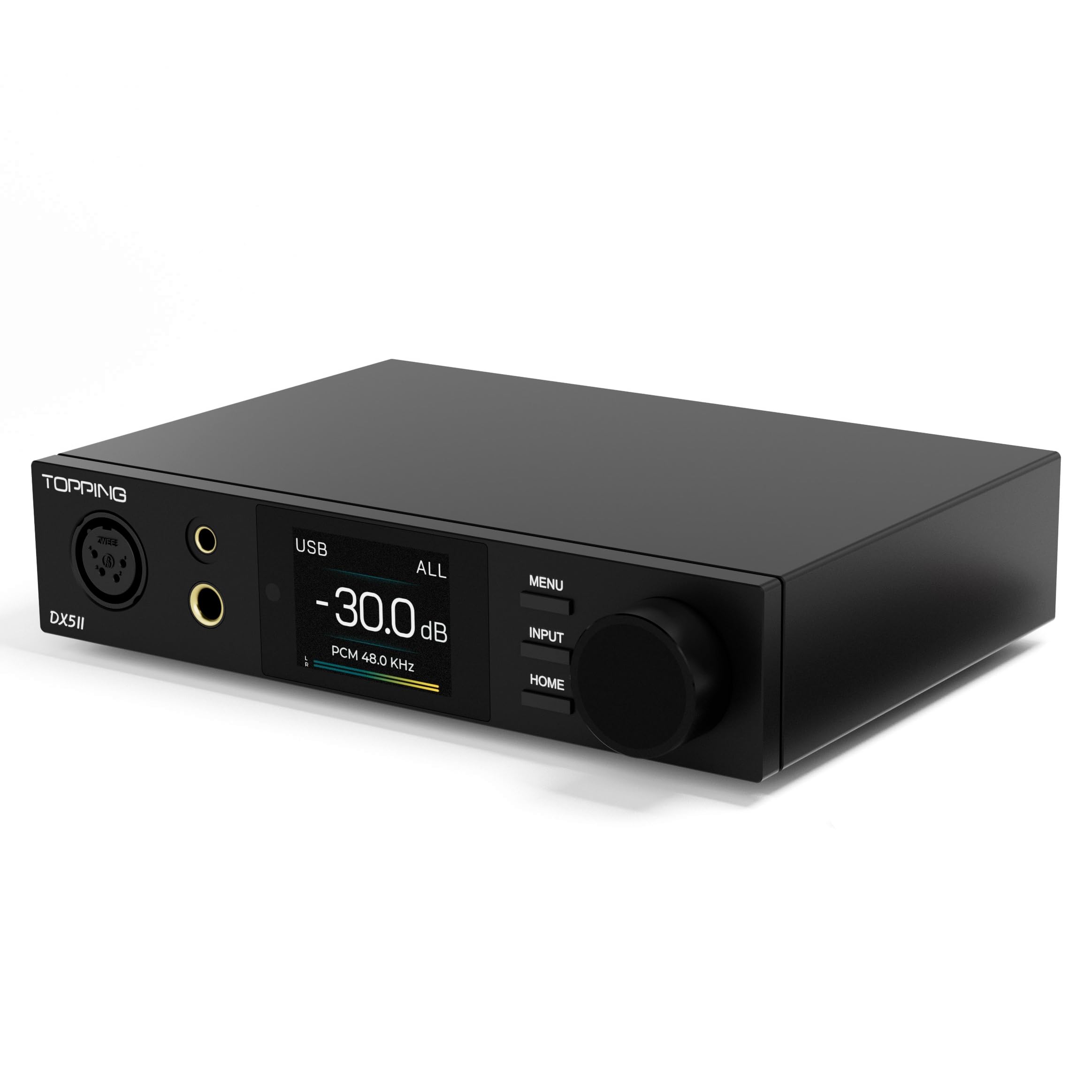
TOPPING DX5 II

87 /100
Sound Score Excellent

Key details

Inputs
USB, optical, coaxial, Bluetooth
Output Power
7600mW x2
Tone Controls
10-band PEQ
Headphone Jacks
4.4mm, 6.35mm
View on Amazon

With dual ES9039Q2M DACs and 7600mW x2 balanced output, the DX5 II delivers transparent, resolved sound and enough current to drive demanding full-size headphones. Complex tracks keep vocal and instrument lines separate without added glare, and the 4.4mm balanced output handles planars like the Hifiman Sundara and higher-impedance dynamics with headroom to spare.

The 10-band PEQ and LDAC Bluetooth are the differentiators in this class. The PEQ is useful for correcting headphone response or room tilt on desktop speakers, and the color display makes input and volume status readable at a glance. With optical, coaxial, USB, and wireless inputs, it can anchor a desk setup that cycles between PC, TV, and phone without swapping cables.

Buyers who already have a balanced headphone-focused chain and want one desktop box with PEQ, wireless, and high power are the right audience. The same feature depth requires accepting a more involved setup than a basic DAC, and firmware updates carry real risk — a unit can become unresponsive after an update, so checking inputs and PEQ during the return period is wise.

Pros

  • Transparent, resolved sound keeps complex mixes clear and separated.
  • High balanced output drives demanding headphones like HD800S and Sundara with headroom.
  • Strong value at the premium tier for the dual DAC, PEQ, Bluetooth, and power combo.
  • Feature set includes 10-band PEQ, LDAC/aptX Adaptive, color display, and 12V trigger.

Cons

  • The color display and 10-band EQ add menu depth; simple volume-and-input setups feel busier here.
  • Premium pricing assumes you will use PEQ, Bluetooth, or the extra balanced power; budget-focused buyers pay for unused capacity.
Our verdict

For desktop listeners who want EQ flexibility and wireless input alongside serious headphone power, the DX5 II delivers that combination in one box.

Check Latest Price
5

Best Budget Analog Amp

Douk Audio U3 Pro

85 /100
Sound Score Excellent

Key details

Inputs
RCA, 3.5mm AUX
Output Power
1500mW @32Ω
Tone Controls
None
Headphone Jacks
3.5mm, 6.35mm
View on Amazon

The U3 Pro is a pure analog headphone amp that delivers 1500mW at 32Ω and accepts 18–600Ω loads from a compact all-metal chassis. RCA and 3.5mm AUX inputs keep it strictly for listeners who already have a DAC, audio interface, or other line source; it adds the output stage that budget desktop combos can underpower.

The OP42/BUF634 stage is socketed, and the sound comes across clean and detailed, with bass extension that holds up on high-impedance dynamics. For a 250Ω or 300Ω headphone, this amp has the voltage swing to reach satisfying levels without pushing a source into distortion; it does not offer balanced output, so the top pick remains the better match for low-impedance planars.

Powering the amp from a noisy USB port can introduce hum; a clean 5V supply or powered hub removes that variable, and the analog stage stays quiet once the supply is clean.

The right buyer already owns a DAC or analog source and runs high-impedance full-size headphones. The volume knob doubles as the power switch and can be touchy at low listening levels; there is no built-in DAC or USB audio input, so this is an add-on amp, not an all-in-one interface.

Pros

  • High-impedance headphones get real headroom from 1500mW at 32Ω and 18–600Ω support.
  • Clean, detailed output with stronger bass extension for full-size dynamics.
  • Compact all-metal case keeps desktop footprint small without feeling cheap.
  • Budget-friendly pricing matches unusually high output for the impedance range.

Cons

  • From a noisy USB port, the amp can pick up hum; a clean 5V supply removes the issue.
  • The volume knob doubles as the power switch and can be touchy when setting low volumes.
Our verdict

For high-impedance headphone owners with a separate source, the U3 Pro is a budget-friendly way to add real output without moving to a balanced stack.

Check Latest Price
6

Budget Gamers

Fosi Audio K5 Pro

86 /100
Sound Score Excellent

Key details

Inputs
USB-C, optical, coaxial
Output Power
80mW @300Ω
Tone Controls
Bass, treble knobs
Headphone Jacks
3.5mm only
View on Amazon

The Fosi Audio K5 Pro gives budget PC and PS5 gamers a compact external sound card with USB-C plug-and-play, a 3.5mm mic input, and physical bass/treble knobs. The aluminum body feels sturdy on a desk, and the tone controls provide immediate tuning without software. It replaces motherboard audio cleanly for low-impedance gaming headsets. The limits sit at the edges: no balanced output, 80mW at 300Ω leaves high-impedance headphones short on volume, and optical/coaxial inputs can be nonfunctional on some units, so SPDIF users should verify early. For its intended audience, the K5 Pro remains a budget-friendly way to add mic support and tone shaping to a desktop setup.

Pros

  • Plug-and-play USB-C setup for PC and PS5 with a 3.5mm mic input.
  • Bass and treble knobs give immediate tone shaping without software.
  • Sturdy aluminum shell suits a permanent desktop spot.

Cons

  • Optical/coaxial inputs can be nonfunctional on some units; SPDIF users should test that port early.
  • Output power tops out at 80mW at 300Ω, so high-impedance headphones may not deliver satisfying volume.
Our verdict

This fits budget gamers using low-impedance headsets on PC or PS5 who want a simple mic-equipped sound card; those with 300Ω headphones or optical-first setups should choose a higher-tier amp.

Check Latest Price
7

First-Time Upgraders

AIYIMA DAC-A2

82 /100
Sound Score Excellent

Key details

Inputs
USB, optical, coaxial
Output Power
160mW @32Ω
Tone Controls
Bass, treble knobs
Headphone Jacks
3.5mm only
View on Amazon

The AIYIMA DAC-A2 combines USB, optical, and coaxial inputs with bass and treble knobs in a compact desktop chassis — a useful combination for a first desktop DAC. Its 160mW output at 32Ω drives IEMs and mid-size over-ear headphones, and the analog tone controls adjust the sound without software.

What keeps it from climbing higher is modest power, no balanced output, and the need for a separate clean 5V adapter — none is included. Static or popping can surface in some cases, so testing early is wise. For a first-time desktop DAC buyer who wants tone controls and simple USB hookup on a tight budget, the DAC-A2 fits.

Pros

  • Clear sound improvement over motherboard audio at a budget-friendly cost.
  • Bass and treble knobs provide practical tone shaping without software.
  • Low entry cost makes this an easy way to try an external desktop DAC.

Cons

  • Separate clean 5V USB adapter needed; the box includes no power supply.
  • Static or popping can surface on some units in quiet listening environments.
Our verdict

Suitable for first-time desktop buyers with mid-size over-ears who want tone controls and a low entry cost.

Check Latest Price

How to Choose

Match Power to Headphone Impedance

Output power figures are meaningless without a load impedance. A budget amp may deliver 1000mW at 16Ω but drop to 80mW at 300Ω, which is why a phone-friendly spec sheet can still sound weak with high-impedance Sennheisers.

Check the mW number at the impedance of your own headphones and leave 50 to 100 percent of extra headroom for dynamic peaks and EQ boosts.

DAC Capability and Inputs

A desktop amp is only as useful as the sources it accepts. USB covers PC and console, optical is the cleanest way to pull audio from a TV or PlayStation, coaxial fits older CD transports, and Bluetooth removes the cable for phone streaming.

DAC chip names and 24-bit/192kHz support matter less than whether the input actually works over the long term. Optical inputs are the most common port to stop working on budget and mid-range units, so test that input during the return period if you plan to use it.

Balanced vs Single-Ended Output

Balanced 4.4mm output separates the ground path for left and right channels, which increases voltage swing and reduces crosstalk. That extra power matters most for planar magnetic and 250–300Ω dynamic headphones.

Single-ended 6.35mm or 3.5mm is enough for IEMs and most 32Ω headphones. Pay for balanced only when your current amp runs out of volume or sounds strained on difficult cans.

Tone Controls and EQ

Bass and treble knobs are tuning tools, not sound-quality upgrades. They help compensate for thin-sounding budget headphones, but the analog circuit sits between the source and the headphones, and low-quality implementations can add noise.

A good PEQ system operates in the digital domain and can correct headphone response without an extra analog stage. If you do not need EQ, a neutral amp with no tone circuit is the cleaner path.

Power Delivery and USB Noise

The amp's power source is as important as its rated output. USB bus power is convenient, but it ties the audio ground to a noisy PC rail; a separate wall adapter provides stable voltage and isolates much of that noise.

Some budget amps ship without any power adapter, so factor in the cost of a clean 5V supply. If an amp hums through USB, try a powered hub or an external adapter before replacing it.

Frequently Asked Questions