9 Best Budget DAC of 2026: Match Your Source, Not Just the Chip

Find the best budget DAC for your TV, desktop, or phone setup, and avoid the source-matching pitfalls that cause silent inputs and wasted money.

A budget DAC's spec sheet can look impressive on paper, but most silent setups do not come from a weak chip. They come from a TV locked to Dolby Digital or a USB port that cannot supply clean power. The right budget DAC is less about maximum sample rate and more about matching the digital source you already own.

That distinction changes what you should buy. A phone listener needs a portable dongle with enough output for their earphones, while a TV owner needs an optical or HDMI ARC converter that works with PCM. Desktop users have to decide whether they want a headphone amp, a line-level DAC, or both. Choosing by source first and specs second avoids the most common mistake in this price range.

The practical result is simple: match the converter to the source signal first, then weigh inputs, outputs, and headphone power. That ordering filters out most budget-DAC disappointments before they start.

About the Sound Score: This comparative score is calculated from a product's published customer rating and review volume. It is not a laboratory measurement or a hands-on test result.

1

Best Overall

Fosi Audio Q4

89 /100
Sound Score Excellent

Key details

Inputs
USB, Optical, Coaxial
Outputs
RCA, 3.5mm
Audio Formats
PCM 192kHz
View on Amazon

The Fosi Audio Q4 packs USB, optical, and coaxial inputs, volume/bass/treble controls, and both RCA and 3.5mm outputs into one compact desktop box. The DAC decodes up to 24-bit/192kHz with clean separation, and the tone knobs change the balance without smearing vocals or adding harshness. Everything you need sits on the front panel, so there is no menu digging or software switching.

The headphone output drives everyday 16-200Ω headphones with enough volume for focused listening, while the RCA line-out feeds powered speakers at the same time. Switching between a computer on USB and a TV or console on optical takes one press of the input selector. The volume knob applies to both outputs, which keeps desktop control simple. That dual-output layout is the main reason the Q4 works as a hub rather than a simple converter.

This is the right match for a desktop listener who wants one budget box for a PC, powered speakers, and a common pair of headphones, or for a TV/console owner who needs optical or coaxial conversion into an existing stereo. The amp is sized for everyday headphones, and the controls stay on the surface. Some units can pass along a faint hiss or static when the USB supply is noisy; a clean 5V port or powered hub lowers the chance.

Cutting the microphone input is the main cost-saving move. The pricier sibling aimed at streamers adds that feature and more output power, but for a listener with a separate mic or no need for one, the Q4 covers the core DAC/amp duties at a lower price. A pure DAC in this class would cost less but leave you sourcing a separate headphone amp; the Q4’s built-in amp removes that step for typical headphones.

The Q4 is best understood as a practical all-rounder rather than a spec-sheet winner. Its input set covers the hardware most desktop users already own: a PC, powered speakers, a pair of dynamic headphones, and possibly an older TV or console. Inside that scope, the tone controls and multiple inputs give it an edge over single-purpose converters, while the amp keeps sensitive headphones fed without outside help. It does not chase the gaming/streaming feature set, and that focus helps it stay affordable.

Pros

  • Tone controls add real bass/treble shaping without muddying the midrange.
  • Connects to powered speakers via RCA and headphones via 3.5mm from the same box.
  • USB, optical, and coaxial inputs handle PC, TV, and console sources.
  • Plug-and-play over USB with no driver hassle on common desktop systems.
  • Stays under the usual budget DAC price while covering the essentials.

Cons

  • High-impedance headphones above 200Ω may not get enough volume from the built-in amp.
  • Occasional unit-level problems can show up as channel imbalance or no sound after months.
Our verdict

For a desktop listener who wants one box for powered speakers, everyday headphones, and optical sources, the Q4 delivers the essentials without paying for streamer extras.

Check Latest Price
2

Best Pure Desktop DAC

SMSL SU-1

84 /100
Sound Score Excellent

Key details

Inputs
USB, Optical, Coaxial
Outputs
RCA
Audio Formats
PCM 768kHz, DSD512, MQA
View on Amazon

The SU-1 is a pure stereo DAC: AK4493S decoding, MQA support, 32-bit/768kHz PCM, and DSD512 over USB, with optical and coaxial inputs for CD players and TVs. The output is wide, detailed, and balanced, a genuine step up from the sound of typical budget DAC/amp combos.

When paired with a decent integrated amplifier or powered speakers, the SU-1 delivers a clean, open presentation with clear imaging. It does not rescue a weak amplifier; it gives a capable one more room to show what it can do. The optical and coaxial inputs also make it easy to connect a TV or CD transport without using the USB port.

MQA and DSD512 matter only if your library uses those formats; for plain PCM playback, the SU-1 still produces the same clean, wide output. The high-res support is a sensible extra for those who need it, not a requirement for everyday listening.

The SU-1 is for budget audiophiles who already own an amplifier or powered speakers and want a dedicated DAC instead of another all-in-one box. Durability varies, and a unit may lose audio output after a few months; that risk is part of the value trade at this price.

Pros

  • Wide, detailed, and balanced sound that brings out more of an existing stereo system.
  • Strong value for a pure DAC with high-res PCM, DSD512, and MQA.
  • Compact aluminum chassis with USB, optical, and coaxial inputs for flexible source hookup.

Cons

  • Headphone-only setups need a separate amplifier; the RCA output is line-level.
  • Faint static or pops can appear on some inputs, depending on source and USB power.
Our verdict

For stereo systems with separate amplification, the SU-1 delivers the best pure-DAC sound per dollar in this set.

Check Latest Price
3

Best Portable USB DAC

Kiwi Ears Allegro Mini

87 /100
Sound Score Excellent

Key details

Inputs
USB-C
Outputs
3.5mm, 4.4mm balanced
Audio Formats
PCM 384kHz, DSD128
View on Amazon

The Allegro Mini is a compact USB-C dongle that delivers clean, quiet output through both 3.5mm single-ended and 4.4mm balanced connections. The DAC section handles 32-bit/384kHz and DSD128, which is more than enough for high-res streaming on a phone or tablet. It stays on the portable side of the budget DAC market, so it does not take the place of a desktop amp. For sensitive IEMs, the separation and darker background over built-in phone audio are immediately noticeable.

On the go, the 4.4mm output is the main reason to pick this dongle over a standard 3.5mm-only adapter. Balanced IEM cables get a budget-friendly home, and the aluminum shell is light enough to leave in a pocket. Efficient IEMs are the best match; full-size headphone power is not part of the package. The low noise floor keeps hiss out of sensitive earphones.

This is for phone and tablet listeners with IEMs who want a low-cost route to balanced output without a desktop unit. The main boundaries are physical: thick phone cases can block the USB-C connector, and there are no inline volume or call controls. Anyone who relies on a recessed case or inline controls should confirm fit and source control before buying. With a thin case and source-level volume, the Allegro Mini fits its role cleanly.

💡 Remove a thick phone case before connecting so the USB-C plug seats fully.

Pros

  • Clean, quiet output improves IEM sound over built-in phone audio.
  • Both 3.5mm and 4.4mm balanced outputs make it a rare budget portable.
  • Compact aluminum body is light enough for pocket carry during daily use.

Cons

  • No inline volume or call controls; volume changes happen on the source.
  • Thicker phone cases can block the USB-C connector, so fit should be checked.
Our verdict

For IEM listeners who want 4.4mm balanced output from a phone or tablet, this is the budget dongle that fits.

Check Latest Price
4

Best for TV & HDMI ARC

SMSL PS100

86 /100
Sound Score Excellent

Key details

Inputs
USB, Optical, Coaxial, HDMI ARC
Outputs
RCA
Audio Formats
PCM 192kHz
View on Amazon

The PS100 adds HDMI ARC plus USB, optical, and coaxial to any stereo system with RCA inputs, covering four source types in one compact box. Unlike a headphone-amp DAC, it is a bridge for systems that already have amplification. Its value is convenience and format flexibility rather than high-res audiophile headroom, and the ES9023 chip supports PCM up to 192kHz, which is ample for TV and console audio.

The RCA output stays clean and low-noise at normal listening volumes, so TV dialogue and console game audio pick up more body than they would from a television headphone jack. That makes a decades-old stereo amplifier usable with modern digital sources.

Input selection can occasionally need a power-cycle nudge to re-lock onto a source, and ARC is PCM-only, so the TV must be set to PCM rather than bitstream before audio passes. Both are setup boundaries rather than barriers to a working stereo connection.

Best for TV or console owners connecting a legacy stereo amplifier or powered speakers that accept RCA. Headphone listeners should look for a DAC with a built-in amp, and anyone who needs a volume knob on the DAC itself will be better served by a different unit.

💡 The DAC may not remember the last input after power-off; check the source selector when you power up.

Pros

  • HDMI ARC plus USB, optical, and coaxial inputs turn one RCA stereo into a multi-source hub.
  • Clear, low-noise RCA output adds body to TV and console audio without audible hiss at normal levels.
  • Compact build with standard RCA outs integrates easily into existing stereo or powered-speaker setups.

Cons

  • Volume steps are coarse, so the amplifier is the better place for fine level control.
  • Unit-to-unit consistency can vary, so setup behavior on one sample may not match another.
Our verdict

For TV and console owners with a legacy amplifier or powered speakers, this is the budget way to add HDMI ARC and three more digital inputs in one compact box.

Check Latest Price
5

Best for Gaming & Streaming

Fosi Audio K5 Pro

86 /100
Sound Score Excellent

Key details

Inputs
USB-C, Optical, Coaxial
Outputs
RCA, 3.5mm
Audio Formats
PCM 192kHz
View on Amazon

The K5 Pro drives gaming headsets with more authority than the top pick and adds a dedicated microphone input that keeps voice chat off the motherboard. Bass and treble knobs sit on the front panel for quick tuning, and the metal case feels solid enough for a desktop that gets moved around. For PS5 or PC users, USB-C is the connection that unlocks the full feature set.

Music and game audio come through with clear separation and a lively high end, and the amp stays quiet at normal listening levels. The tone controls provide a useful amount of adjustment without turning the sound mushy, and the extra output power covers higher-impedance headphones better than the cheaper sibling. Buyers with simple music-only needs can save money with the top pick, because the K5 Pro's main additions target gaming and streaming setups.

The K5 Pro is right for budget-minded PS5 and PC gamers who want one compact box for voice chat, game audio, and a stronger headphone drive. It is also a strong match for streamers who need a microphone input. If you plan to use optical or coaxial only, treat USB-C as the safer primary input, because digital input lock can be inconsistent on some units; general listeners who do not need a mic can get the same core DAC/amp duties for less.

💡 When using optical or coaxial, set the source to PCM before judging the connection.

Pros

  • Clear, lively sound and strong DAC performance for gaming and music
  • Metal build with front bass and treble controls that are easy to adjust mid-session
  • Adds mic input and more headphone power than the top pick at a strong value for PS5/PC gamers

Cons

  • Optical and coaxial inputs may not lock on every unit; USB-C is the input to plan around.
  • USB audio can drop out mid-session, and a unit with recurring dropouts is best exchanged under warranty.
Our verdict

The K5 Pro is the better pick when a mic input and extra headphone power matter more than saving a few dollars; without those needs, the top pick covers the same core for less.

Check Latest Price
6

Ultra-Budget TV Conversion

PROZOR DAC01s

89 /100
Sound Score Excellent

Key details

Inputs
Optical, Coaxial
Outputs
RCA, 3.5mm
Audio Formats
PCM 192kHz
View on Amazon

The PROZOR turns optical or coaxial digital audio into RCA or 3.5mm analog with no setup fuss, making it a budget bridge for connecting a TV or console to older stereo amplifiers. It is not a headphone amp, and it does not decode Dolby/DTS, but for a powered-speaker or receiver setup it is a cheap way to test whether digital conversion helps.

Unit-to-unit consistency can vary, so this suits non-critical hookups; the low price and simple hookup make the tradeoff acceptable there. What keeps it below the higher picks is missing input flexibility and a real headphone amp; this slot is for simple conversion only.

💡 Use a 5V USB phone charger for power; the adapter is not included.

Pros

  • Plug-and-play conversion from optical or coaxial to RCA and 3.5mm outputs.
  • Budget-friendly way to test digital conversion without buying a desktop DAC/amp.
  • Clean basic conversion without hum or audio delay for ordinary TV/stereo setups.

Cons

  • No volume control on the converter; the connected amp or powered speakers set listening level.
  • Unit-to-unit consistency can vary; the 3.5mm output may develop noise or drop audio in some cases.
Our verdict

For a TV or console feeding older analog gear, this is a cost-effective digital input bridge. Keep it in non-critical duty and verify the outputs shortly after setup.

Check Latest Price
7

Desktop Tone-Control Listeners

AIYIMA DAC-A2

82 /100
Sound Score Excellent

Key details

Inputs
USB, Optical, Coaxial
Outputs
RCA, 3.5mm
Audio Formats
PCM 192kHz
View on Amazon

The AIYIMA DAC-A2 pairs USB, optical, and coaxial inputs with a headphone amp and RCA outputs, and the bass and treble knobs provide hands-on tone adjustment without software EQ. For a first desktop setup, that feature set covers the essential listening tasks at a budget-friendly cost.

It needs a separate 5V adapter, and TV or console USB ports can pass along hum rather than clean current; some units also develop static or clicking over time. Those boundaries put it behind the cleaner all-in-one options in this roundup, so for PC listeners with a wall adapter ready, the tone controls and input flexibility make it a sensible entry-level pick.

Pros

  • Bass and treble knobs shape headphone sound effectively without software EQ.
  • Strong value and build quality for an entry-level desktop DAC/amp.
  • USB, optical, and coaxial inputs connect easily for desktop sources.

Cons

  • Needs a separate 5V adapter; TV and console USB ports may add hum.
  • Static or clicking can develop in some units over time.
Our verdict

For a PC listener with a clean USB power source on hand, the AIYIMA DAC-A2 is a budget-friendly first DAC; outside that setup, the roundup's top pick is the easier choice.

Check Latest Price
8

High-Impedance Headphones

FX-Audio DAC-X6

84 /100
Sound Score Excellent

Key details

Inputs
USB, Optical, Coaxial
Outputs
RCA, 6.35mm
Audio Formats
PCM 96kHz
View on Amazon

The FX-Audio DAC-X6 is a desktop DAC/amp built around CS4398 and TPA6120A2, with a 6.35mm headphone output and replaceable op-amps that give tinkerers an upgrade path. It drives high-impedance headphones with useful authority, and the front switches and knob have a solid, deliberate feel. Where it loses ground to the all-rounder in this set is system integration: the RCA line-out stays fixed, so the volume knob only affects headphones and cannot serve as a preamp. Static or buzzing has been noted in some setups, and unit-to-unit quality can vary, which makes it a targeted buy for headphone-focused desktop listeners rather than a general-purpose converter.

Pros

  • High-impedance headphones get useful power from the TPA6120A2 stage, a good match for 250-ohm dynamic cans.
  • Chunky switches and knob give the DAC-X6 a solid mechanical feel for a desktop component.
  • The bundled standalone DAC and headphone amp combination carries a budget-friendly price for desktop use.

Cons

  • RCA line-out is fixed, so the volume knob only adjusts headphones; powered speaker users need another volume control.
  • In some setups, static or buzzing can appear, and unit-to-unit quality can vary, so a flexible return policy helps.
Our verdict

Headphone-only desktop setups that value high-impedance power and op-amp swapping are the exact fit for this budget workhorse.

Check Latest Price
9

Phone/laptop IEM Listeners

BZINK USB-C DAC

86 /100
Sound Score Excellent

Key details

Inputs
USB-C
Outputs
3.5mm
Audio Formats
PCM 384kHz
View on Amazon

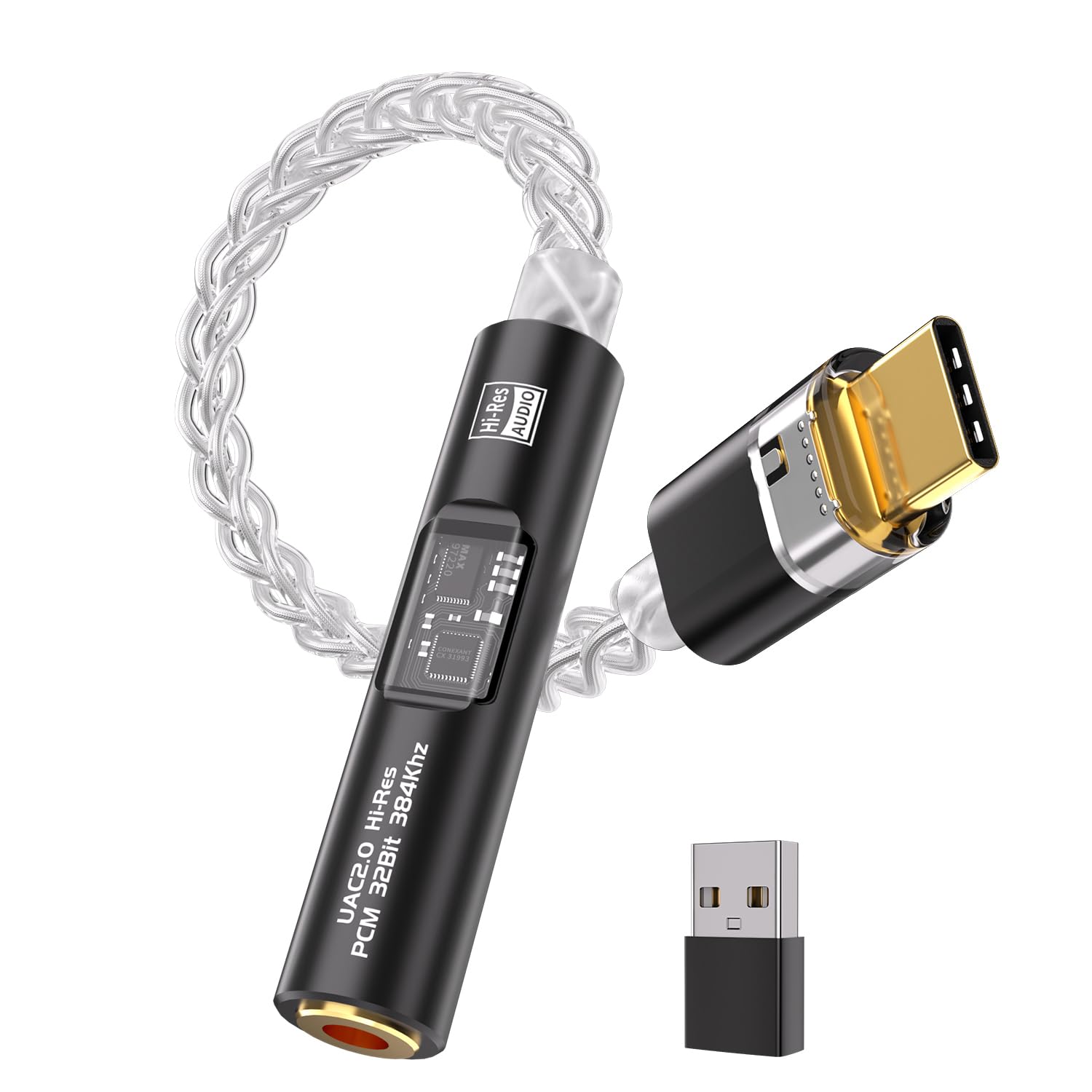
The BZINK is a crisp, quiet USB-C dongle that adds a 3.5mm output to phones, laptops, and desktops. The braided cable and metal housing feel above the entry-level price, and the included USB-A adapter extends compatibility with PCs and Macs. It delivers clean, neutral sound through sensitive IEMs, which is the main draw for budget-minded listeners. Output power is modest and durability varies from unit to unit, so it trails the balanced-output portable in this guide despite the small price gap.

Pros

  • Clean, neutral sound quality for sensitive IEMs
  • Premium-feeling cable and housing at an entry-level price
  • Broad compatibility across phones, PCs, and Macs

Cons

  • Amplification is modest; high-impedance over-ears may not reach satisfying volume
  • Durability can vary, with intermittent audio cutouts possible after months of use
Our verdict

For budget-minded phone and laptop listeners who keep to sensitive IEMs, this compact dongle is a low-cost way to improve USB-C audio.

Check Latest Price

How to Choose

Inputs

A DAC's input layout defines which sources it can connect to. USB works for computers and phones; optical and coaxial bridge to TVs, consoles, and CD players. HDMI ARC handles modern TVs without analog outputs.

The catch is bitstream. Most budget DACs decode only PCM, so a TV set to Dolby Digital can produce silence. Confirm the source can switch to PCM before choosing an optical or ARC input.

Outputs

RCA outputs feed powered speakers or amplifiers, while 3.5mm can be line-level or headphone-level depending on the product. 4.4mm balanced adds power and cleaner separation for portable IEMs with balanced cables.

The hidden trade-off is volume control: many budget RCA outputs are fixed-level, so you need a preamp or amplifier with its own volume knob.

Headphone Amplification

Headphone power is about impedance matching, not just wattage. High-impedance 300Ω headphones need voltage; low-impedance IEMs need clean current. A pure DAC with only RCA output cannot drive headphones directly.

Check the amp's impedance range and power rating against your specific headphones. A 160mW@32Ω amp works for many portable cans but not for demanding planars.

Driverless Setup

Driverless DACs use the operating system's standard USB audio class, which makes them plug-and-play on phones, Macs, and Windows. That convenience can limit exclusive high-res access on Windows.

High-res or MQA-capable DACs may require a vendor driver for full PCM/DSD decoding. If you want bit-perfect output from a Windows PC, plan for that setup; if you mainly use a phone, pick a truly plug-and-play dongle.

Audio Formats

High sample rates and DSD/MQA only matter if your files or streaming service use them. Most music and TV audio is standard PCM at 44.1 or 48kHz, so every budget DAC handles it.

The practical compatibility issue is Dolby Digital bitstream from TVs and consoles. Budget DACs convert PCM, not compressed surround formats, so set the source to PCM/LPCM or use a device that does the decoding.

Frequently Asked Questions