9 Best Desktop Speakers with Subwoofer in 2026: RMS Specs That Last

Best desktop speakers with subwoofer for real low end: compare RMS power, driver size, bass controls, and reliability for desks and gaming.

Desktop 2.1 speakers are the fastest way to get bass without a receiver, yet listings make the wrong number easy to trust. Peak wattage is marketing; RMS wattage and subwoofer driver size decide what you hear during a bass-heavy track or a loud game. A 4-inch sub with a huge peak rating still sounds thin next to a 5.25-inch driver with honest RMS output.

Control is the second separation point. A dedicated bass knob lets you tune the sub to your room; without one, the same cabinet booms on one desk and sounds thin on another. Furniture, sub placement, and chair distance change perceived bass, so a fixed-tuned sub forces you to live with the manufacturer's guess.

Reliability follows price more than brand. Entry-level sets are the most likely to lose a channel or stop producing bass within months. Spending a bit more for a larger sub, bass control, and digital or RCA inputs returns cleaner sound and fewer replacements.

About the Sound Score: This comparative score is calculated from a product's published customer rating and review volume. It is not a laboratory measurement or a hands-on test result.

1

Best Overall

Logitech Z625

93 /100
Sound Score Outstanding

Key details

Inputs
Optical, 3.5mm, RCA
Footprint
Full-size desktop system
RMS Power
200W RMS total
Subwoofer
THX-certified ported sub
View on Amazon

THX-certified 200W RMS powers a ported subwoofer and two desktop satellites with enough headroom for near-field gaming, movies, and loud music. The optical input joins RCA and 3.5mm, so a PC, console, and TV can share one system without re-cabling. The right satellite carries power, volume, and bass controls, keeping adjustments at hand instead of under the desk. That layout turns source switching and level changes into a desktop-side operation, which reduces the friction of moving between games and films.

The subwoofer's low-end delivery is the anchor: it produces tangible chest-thump without burying dialogue, and the satellites stay composed across a wide usable volume range. Bass control on the satellite allows quick tuning for different content, and the clean cable route from the satellites keeps the desktop tidy from first plug-in. The low end stays controlled during long sessions, which is unusual for a ported sub at this price tier.

THX certification here is more than a badge: the system sustains 200W RMS without gasping, which matters in a category where peak-watt numbers overstate a small amp's real output. The optical input and a real power switch close the two biggest gaps of the horn-tweeter alternative in this class, making the Z625 the more complete multi-source desktop package. You get the wide, open presentation of a traditional 2.1 layout rather than the condensed character of a soundbar-style unit.

This wired system suits power desktop users, gamers, and movie watchers who want one set for multiple sources. It needs a full-size desk; the ported sub and standard satellite footprint dominate a cramped setup. Listeners who spend long sessions at very high output should account for a resonant buzz that can surface on certain frequencies, and the highly sensitive volume knob's fast taper makes fine level matching a light-touch skill.

The bass control on the satellite lets you dial back low end for near-field listening without sacrificing vocal clarity. At moderate volumes, the system settles into a much smaller character, which is the flexibility a power desktop setup needs. If you prefer an even flatter response, the bass knob gives enough range to tame the sub without eliminating its presence.

💡 Use the source volume for fine level matching; the satellite knob handles broad changes quickly.

Pros

  • Powerful, crisp sound with thundering bass fills a desktop with cinema-style body.
  • Strong value for the performance tier; the optical input and controls justify the premium.
  • Easy setup with clean cable routing keeps a desk orderly with minimal fuss.
  • Wide usable volume range covers quiet background listening and room-filling output.

Cons

  • Volume knob jumps in large increments, so precise level setting is fiddly.
  • At high output, a resonant buzz can emerge on certain frequencies and color loud passages.
Our verdict

The Z625 is the wired 2.1 system for a multi-source desktop setup, pairing THX-certified output with optical input and direct controls.

Check Latest Price
2

Best for Audiophile-Grade Clarity

Klipsch ProMedia 2.1

91 /100
Sound Score Outstanding

Key details

Inputs
3.5mm aux
Footprint
Compact satellites plus sub
RMS Power
Subwoofer
6.5-inch ported side-firing
View on Amazon

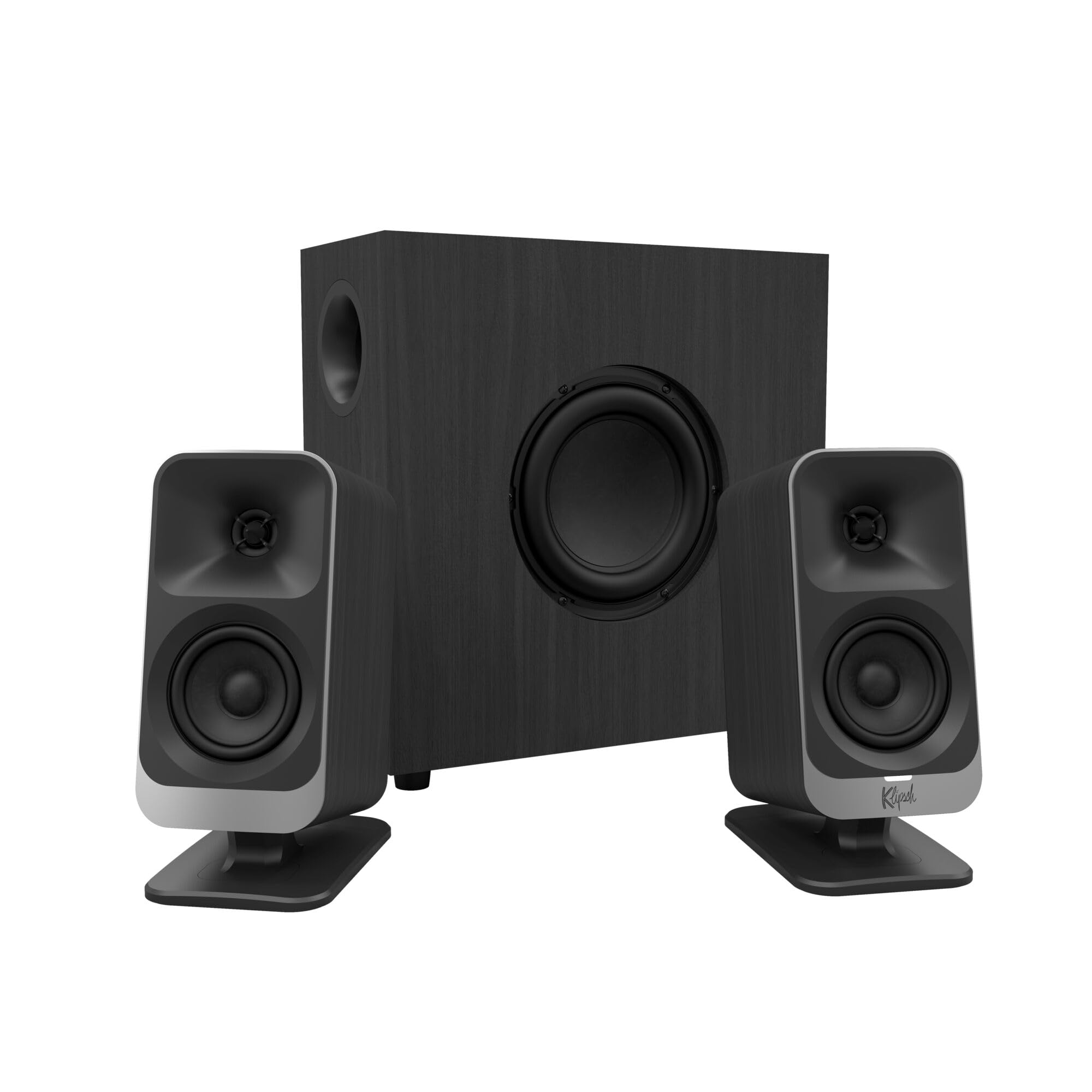
The MicroTractrix horn tweeters deliver the most detailed desktop sound near this price. Highs stay crisp and separated, so vocals and game cues cut through without harshness. The 6.5-inch side-firing ported sub adds low-end weight without smearing the midrange, and the 200W peak amp gives enough headroom to fill a large room.

The control pod keeps volume and subwoofer gain at hand, and the single 3.5mm aux input makes setup simple. The sub enclosure feels substantial for the class, and the overall build stands up to daily desk use. The ported sub can sit beside a desk without pointing the driver at a wall, so placement is flexible. This is a lot of sound for the money.

This wired system suits desktop listeners who prioritize clean high-frequency detail over deep sub-bass, gamers who want THX-style immersion from a small footprint, and audiophiles shopping on a budget. The amp stays live whenever plugged in, so a switched strip is the practical addition; buyers who demand a standby switch or want zero QC variance should look at the top pick. If you can accept occasional variance in long-term reliability, this remains a strong value.

Pros

  • Horn-tweeter highs stay crisp and separated, so vocals and effects remain distinct in busy game mixes.
  • Build quality feels substantial, with a sub enclosure that doesn't flex under load.
  • This sound tier usually costs more; the ProMedia undercuts that expectation.
  • Output headroom covers large rooms, not just near-field desks.

Cons

  • No standby switch
  • Occasional systems can develop output issues around the 20-month mark under daily use.
  • The amplifier or subwoofer can develop intermittent noise or lose output in individual units.
Our verdict

For desktop listeners who put high-frequency detail first, the ProMedia 2.1 delivers reference-class clarity without the reference-class price tag.

Check Latest Price
3

Best Budget / Small-Desk Pick

Creative Pebble Plus

88 /100
Sound Score Excellent

Key details

Inputs
3.5mm aux
Footprint
Tiny desk footprint
RMS Power
8W RMS
Subwoofer
4-inch down-firing ported
View on Amazon

USB power and a 4-inch sub fit a tiny desk without a wall wart, while the 2-inch elevated drivers aim sound toward ear level instead of into the keyboard. The satellites are small enough to stay clear of monitors, and the down-firing sub tucks beneath without demanding much floor space.

At near-field desk distances the 2-inch drivers keep dialogue and vocals clear, and the front volume knob is easy to reach. The cabinet build feels sturdy for the price, and the whole setup stays visually tidy under a monitor.

This set is for a student or casual listener with a small desk and a USB-only setup. It brings 2.1 structure to a workspace without a wall socket, but max volume is limited and the sub adds warmth, not deep thump — fine for near-field listening, not for filling a large room.

💡 Engage high-gain mode for a louder near-field output without pushing the knob past three-quarters.

Pros

  • USB power and a 4-inch sub fit a tiny desk without a wall wart or extra cables.
  • Compact satellites tuck under a monitor and keep the desk visually clean.
  • Strong value at the budget price tier for casual near-field listening.
  • Cabinet build feels sturdy for a budget-priced 2.1 set.

Cons

  • On a desk where the bass balance needs tuning, the front knob controls volume only and leaves the sub's blend fixed.
  • Sound quality can vary between units, with occasional sets sounding tinny or lacking definition.
Our verdict

For near-field desktop use, this is the 2.1 set that removes the power-brick barrier for a USB-only workstation.

Check Latest Price
4

Best for Wireless Convenience

Logitech Z407

87 /100
Sound Score Excellent

Key details

Inputs
Bluetooth, micro-USB, 3.5mm
Footprint
Compact oval satellites
RMS Power
40W RMS
Subwoofer
20W ported down-firing
View on Amazon

The wireless control dial and Bluetooth make cable-free desktop listening practical. This 2.1 system is a smaller-output alternative to the wired THX-certified top pick, trading peak wattage for a desktop that doesn't need a reach-under-the-desk volume knob. The 30m dial range and dual-position satellite angles fit near-field setups where the sub tucks away.

Input switching between Bluetooth, 3.5mm, and micro-USB is fast, so a laptop, phone, and desktop can share the same pair. The 20W ported down-firing sub keeps low-end presence while sitting out of sight, and the 80W peak / 40W RMS system fills a typical desk space without needing a large room.

This suits someone who sits away from the sub, switches devices through the day, and values a clean desk over a wired control knob. The wireless-first design means accepting some Bluetooth pairing friction and a non-traditional volume dial, which is where the top pick suits conventional setups better.

💡 Place the puck where the dial is easy to reach; the 30m range gives plenty of placement freedom.

Pros

  • Immersive, detailed sound with strong bass for a near-field desktop layout.
  • Wireless features and a control dial add genuine convenience for multi-device desk setups.
  • Setup and input switching are quick enough to move between laptop and desktop without cable juggling.

Cons

  • The puck's volume tracking can feel finicky until the scroll gestures become familiar.
  • Bluetooth can drop in busy RF environments, adding a reconnect step to an otherwise cable-free setup.
  • A channel can lose output over time in individual units, so an early left/right check matters.
Our verdict

The Z407 is the cable-free 2.1 to choose when desk tidiness matters more than maximum output.

Check Latest Price
5

Best RGB Gaming Value

Bluedee SK900 Pro

88 /100
Sound Score Excellent

Key details

Inputs
Bluetooth, USB-A, USB-C, AUX
Footprint
RGB compact desk setup
RMS Power
Subwoofer
Independent bass unit
View on Amazon

The Bluedee SK900 Pro bundles DSP-tuned 2.1 sound, Bluetooth 5.4, USB-A/USB-C, AUX, and a single knob for volume, playback, mode, and RGB lighting into a compact desk package. For the mid-range price, that connection set covers more ground than the wireless-sub soundbar at a higher price, while the separate subwoofer delivers actual low-end weight instead of a simulated bump.

At near-field listening distances, the 80W peak rating translates into clean game audio and satisfying bass without needing to crank the system. DSP tuning keeps dialogue and vocals above the sub, and switching between Bluetooth and wired sources happens from the same knob that controls lighting. The RGB modes are bright enough to show under a monitor but do not require a separate app.

This is a system for RGB-focused gamers and Bluetooth desktop listeners who want one 2.1 package with flexible inputs and a real sub. It is not aimed at reference-critical listening; a studio-monitor setup covers that use case. In some cases, satellite volume balance can differ between left and right channels; set both speakers up and confirm levels right after unboxing.

Pros

  • Balanced sound with deep bass keeps game effects and music clear at near-field desk levels.
  • RGB, Bluetooth 5.4, DSP tuning, and a sub in one package at a mid-range price.
  • Bluetooth 5.4, USB-A, USB-C, and AUX inputs fit PC, phone, and console setups.
  • Compact satellites and RGB lighting suit a gaming desk without taking over the layout.

Cons

No consistent drawbacks identified in the available review data.

Our verdict

The right compact 2.1 for a desk setup that needs Bluetooth, USB-C, RGB, and real bass without jumping to a premium soundbar price.

Check Latest Price
6

Best Soundbar-Style Compact

Nylavee SK100 Pro

86 /100
Sound Score Excellent

Key details

Inputs
Bluetooth 5.4, 3.5mm
Footprint
Soundbar under monitor
RMS Power
30W RMS
Subwoofer
5.25-inch standalone sub
View on Amazon

Dual silk tweeters and a standalone 5.25-inch subwoofer give this slim soundbar more low-end weight than the form factor suggests. The bar handles midrange and highs in one enclosure, while the separate sub carries bass duties, which makes for a compact desktop footprint without the usual satellite boxes. Channel spacing is close together, as with any soundbar-style layout, but the tradeoff is a much shorter desk footprint.

At a mid-range price, it delivers a livelier low end than the compact bar profile promises. Bluetooth 5.4 pairs quickly and holds a stable connection, and the 3.5mm AUX input covers wired use when you want to skip wireless. A single side knob controls power, mode, and volume, so there is no separate control pod to manage.

This is the right 2.1 for Bluetooth-first desktop users with a small desk who want a soundbar-style bar under the monitor and a real sub somewhere out of the way. The catch is that the subwoofer has no independent level control; it works best as a set-and-forget part of the system. That limitation matters most if you like to dial bass per track, but in near-field listening the fixed balance is easy to live with.

💡 Place the sub near a wall or corner to shape bass presence without a level knob.

Pros

  • Crisp near-field sound with bass weight from a dedicated 5.25-inch sub.
  • Strong value, pairing a real sub and silk tweeters at a mid-range price.
  • Plug-and-play setup with one side knob for power, mode, and volume.
  • Bluetooth 5.4 pairs quickly and holds a stable connection.

Cons

  • In a large room, 60W peak output runs out of headroom before filling the space.
  • Subwoofer level is not independently adjustable, so the low end is tied to the main volume.
Our verdict

For desktop listeners who want a soundbar-style bar, a real sub, and Bluetooth under a monitor, this setup delivers.

Check Latest Price
7

Budget Office Setups

Cyber Acoustics CA-3610

87 /100
Sound Score Excellent

Key details

Inputs
3.5mm aux, headphone out
Footprint
Angled satellites, compact
RMS Power
30W RMS
Subwoofer
5.25-inch down-firing ported
View on Amazon

Volume and bass sit on a desktop pod, a rarity in the budget 2.1 tier. The angled satellites aim sound toward ear level, and the 5.25-inch down-firing sub gives a compact desk setup enough low-end presence. Long-term consistency varies, with occasional loss of output from the sub or right channel noted, so a return-friendly retailer makes sense. The step-up model in the same line adds more output and separate bass tuning, but the on-desk control keeps this one appealing.

Pros

  • Desktop pod keeps volume and bass within reach without reaching behind the sub.
  • Angled satellites sit low-profile and aim sound toward ear level for a desktop setup.
  • Strong value in the entry 2.1 tier, with enough output for a desk rather than a large room.

Cons

  • For vocals-forward listening, the midrange lacks fine tuning; no dedicated control pulls vocals forward.
  • On bass-heavy tracks, low-end stays thick rather than tight and loses some definition.
Our verdict

For a compact desk setup that wants volume and bass control near at hand, this fits as a budget near-field 2.1.

Check Latest Price
8

Klipsch Fans Gaming

Klipsch ProMedia Lumina

80 /100
Sound Score Excellent

Key details

Inputs
USB-C, AUX, Bluetooth 5.3
Footprint
Tiltable satellite stands
RMS Power
Subwoofer
6.5-inch low-profile with gain
View on Amazon

USB-C and the Klipsch Control app put the ProMedia sound into a current desk setup, with RGB lighting that can react to screen content and a 6.5-inch low-profile sub that adds bass without swallowing the desktop. That mix suits PC gamers who already appreciate the classic wired ProMedia and want app EQ or lighting sync on a USB-C source.

The reason this sits below the classic wired ProMedia is value: it costs near twice as much, and Bluetooth pairing plus the control app can need a retry or restart before a session settles. The sound quality is the reason to stretch, but buyers who only want that Klipsch clarity are better served by the wired version.

Pros

  • ProMedia sound quality carries into gaming and music at near-field volume.
  • RGB lighting reacts to screen content and suits low-light gaming without extra glow.
  • USB-C connection and tiltable stands simplify a clean desk arrangement.

Cons

  • Bluetooth pairing and the Klipsch Control app may need a retry or restart before they settle.
  • Premium price near twice the classic wired ProMedia makes sense only when the new features get used.
Our verdict

For a USB-C-first gaming desk where app EQ and lighting matter more than wired simplicity, this is the modern Klipsch to pick.

Check Latest Price
9

Razer Ecosystem Fans

Razer Leviathan V2

79 /100
Sound Score Very Good

Key details

Inputs
Bluetooth 5.2, USB-C
Footprint
Soundbar plus wireless sub
RMS Power
Subwoofer
5.5-inch down-firing wireless
View on Amazon

Razer fans get a genuinely tidy desktop audio setup: the wireless sub and 18-zone Chroma RGB clear the desk of extra cabling and blend into an existing Razer ecosystem. Setup is easy, and the compact soundbar footprint works well in tight space. At this price, the sound signature divides opinion, and individual units can cease output after about a year of use, so value-focused shoppers should treat this as a Razer ecosystem purchase rather than a general desktop 2.1 recommendation. The slimmer soundbar-style option in this set covers similar ground with fewer caveats.

Pros

  • Easy setup and clean cable management under a monitor keep the desk uncluttered.
  • Wireless sub and 18-zone Chroma RGB integrate into an existing Razer lighting setup.

Cons

  • For cable-free listening, Bluetooth can drop and require reconnection; USB-C avoids that.
  • Buyers who want a traditional 2.1 footprint miss the wider stereo separation of separate satellites.
Our verdict

This fits a Razer-centric desk where tidy under-monitor placement and Chroma sync matter most. Outside that setup, the slimmer soundbar-style option in this set is the better first stop.

Check Latest Price

How to Choose

RMS Power vs Peak Wattage

RMS wattage is continuous output the amplifier can hold while playing music; peak wattage is a short burst before distortion sets in. Listings feature peak numbers because they are larger, not because they describe everyday volume.

For desktop use, 8W RMS works in a small room at moderate volume, while 30W RMS or more fills a bedroom and keeps up with movies. If you regularly push loud games, aim for 40W RMS or higher and pair it with a sub driver over 5 inches.

Subwoofer Size and Type

Driver size controls how much air the sub moves. A 4-inch driver adds warmth and a polite low end; a 5.25-inch or 6.5-inch driver moves enough air for tactile bass in games and movies.

Ported enclosures tune the cabinet for more output at low frequencies, while down-firing and side-firing designs direct that output toward the floor or wall. Room placement changes the result, so a ported 5.25-inch sub with a real enclosure is the baseline for noticeable desktop bass.

Inputs and Connectivity

Inputs determine how many devices can stay connected. A 3.5mm aux input works with any PC; RCA connects to TVs and consoles; optical carries digital audio from a console or TV. Bluetooth removes the cable but can introduce pairing friction.

If you switch between a work laptop, gaming PC, and TV, choose a set with at least two wired inputs and Bluetooth. That keeps everything connected without unplugging cables for each source change.

Bass and Volume Control

A dedicated bass knob adjusts the sub's gain to your room, furniture, and music. Without one, the sub is fixed at the factory and can boom on one desk or disappear on another.

Check where the control lives: a physical knob on the satellite or desktop pod is simple, while app-only control requires pairing and software. For daily listening, a control pod with volume and bass is the most convenient layout.

Size and Placement

Satellite size affects monitor clearance, and sub cable length decides whether the sub can sit on the floor. A soundbar-style layout keeps everything under the monitor but narrows stereo separation.

Measure your desk and the distance from the sub location to the speaker before buying. Short cables and a large sub force awkward placement, which changes bass response more than the driver size alone.

Frequently Asked Questions