9 Best Gaming Speakers of 2026: Real Volume, Not Wattage Inflation

Which gaming speakers actually deliver loud, clean sound for PC and console play — and which specs to ignore before you buy.

Gaming speaker listings love big wattage numbers. The catch is that many budget models claim those numbers on 5V USB power, which simply cannot deliver room-filling output. A desktop speaker can look loud on paper and still run out of headroom the moment an explosion hits.

That mismatch between marketing and lived use is why this guide focuses on how each system actually behaves at gaming volume, not how many watts the box advertises. The right pair balances output, bass depth, and connectivity for a specific desk and room size.

For most setups, the practical choice comes down to power source and driver size: AC-powered speakers with larger drivers and a subwoofer output will satisfy far longer than an aggressively priced RGB set. Knowing where that line sits is the difference between buying once and replacing in six months.

About the Sound Score: This comparative score is calculated from a product's published customer rating and review volume. It is not a laboratory measurement or a hands-on test result.

1

Best Overall

Edifier G2000

92 /100
Sound Score Outstanding

Key details

EQ Modes
Game, Music, Movie
Subwoofer
Output only
Connectivity
Bluetooth, USB, 3.5mm
RGB Ecosystem
12 RGB effects
View on Amazon

The G2000 is the most complete mid-range 2.0 set for a desk, combining three switchable EQ presets with Bluetooth, USB, and AUX inputs and a subwoofer output. The 32W peak output is enough to make a gaming session feel alive without pushing the drivers into harshness, and the Game/Music/Movie modes meaningfully reshape the tone rather than acting as a gimmick. Clear mids and a controlled top end keep footsteps, dialogue, and directional cues readable, and the compact cabinet keeps the sound focused instead of boomy.

Setup is quick: USB or 3.5mm gets you running on a PC or console, while Bluetooth handles a phone or tablet without re-cabling. The enclosures fit under most monitors with room to spare, and the RGB can be left on a single color or cycled through effects without turning the desk into a light show. The cabinet styling reads more like a premium desktop audio component than a gamer accessory, which matters for workspaces that double as gaming spots.

The right buyer is a PC gamer who wants one pair of speakers across several devices and doesn't want a large subwoofer taking up floor space. USB covers the PC, AUX reaches a console or secondary source, and Bluetooth pulls in a phone. The G2000's volume ceiling is moderate rather than thunderous, so it is best at near-field distances; bass-heads can add an external subwoofer through the output jack if the stock low end isn't enough.

The 2.75-inch full-range drivers handle voice-heavy content particularly well, keeping chat audio and dialogue intelligible at moderate output. The Game EQ nudges the presentation forward for positional cues, while Music mode eases the response for longer listening sessions. That range gives the G2000 more utility than a one-trick RGB speaker.

For a mid-range price, the G2000 delivers more utility than most RGB desktop sets: three real EQ modes, wired and wireless inputs, and a subwoofer output cover the bases that budget speakers skip. It doesn't try to be the loudest or bass-heaviest option in the category; it gets the fundamentals right and leaves room to upgrade. That makes it the safest all-around recommendation for gamers who want one clean desktop set instead of a stack of separate components.

Pros

  • High-quality, crisp sound with strong dynamics at desktop listening levels.
  • Bluetooth, USB, and AUX inputs make it easy to move between PC, console, and phone.
  • Compact size tucks under a monitor without dominating a desk.
  • Understated RGB and clean styling fit a workspace without a heavy gamer look.
  • Very easy to set up; just connect and play.

Cons

  • Maximum volume is moderate: clean at a desk but not a room-filler.
  • No dedicated subwoofer is included in the box, so out-of-the-box bass weight is limited.
Our verdict

For a compact desktop gaming setup, the G2000 delivers the strongest blend of EQ flexibility, connectivity, and clean output at this price. Room-filling volume and sub-in-box bass are left to larger 2.1 sets.

Check Latest Price
2

Best Premium 2.1 System

SteelSeries Arena 7

88 /100
Sound Score Excellent

Key details

EQ Modes
Sonar 10-band EQ
Subwoofer
6.5in included
Connectivity
USB, AUX, optical, Bluetooth
RGB Ecosystem
4-zone PrismSync RGB
View on Amazon

A genuinely complete 2.1 system, the Arena 7 puts two-way satellites in charge of the detail and a 6.5-inch down-firing sub in charge of the weight. Sonar software adds a 10-band EQ and spatial audio, so directional cues in shooters land clearly without gimmicky virtual-surround tricks. With USB, AUX, optical, and Bluetooth, the same pair can serve a PS5, a PC, or a TV without extra switches.

This is for bass-first gamers with a PS5 and PC who want one premium 2.1 package. The Bluetooth input is there, but this is not a wireless-first setup; the wired connections are the dependable path for gameplay. The sub delivers the kind of low-end presence a desktop stereo pair cannot match.

The screen-synced RGB alternative in this category leans much harder on lighting spectacle. The Arena 7 instead keeps a conventional hi-fi layout, with the sub doing the heavy work and the satellites sitting quietly on the desk. That makes it a true 2.1 system rather than a virtual surround bar, which is the right trade for anyone who prioritizes bass and input flexibility over light shows.

💡 Use USB or optical for gameplay; Bluetooth suits music and casual video.

Pros

  • Clear highs and powerful bass from two-way satellites and a dedicated 6.5-inch sub.
  • Full premium 2.1 package that feels worth the money rather than a collection of separate components.
  • PrismSync ambient lighting adds desk presence without overwhelming the room.
  • Simple out-of-box setup with minimal cable tangle.

Cons

  • Bluetooth adds enough delay in games and video that wired input is the practical choice.
  • Control quality varies between units; a stuck volume knob or silent channel can arrive without warning.
Our verdict

The Arena 7 is the 2.1 system to choose when you want true sub-bass, a real EQ, and console-friendly inputs without assembling separate components.

Check Latest Price
3

Best Budget RGB Soundbar

Redragon GS560

88 /100
Sound Score Excellent

Key details

EQ Modes
None
Subwoofer
None
Connectivity
USB, 3.5mm
RGB Ecosystem
Audio-synced RGB bar
View on Amazon

The audio-synced RGB lightbar and chunky volume knob give the GS560 a playful identity that budget soundbars rarely manage, and the 16-inch frame fits a typical desk setup without crowding the mouse. The LED accents stay bright enough to read as a deliberate part of the build rather than an afterthought, and the lightbar width matches a standard monitor footprint.

Setup is a two-cable job: USB carries power from the monitor or tower, and a 3.5mm input handles alternate sources. Touch backlight controls cycle through the RGB modes while the volume knob doubles as the power switch, so daily use stays plug-and-play.

Mids carry dialogue and game audio clearly at desk distance, which is the main job for a soundbar this size. Voice separation keeps callouts understandable in busy scenes.

This is the right call for under-monitor soundbar fans and budget RGB builders working with limited desk space. Bass is limited and maximum volume is moderate, so it works best as a near-field desktop companion rather than a room-filler. Music purists and buyers who need output beyond a desk should plan around a larger 2.1 system.

💡 Place the soundbar toward the front edge of the desk for the clearest mids from the compact drivers.

Pros

  • Strong value for the price, especially for a 16-inch RGB soundbar.
  • Bright RGB lighting adds color to a dark desk without feeling overpowering.
  • Two-cable setup with touch controls gets it running quickly.
  • Color presets and RGB customization make it easy to match the rest of the setup.

Cons

  • Treble can sound muffled on dense tracks, so music-heavy games lose some detail.
  • Durability can vary between units; extended use may eventually reduce audio output.
Our verdict

For under-monitor soundbar fans and budget RGB builders, the GS560 is the style-first soundbar that makes a plain desk feel like part of the gaming setup.

Check Latest Price
4

Best Budget Bookshelf Sound

OHAYO C6

87 /100
Sound Score Excellent

Key details

EQ Modes
None
Subwoofer
None
Connectivity
Bluetooth 5.3, RCA, AUX, USB
RGB Ecosystem
No RGB
View on Amazon

The OHAYO C6 is the budget bookshelf pair that puts its money into sound rather than spectacle. An MDF cabinet, a 3-inch carbon-fiber driver, and a 0.75-inch silk-dome tweeter deliver the most balanced low-volume performance in this price tier, with bass depth that surprises given the driver size.

Bluetooth 5.3 pairing is quick, and moving between a phone and a PC takes little effort. The compact MDF cabinets fit neatly on a desk, and the silk-dome tweeter keeps treble smooth at quiet listening levels.

This pair is for music-loving gamers on a budget who want a wood-cabinet desktop setup rather than RGB spectacle. It works best in small offices or bedrooms where clean low-volume listening matters most, and it is not built for extreme maximum volume. The volume knob's feel is worth a quick full-range check on arrival because it can vary between units.

💡 Keep the speakers at ear height and give them a little breathing room from the wall to get the cleanest low end.

Pros

  • Balanced sound with surprising bass depth for 3-inch drivers.
  • MDF cabinet and silk-dome tweeter give the build a more premium feel than the price suggests.
  • Bluetooth 5.3 pairs quickly and moves between devices with minimal effort.
  • Compact footprint fits a small desk without sacrificing low-end presence.

Cons

  • Volume knob sensitivity can vary between units, so the feel is worth checking on arrival.
Our verdict

The C6 is the budget bookshelf pick for gamers who care more about how their music sounds than how their desk lights up.

Check Latest Price
5

Best Compact RGB Soundbar

Razer Leviathan V2 X

84 /100
Sound Score Excellent

Key details

EQ Modes
None
Subwoofer
No sub, radiators
Connectivity
USB-C, Bluetooth 5.0
RGB Ecosystem
14-zone Chroma RGB
View on Amazon

The Leviathan V2 X is the single-cable compact soundbar in this group. A USB-C connection carries power and audio, while 14-zone Chroma RGB syncs with the rest of the Razer ecosystem, and the low-profile chassis sits under standard monitors without blocking the screen. Setup is one cable: plug the soundbar into a PC and it becomes an audio device with no separate power brick. The lack of a separate subwoofer keeps the footprint small and the cable count down. Chroma Sync extends the lighting to compatible games and apps, which matters more to a Razer owner than raw acoustic output. For a clean gaming desk, that is the central benefit.

The intended buyer is the Razer Chroma owner with a minimalist desk and a compact room. Bass is thin, maximum volume is modest, and Bluetooth can disconnect or lag, so the USB-C cable is the safer connection for gaming. At a mid-range price, you are paying for Chroma integration and a small footprint, not acoustic depth or room-filling presence.

Midrange clarity is fine for speech and game audio at typical desk volume, and the low-profile design is easy to place. A unit can shut off at high volume, so test at the level you normally use before committing. For the buyer above, the compact footprint and easy Chroma setup make that tradeoff acceptable. It is a convenience-first package, and that is a valid priority for the right setup.

💡 Use the USB-C connection for gaming and keep Bluetooth for casual music playback.

Pros

  • Sleek, premium appearance that blends into minimal desk setups.
  • Easy to set up and use with a single USB-C connection.
  • Compact size sits cleanly under standard monitors.

Cons

  • Bluetooth can disconnect or lag, so the USB-C connection is the safer choice for gaming.
  • Bass is thin and maximum volume is modest, keeping the soundbar suited to compact spaces and moderate levels.
  • A unit can shut off at high volume, so test at your usual listening level.
Our verdict

For a tidy Chroma-ready desk where space is the priority, the Leviathan V2 X is the right shape; keep listening levels moderate and stay on USB-C for gaming.

Check Latest Price
6

Game-Reactive RGB Fans

Logitech G560

89 /100
Sound Score Excellent

Key details

EQ Modes
G Hub software EQ
Subwoofer
6.5in included
Connectivity
USB, Bluetooth, 3.5mm
RGB Ecosystem
4-zone LIGHTSYNC RGB
View on Amazon

The most spectacle-heavy 2.1 in this set, the Logitech G560 pairs 240W peak power and a 6.5-inch sub with per-game LIGHTSYNC RGB that tracks on-screen action. That combination makes it a standout for Windows gamers who want bass and visual drama from the same desk. The catch is ownership friction: G Hub software can glitch, Bluetooth streaming may drop, and occasional power issues can interrupt the experience, so the premium package is not as polished as the SteelSeries alternative. It also demands G Hub setup for lighting, which pushes it away from plug-and-play buyers.

Pros

  • Loud, bass-heavy output with a 6.5-inch sub fills a gaming room.
  • Four-zone LIGHTSYNC RGB reacts to on-screen action and stands out on a dark desk.

Cons

  • macOS primary users get no DTS:X processing, so the headline surround mode is unavailable on that platform.
  • Virtual 7.1 mode can sound hollow or artificial, so the surround claim overstates the real benefit.
Our verdict

For a Windows gaming desk where bass depth and reactive RGB matter most, the G560 delivers the show.

Check Latest Price
7

Budget Red Setups

Redragon GS550

88 /100
Sound Score Excellent

Key details

EQ Modes
None
Subwoofer
None
Connectivity
USB, 3.5mm, headphone/mic
RGB Ecosystem
Red LED backlight
View on Amazon

The GS550 splits into two satellites or merges into one soundbar, and the headphone and mic passthrough jacks make it a practical audio hub for a first PC build. It sets up in minutes, and the red/black styling fits red-themed desks without demanding attention. Maximum volume is low and bass is thin; this is a convenience set, not a performance set. That tradeoff is easy to accept on a small desk where entry-level price and everyday utility matter more than room-filling output. Large rooms and bass-sensitive listening are outside its useful range.

Pros

  • Headphone and mic passthrough jacks make it a practical hub for a first desktop setup.
  • Easy USB power and 3.5mm connection get a first build running quickly.
  • Red/black styling matches red-themed gaming desks without visual clutter.

Cons

  • A unit can develop static/crackle on the aux input over time.
  • A unit can lose audio output entirely, so testing it after arrival is worthwhile.
Our verdict

The GS550 makes sense for an ultra-budget first build where headphone/mic passthrough and red-themed looks matter more than low-end weight or loudness.

Check Latest Price
8

RGB Showpiece Gamers

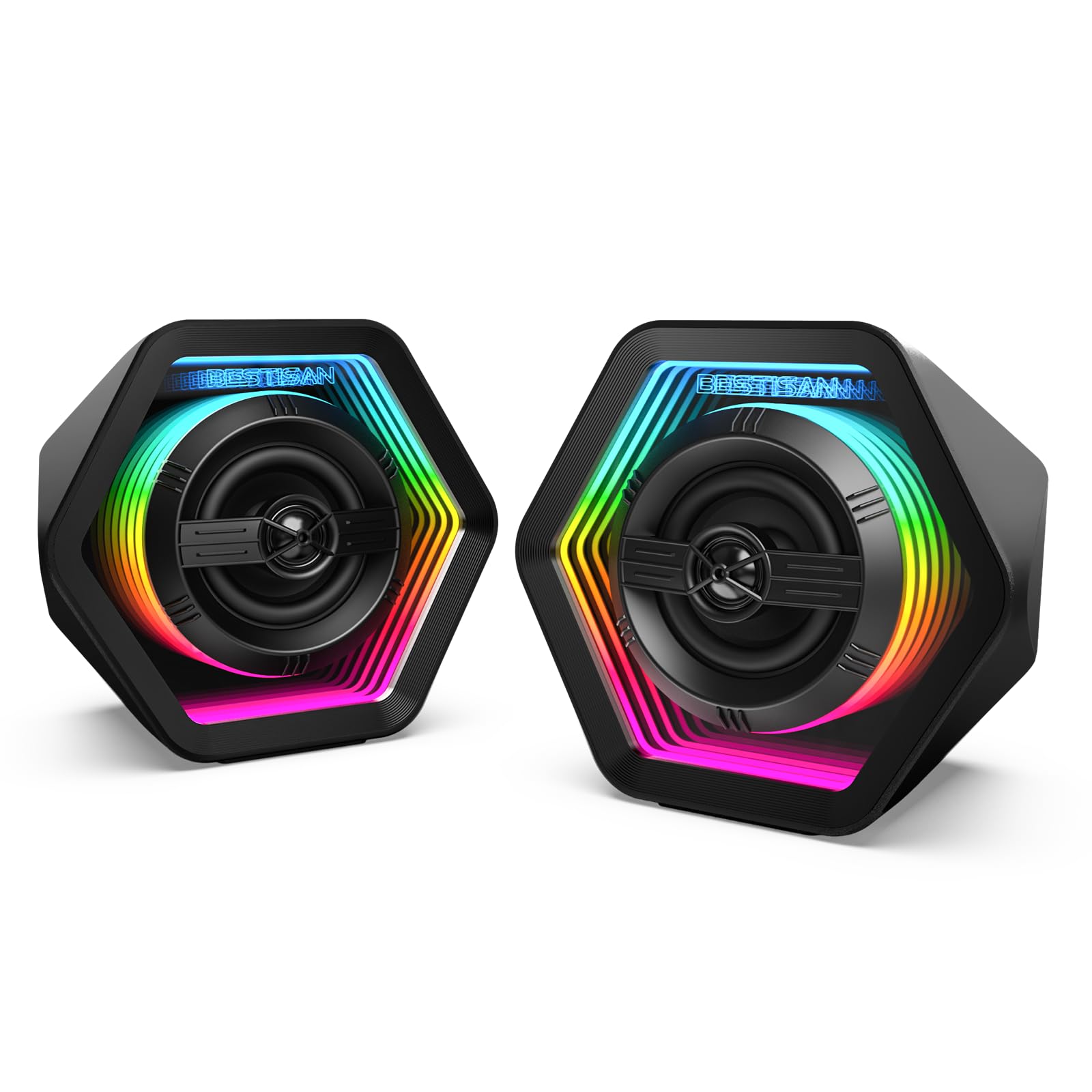
BESTISAN GM06

84 /100
Sound Score Excellent

Key details

EQ Modes
Game, Movie, Music
Subwoofer
None
Connectivity
Bluetooth 5.3, AUX, USB-C
RGB Ecosystem
Infinity mirror RGB, 8 modes
View on Amazon

Fifty watts of peak output, three EQ modes, and a mirrored RGB light tunnel make this a feature-dense budget gaming 2.0 setup. Sound holds up well at this price, and Bluetooth 5.3 plus AUX and USB-C inputs let it move between PC and TV without re-cabling. The biggest catch is on the control side: a unit may arrive with a volume button or remote that does not register, so QC experience varies. That keeps it a showpiece-first recommendation rather than a long-term durability pick.

Pros

  • 50W peak output plus three EQ modes deliver lively, game-ready sound for the price.
  • Infinity-mirror RGB tunnel gives the desk a distinct look that ordinary glow-LED speakers miss.
  • Bluetooth 5.3, AUX, and USB-C inputs cover PC and TV duties with minimal setup fuss.

Cons

  • The bundled remote adds functionality, but buyers who prefer a simple no-remote setup may find it extra.
  • On some units, the volume button or remote may not respond, so an early check is worthwhile.
Our verdict

For an RGB-focused desk where lighting and EQ options matter more than long-term certainty, this set delivers a lot for the money — with the caveat that the controls deserve a quick test after unboxing.

Check Latest Price
9

Klipsch Loyalists

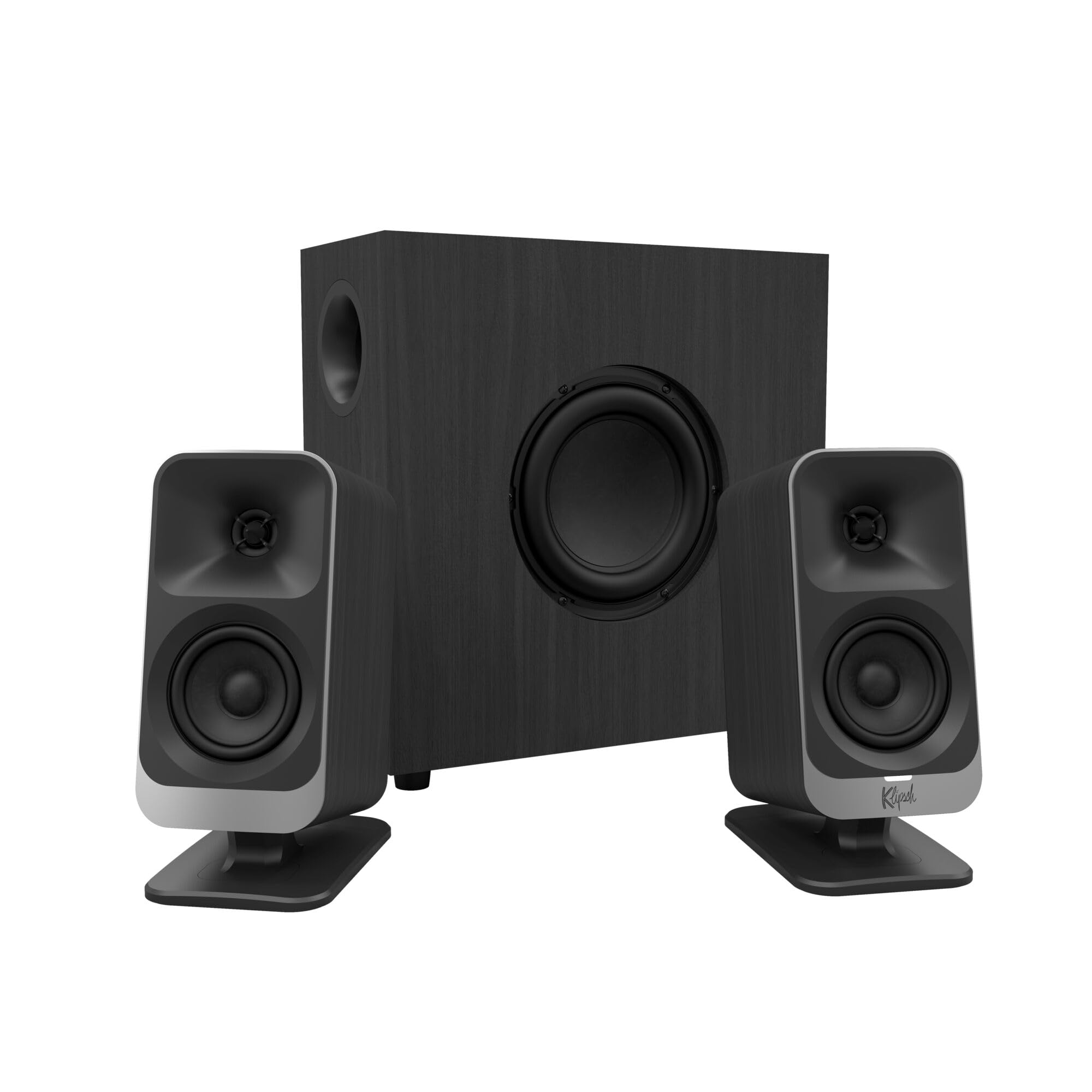
Klipsch ProMedia Lumina

80 /100
Sound Score Excellent

Key details

EQ Modes
Klipsch app EQ
Subwoofer
6.5in included
Connectivity
USB-C, AUX, Bluetooth 5.3
RGB Ecosystem
Backlit RGB, music-react
View on Amazon

Klipsch's desktop heritage comes through in the ProMedia Lumina's clear midrange and well-balanced 6.5-inch subwoofer, while the backlit RGB stays subtle enough for a workspace. Tiltable satellites and simple USB-C/AUX hookup make placement and setup painless.

It sits a tier below the premium 2.1 leaders in this roundup because of the two tradeoffs listed in the cons: software-dependent EQ and wireless behavior. For Klipsch loyalists and content creators who accept a wired primary connection, the Lumina still delivers a refined, heritage-flavored desktop sound.

Pros

  • Clear, realistic sound with a balanced subwoofer
  • Subdued backlit RGB adds atmosphere without turning the desk into a light show.
  • Plug-and-play USB-C and AUX connections get the system running quickly.

Cons

  • App-based EQ depends on Klipsch Control, which can glitch and comes with a vague manual.
  • Bluetooth may time out or sound scratchy, so wired input is the more dependable path.
Our verdict

For Klipsch loyalists and content creators who want a refined-looking desktop audio setup, the Lumina is a worthwhile premium 2.1.

Check Latest Price

How to Choose

Amplifier Power and Driver Size

Amplifier power and driver size determine real output, but the two must be read together. A high wattage rating on a 5V USB-powered speaker cannot produce the same clean headroom as an AC-powered model with a larger driver. Larger drivers move more air, which is what you feel as bass and impact.

For a typical desk, 2.75- to 3-inch drivers with AC power fill a room at moderate volume. If a speaker runs from USB alone, treat the wattage number as a marketing figure and set your volume expectations accordingly.

Subwoofer or Subwoofer Output

A dedicated subwoofer is the single biggest upgrade for game impact, especially for explosions and soundtrack cues. The trade-off is placement: a 6.5-inch sub takes floor space near the desk, while a subwoofer output jack lets you add your own down the road.

If you want serious low end now, choose a system with the sub included; if desk space is tight, a 2.0 set with a sub output gives you the upgrade path without buying a new pair later.

Connectivity Options

Wired connections are the priority for gaming because Bluetooth introduces latency, and even modern versions can drop out under interference. USB handles audio and often powers the speaker, while 3.5mm AUX works with nearly everything, including consoles and older hardware.

Optical input is useful for PS5 and TVs, but check whether your console supports it before paying for it.

RGB Ecosystem and Lighting Control

RGB is easy to chase but hard to live with. Standalone audio-synced modes work immediately, while ecosystem lighting (Chroma, LIGHTSYNC, PrismSync) requires software that stays running in the background.

If you never want to open another settings menu, pick lighting that works without software.

EQ Modes and Software Tuning

Preset EQ modes change how the drivers respond before you hear anything, which is why Game, Music, and Movie modes can make the same speaker sound dramatically different. Physical tone knobs achieve the same result without software, but they offer less precision.

For a set used across games, music, and video calls, a speaker with either three presets or a 10-band EQ is easier to live with than one with no tuning at all.

Frequently Asked Questions