7 Best Headphone DAC Amp of 2026: Picks That Match Your Setup

Best headphone DAC amp picks for desktop, portable, and gaming listeners, matched to headphone power needs and input flexibility.

DAC chip names and maximum power numbers dominate the marketing, but they rarely decide whether a DAC amp earns a place on your desk. The useful buying decisions are smaller: which inputs work reliably, how the volume control behaves, whether the unit needs a wall adapter, and whether the outputs match the headphones you already own.

That is why the best choice for one listener is a pocket-size Bluetooth receiver with app EQ, while for another it is a balanced desktop amp with enough current for planars. Portability, power, and input flexibility pull against each other; you give up one to get the other.

Use the same logic when comparing models: check the power at the impedance your headphones actually present, confirm the inputs match your source, and decide whether you want physical tone controls or app-based EQ. The right purchase is the one whose inputs, outputs, and power delivery line up with the listening setup you already have.

About the Sound Score: This comparative score is calculated from a product's published customer rating and review volume. It is not a laboratory measurement or a hands-on test result.

1

Best Overall

FiiO K11

90 /100
Sound Score Outstanding

Key details

EQ Controls
None
Digital Inputs
USB, optical, coaxial
Balanced Output
4.4mm BAL, 3.5mm SE
Headphone Power
1400mW
View on Amazon

At 1400mW, the K11 gives high-impedance headphones room to breathe through the 6.35mm single-ended output, and the 4.4mm balanced output adds a clean second path without moving to a larger desktop amp. The 6.35mm and 4.4mm outputs give both single-ended and balanced cable owners a direct connection. The VA display keeps the active input, sample rate, and volume visible, while the volume knob has a weighted feel that makes fine level matching easy. USB, optical, and coaxial inputs accept PC, Mac, PS5, and dedicated transports, so the K11 works as a single input hub rather than a one-port desktop dongle.

The shell and control give the K11 a durable, permanent-desk feel, and the rear RCA line-out lets it drive powered speakers alongside headphones. That makes the K11 a practical all-rounder: connect a computer or console over USB, a TV over optical or coaxial, and use the front control to switch between speaker and headphone listening. The K11 handles high-impedance headphones with ease, and the volume range is smooth from low-level background listening to louder session levels. For buyers with active monitors and a single good headphone, one box handles the whole desk.

For the price, the K11 covers the broad middle of desktop listening: clean single-ended and balanced outputs, enough power for high-impedance headphones, and a line-out for speakers. Balanced output at this price usually means a separate amp or a much larger chassis; here it is built into a compact mid-range box. The K11 does not chase THX-class power or extreme planar-driver headroom; that territory belongs to the higher-power sibling in the same lineup. The practical difference is headroom planning, not sound quality at ordinary listening levels.

This is the desktop all-rounder for buyers who want one wired hub for headphones and powered speakers. The optical input can be silent on certain units, so if optical is part of the source chain, verify it early. USB and coaxial are the simpler connection paths in this package, and the compact footprint leaves room for a keyboard, monitor, or powered speakers on the same desk.

Pros

  • Clean, clear delivery with enough power for high-impedance headphones.
  • Sturdy metal build gives the desktop setup a premium feel.
  • Balanced 4.4mm output opens a clean path without jumping to flagship desktop gear.
  • PS5, Mac, PC, and headphones all work from one compact unit.
  • RCA line-out makes powered speakers a natural add-on.

Cons

  • A wireless phone or tablet stream needs a separate Bluetooth receiver; the K11 is wired-only.
  • No battery inside, so the K11 is tied to a desktop rather than a travel bag.
Our verdict

For a wired desktop stack, the K11 is the value anchor: balanced 4.4mm output, multiple digital inputs, and enough power for typical headphones, with a line-out for speakers.

Check Latest Price
2

Best Wireless & EQ Choice

Qudelix-5K

92 /100
Sound Score Outstanding

Key details

EQ Controls
Parametric EQ app
Digital Inputs
Bluetooth, USB-C
Balanced Output
2.5mm BAL, 3.5mm SE
Headphone Power
240mW BAL, 80mW SE
View on Amazon

The Qudelix-5K brings LDAC and aptX Adaptive wireless streaming, a clip-on battery, and app-controlled parametric EQ to wired headphones. That puts it in a different lane from the pocket USB-C dongle in this roundup, which needs a wired connection for everything.

Dual ES9219 DAC chips feed 2.5mm balanced and 3.5mm single-ended outputs with 240mW balanced and 80mW single-ended. That is ample for efficient IEMs and portable headphones, while the balanced output offers extra headroom for harder-to-drive models.

The companion app separates this unit from simpler dongles. It stores multiple EQ presets, adjusts gain, and lays out filter controls clearly, so you can shape a wired headphone's response without desktop software. A tiny body about the size of a 9V battery clips to a bag strap and handles daily commutes.

This is for commuters and desk workers who already own wired IEMs or headphones and want wireless mobility plus precise tone control. The 2.5mm balanced output is the only balanced option, so 4.4mm cable owners need an adapter. It is a receiver, not a transmitter, and quiet recordings or inefficient headphones may need the volume near its ceiling.

💡 Store EQ presets in the app for each headphone and use the clip on a bag strap or collar.

Pros

  • Neutral sound with high output capability for IEMs and efficient headphones.
  • App-controlled 10-band parametric EQ with preset storage and gain adjustment.
  • LDAC and aptX Adaptive add wireless streaming to wired headphones.
  • Clip-on body about the size of a 9V battery.

Cons

  • Quiet recordings or inefficient headphones may require near-max volume, especially through single-ended output.
  • Bluetooth-only headphones cannot receive audio from this unit; it is a receiver for wired headphones.
Our verdict

The Qudelix-5K is the pocket pick for wired IEM owners who want app-based tuning and wireless mobility.

Check Latest Price
3

Best Balanced Desktop Power

FiiO K7

88 /100
Sound Score Excellent

Key details

EQ Controls
None
Digital Inputs
USB, optical, coaxial, AUX
Balanced Output
4.4mm BAL, 6.35/3.5mm SE
Headphone Power
2000mW balanced
View on Amazon

Dual THX AAA 788+ amps and 2000mW balanced output give the K7 genuine headroom for demanding headphones. This is the desktop upgrade for planar and high-impedance owners who need more current than the top pick’s balanced stage can sustain.

The K7’s clean stage and instrument separation stay composed at higher output levels, and its 6.35mm single-ended output still drives efficient dynamic headphones without strain. Balanced output through 4.4mm is the defining feature, adding the extra current that planar and high-impedance headphones need. USB, optical, coaxial, and AUX inputs cover standard desktop sources, though Bluetooth and microphone input are absent.

This is a desktop unit for listeners with planar or high-impedance headphones and a balanced 4.4mm cable. The K7’s value depends on that cable; without balanced output, a large part of its power advantage stays unused. No battery means it stays on a desk rather than in a bag, and anyone needing Bluetooth or a mic input is outside the K7’s intended desktop use.

The main tradeoff is the stepped volume dial, which uses noticeable steps and concentrates usable level changes near the upper end. That keeps the K7 from being the easier all-rounder choice, though listeners who set a level and leave it will not mind.

Pros

  • Clean stage and instrument separation hold up at higher output levels.
  • Plenty of clean power for demanding headphones, including planars.
  • Strong value as a power-focused balanced desktop amp/DAC at a mid-range price.

Cons

  • Power-on behavior can vary between units, including units that become unresponsive after extended use.
Our verdict

The K7 is the power-focused balanced desktop amp for headphone owners who need more headroom than the top pick’s output stage can supply.

Check Latest Price
4

Best Gaming/Console All-In-One

Fosi K7

90 /100
Sound Score Outstanding

Key details

EQ Controls
None
Digital Inputs
USB-C, optical, coaxial, Bluetooth
Balanced Output
4.4mm BAL, 3.5mm SE
Headphone Power
2100mW
View on Amazon

Fosi's K7 puts 2100mW, balanced 4.4mm output, Bluetooth, and a headset mic jack into one desktop metal box — the feature-dense gaming hub of this lineup. It uses AK4493S and TPA6120 hardware, decodes PCM 384/32 and DSD256, and offers a bigger feature set than the entry-level tone-control combo in this set, which has no balanced or wireless capability.

Output stays clean with tight bass across single-ended and balanced connections, and the 2100mW figure translates to real headroom for planars and 300Ω headphones. The volume dial has a smooth taper, so low-level listening is usable without jumpy steps. RCA outputs let powered speakers sit alongside the headphone amp without re-plugging.

The K7 belongs on a fixed desk with a 12V outlet available. It is a desktop component, not a portable dongle, so buyers who want pocket use should look at pocket-friendly alternatives. For PS5/PC gamers who need one box to handle game audio, headset voice chat, and wired headphones, this covers the setup without extra boxes. The 3.5mm mic input is the detail that separates this from typical desktop DAC/amps: PS5 and PC headsets keep their existing microphones instead of requiring a separate USB interface.

💡 Use the 4.4mm balanced output for full power; the 3.5mm jack handles efficient headphones and IEMs.

Pros

  • High clean output with tight bass and enough power for demanding headphones.
  • Strong performance across gaming, music, and general desktop listening in one unit.
  • Smooth volume control with practical low-volume adjustment for quiet listening.
  • Feature set for the price is strong, with Bluetooth, balanced output, digital inputs, and a mic jack.

Cons

  • Analog-only sources have no line input, so turntables and tape decks need an external ADC.
  • Bluetooth works as a receiving source only; wireless headphones cannot pair to it.
Our verdict

The K7 handles the PS5/PC gaming desk without stacking separate DAC, amp, and mic adapters.

Check Latest Price
5

Best Budget Gaming/Desktop Upgrade

Fosi K5 Pro

86 /100
Sound Score Excellent

Key details

EQ Controls
Bass, treble knobs
Digital Inputs
USB-C, optical, coaxial
Balanced Output
None
Headphone Power
1000mW
View on Amazon

The K5 Pro gives budget gamers physical bass and treble knobs plus a headset mic jack in one compact box, a combination the main pick in this roundup leaves out. It is a wired single-ended unit, so the feature-dense gaming hub above it adds Bluetooth and balanced output at a higher price and larger footprint.

This suits budget console/PC gamers and desk users who want USB, optical, coaxial, and mic connections with immediate tone controls. Optical and coaxial input behavior can vary on some units, so USB is the safer primary connection. If you plan to drive 300Ω or planar headphones, output power may feel limited; efficient gaming headsets and IEMs are a better match.

Sound clarity is strong for an entry-level gaming setup, with clean game audio and intelligible voice chat. The metal shell has a solid, heavy feel, and the bass and treble knobs respond without requiring software. For efficient headphones, the volume range covers everyday listening levels comfortably.

Pros

  • Physical bass and treble knobs allow instant tone shaping without software.
  • Sound clarity is strong for entry-level gaming and voice chat.
  • Metal build feels solid and heavier than its budget positioning suggests.
  • USB, optical, coaxial, and mic inputs cover console and PC setups.

Cons

  • Optical and coaxial input behavior can vary between units, making USB the connection to count on.
  • Higher-impedance or planar headphones may not get enough volume headroom.
Our verdict

Budget-conscious gamers with efficient headsets get a useful tone-control feature set here: physical knobs, a mic input, and USB-first simplicity.

Check Latest Price
6

Ultra-Budget Starter

AIYIMA DAC-A2

82 /100
Sound Score Excellent

Key details

EQ Controls
Bass, treble knobs
Digital Inputs
USB, optical, coaxial
Balanced Output
None
Headphone Power
160mW
View on Amazon

The AIYIMA DAC-A2 is the most affordable functional desktop DAC/amp starter with bass and treble controls plus USB, optical, and coaxial inputs. For a first desktop setup with efficient IEMs or low-impedance headphones, it delivers tunable sound at an ultra-budget price. The 160mW output is fine for sensitive IEMs but not power-hungry headphones, and the required 5V USB adapter is sold separately. Those limits keep it below the main picks, but they are acceptable boundaries for an IEM-only first setup. That trade-off is clear before purchase.

Pros

  • Delivers surprisingly capable sound for an ultra-budget price.
  • Bass and treble controls allow quick tonal tuning without software.
  • Works as a simple desktop DAC/amp for low-impedance headphones and IEMs.

Cons

  • Plan on supplying your own 5V USB adapter
  • Quiet listening can reveal static, clicking, or popping on certain units.
Our verdict

This is the right call for an efficient-IEM listener who wants a desktop DAC/amp on the smallest possible budget. Full-size headphone owners should set their sights on the main picks.

Check Latest Price
7

Premium Desktop Alternative

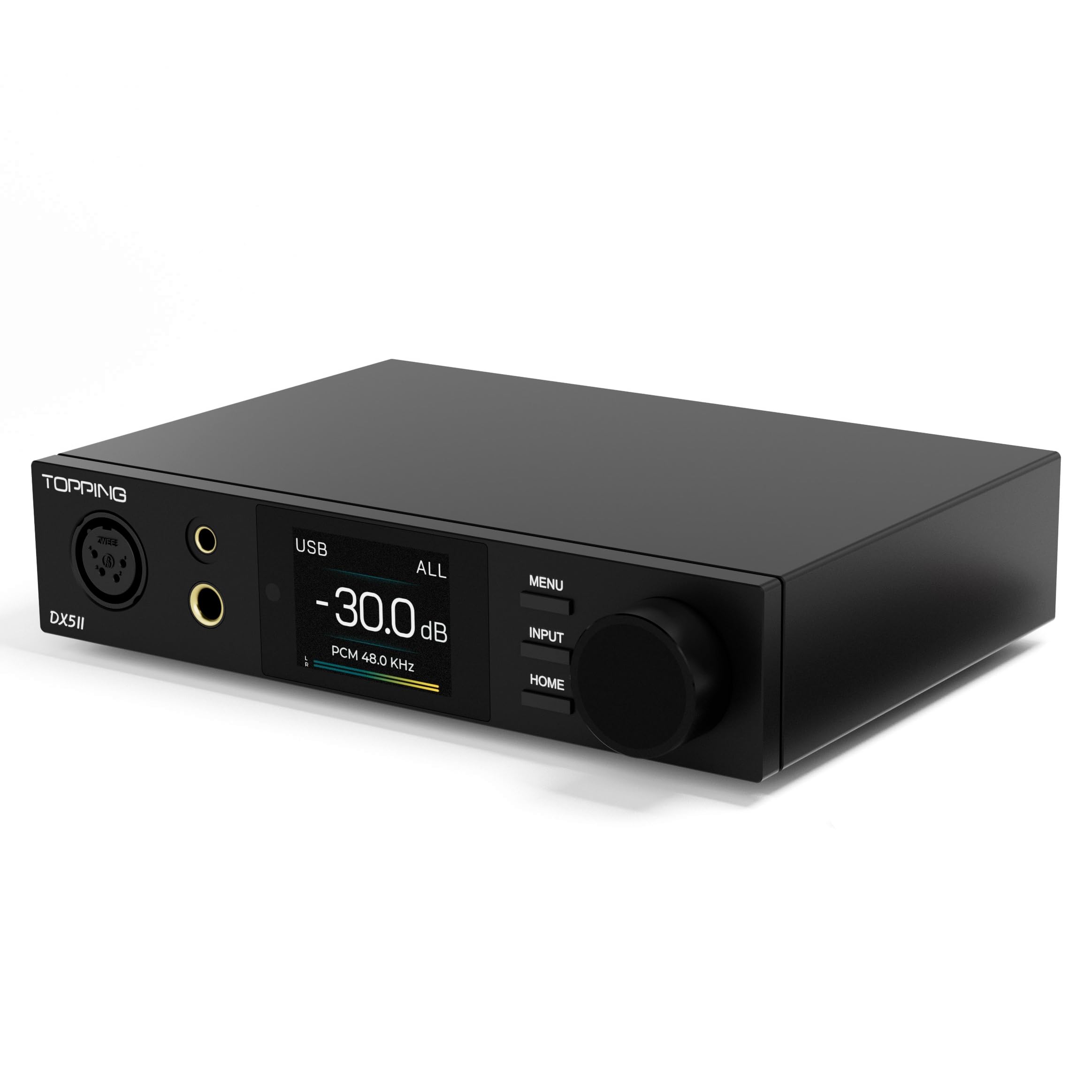
Topping DX5 II

87 /100
Sound Score Excellent

Key details

EQ Controls
10-band PEQ
Digital Inputs
USB, Bluetooth, optical, coaxial
Balanced Output
4.4mm BAL, 6.35mm SE
Headphone Power
View on Amazon

On the desk, the DX5 II is a very sharp operator: precise, neutral sound, LDAC Bluetooth, a 10-band PEQ, and balanced outputs that drive high-impedance headphones with ease. It pairs with computers, phones, and existing desktop systems cleanly.

Unit-to-unit consistency is the tradeoff that keeps it from the main recommendation: a premium-spec product that demands an early evaluation period. For desktop listeners who want LDAC, PEQ, and high power, the DX5 II delivers a feature stack few rivals match at this price. Strict-budget builds and buyers with a low tolerance for QC risk are better served elsewhere.

Pros

  • Precise, neutral sound keeps complex tracks clean and well-separated.
  • Connects cleanly across computers, phones, and existing desktop systems.
  • The feature set is a strong value for a premium desktop unit.

Cons

  • A firmware update can brick the unit.
  • A unit can become unresponsive within a few weeks of normal use.
Our verdict

Buy it for a desktop rig that needs LDAC, PEQ, and balanced power in one box — if you're willing to verify the unit early.

Check Latest Price

How to Choose

Headphone Output Power

Power ratings are only meaningful at a stated impedance. A high number at 32Ω does not guarantee enough voltage for 300Ω dynamic headphones, and a low 160mW figure is fine for efficient IEMs.

Planar and high-impedance models need more current and voltage, so look for at least 1000mW at 32Ω or an explicit balanced power figure for demanding headphones. Match the amp to the headphones you own, not the biggest number on the spec sheet.

Balanced vs Single-Ended Outputs

A balanced output uses separate amp paths for left and right channels, which typically raises power and lowers crosstalk. In practice, the gain is headroom: planars and high-impedance dynamics sound cleaner at higher volumes.

If your headphones are efficient and you listen at moderate levels, a single-ended 3.5mm or 6.35mm output is enough. Balanced only becomes necessary when you need extra power or you already own balanced cables.

Digital Input Flexibility

USB is the default for computers, while optical and coaxial connect TVs, CD players, and consoles without pulling audio from a noisy motherboard. Bluetooth adds convenience but can introduce latency and compression, so it is a bonus rather than a core requirement.

Optical inputs are the most common trouble spot in this category. If your main source is USB, a unit with one solid USB input beats a multi-input box with a flaky optical port.

Tone Controls and EQ

Physical bass and treble knobs adjust the signal before amplification, making them easy to use but broad in effect. Parametric EQ instead targets specific frequency bands and can correct a headphone's response without adding unwanted brightness or boom.

Console listeners benefit most from physical knobs because they can tune a game mix without software. If you already use system EQ on a computer, an amp without tone controls is not a drawback.

Power Supply Requirements

Smaller DAC amps draw power over USB, while larger desktop units need a dedicated adapter. A USB-powered model plugged into a low-current hub can produce dropouts or noise even when the circuit is otherwise quiet.

Check whether the adapter is included before you buy; some budget models expect you to supply a 5V USB source. A clean, stable power supply also keeps the noise floor low, which matters most with sensitive IEMs.

Frequently Asked Questions