
8 Best Headphones for Conference Calls of 2026: Call Clarity

Best headphones for conference calls that deliver clear mic pickup, all-day comfort, and reliable USB or wireless controls for PC softphones.

The most common conference call problem starts with a misunderstanding: 'noise cancelling' on a headset usually describes the microphone, not the ear cups. Background noise still reaches your ears, and poor mic isolation lets your keyboard clatter reach everyone else. The result is a call that feels more exhausting than it should.

The right headset matches the way you actually work. Wired USB with inline mute and a noise-reducing boom mic removes Bluetooth variables for desk-bound PC callers. Wireless with a dedicated dongle adds mobility, but only if mute and call controls function inside your softphone.

A long review history can make a budget pick feel safe, but it does not fix an on-ear clamp that becomes sore by hour three. This guide weighs connection type, mic noise rejection, and all-day fit so the voice on the other end stays clear without the end-of-day ear pain.

About the Sound Score: This comparative score is calculated from a product's published customer rating and review volume. It is not a laboratory measurement or a hands-on test result.

1

Best Overall

Jabra Evolve 20

87 /100
Sound Score Excellent

Key details

Connectivity
Wired USB-A, USB-C
Call Controls
In-line call, volume
All-Day Comfort
132g
Mic Noise Reduction
Noise-canceling microphones
View on Amazon

The Jabra Evolve 20 2025 Edition leads with dual USB-A and USB-C connectivity in a 132g wired frame, covering laptops, docks, and desktops without a separate adapter. Jabra pairs 28mm drivers with an in-line control pod for call answer/end, mute, and volume, keeping common softphone actions close at hand. That design puts speech clarity and lightweight wear ahead of music playback or wireless mobility.

The USB signal path bypasses Bluetooth pairing and battery management, and the headset appears as a standard audio device in Windows, macOS, and common softphone applications. Setup becomes more about plugging in than configuring, which suits hybrid workers who rotate between desks and machines. The wired USB path also removes wireless interference as a variable on important calls.

Build quality lands above the usual budget on-ear set, with a clean finish and controls that feel matched to a mid-range office headset. The 132g weight keeps pressure low during long stretches, and the ear cushions stay comfortable enough for hours of calls without constant adjustment. The inline control pod sits far enough down the cable to avoid tugging at the ear cup during adjustments.

Call output stays clear for the wearer, and the boom mic keeps voice intelligible in a private office or quiet home workspace. Background noise on the far end is reduced but not fully removed in an open-plan room; nearby voices and desk noise can still be picked up. That makes the headset better suited to controlled environments than crowded floors.

The target buyer is an office professional or hybrid worker who spends hours on softphone calls and moves between USB-C and USB-A machines. It also fits all-day callers who prefer a light on-ear fit over the clamping pressure of some budget sets. Passive mic noise reduction may not remove all open-space background noise, so buyers in loud rooms should treat this as a voice-clear headset rather than a total noise shield. Call center workers wanting flip-to-mute or a busylight will need a different feature set.

💡 Keep the boom mic close to your mouth and reduce nearby desk noise when possible; passive noise reduction works best at short range.

Pros

  • Solid build quality and clean finish for a mid-range office headset.
  • Dependable call performance across long softphone sessions.
  • Clear voice and call audio keep softphone conversations intelligible.
  • Light 132g build with enough comfort for all-day wear.
  • Strong value for a mid-range wired headset with dual USB support.

Cons

  • Open-plan spaces can still let nearby voices and desk noise reach the far end, despite the noise-cancelling mic.
Our verdict

For desk and hybrid workers who want a single wired headset across USB-A and USB-C machines, the Evolve 20 is a light, controlled call tool with controls at the cable.

Check Latest Price
2

Best Budget Proven Workhorse

Logitech H390 USB Headset

88 /100
Sound Score Excellent

Key details

Connectivity
Wired USB-A
Call Controls
In-line volume, mute
All-Day Comfort
On-ear leatherette
Mic Noise Reduction
Rotating noise-canceling boom
View on Amazon

The Logitech H390 puts a rotating noise-cancelling boom mic and inline volume/mute controls at the center of a wired USB-A headset for PC calls. That control set gives callers direct volume and mute adjustments without leaving the conversation. Compared with the simpler lightweight USB-A model in this set, the H390 offers stronger call-focused features and more controls for daily voice work.

Budget-conscious PC callers with moderate call volume get the most from this headset. It works as a plug-and-play USB-A device and suits home-office and softphone use. The on-ear leatherette pads can feel tight over long stretches, so all-day callers who are sensitive to on-ear clamping should consider an over-ear design. USB-C-only laptop owners will need an adapter.

Voice output and mic pickup anchor the daily experience. Callers hear clear, loud audio, and the boom mic handles ordinary home-office noise without much fuss. Inline controls sit on the cable and keep mute access immediate during softphone meetings, which reduces dependence on app-level controls. The rotating boom can be positioned close for speech clarity and moved away when not on a call.

💡 Position the boom mic about an inch from the corner of the mouth for clearer voice pickup.

Pros

  • Clear, loud audio keeps voices easy to hear on calls.
  • Rotating noise-cancelling boom mic keeps speech focused during calls.
  • Inline volume and mute controls keep call adjustments close at hand.
  • Strong value for budget-conscious PC callers.

Cons

  • Ear pads and joints may wear or loosen earlier than expected under heavy use.
  • Mic noise cancellation may not remove all background noise in loud settings.
Our verdict

For moderate-call PC users with a USB-A port, this headset keeps call management close and the budget intact.

Check Latest Price
3

Best Wireless Value with Charging Dock

Mopchnic DH18 Wireless

86 /100
Sound Score Excellent

Key details

Connectivity
Bluetooth 5.3, USB dongle
Call Controls
Mute button, MFB
All-Day Comfort
On-ear pads
Mic Noise Reduction
ENC noise cancellation
View on Amazon

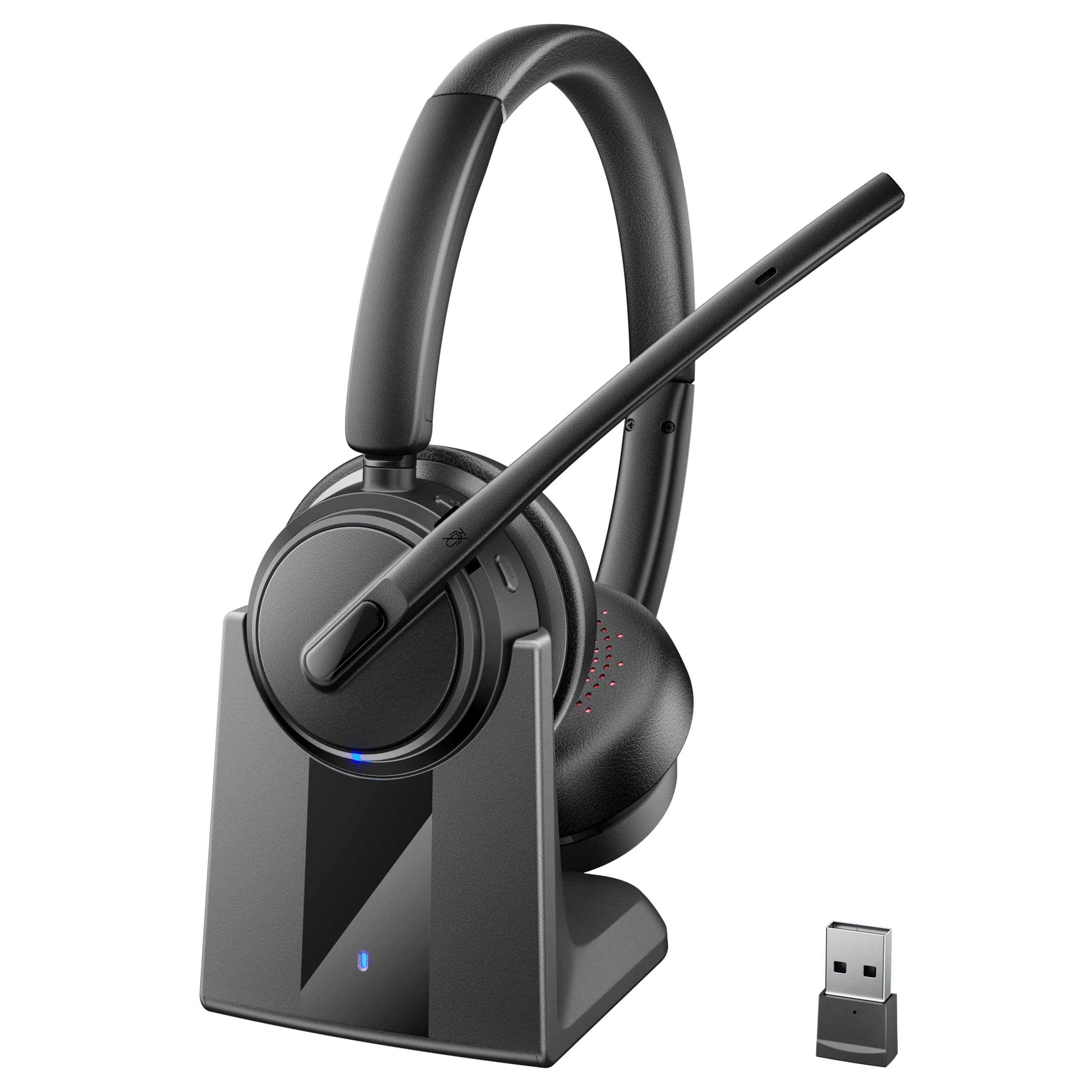
The Mopchnic DH18 separates itself with Bluetooth 5.3 and USB dongle connectivity, a charging dock with dongle storage, and up to 50 hours of talk battery. The feature-packed wireless alternative in this set leans on broader controls; the DH18 keeps the dock-and-call loop focused on long battery and steady connectivity. Multipoint pairing adds phone-plus-PC flexibility for switching between a softphone and a mobile line.

Call fidelity is the main priority. The 270-degree reversible boom mic suppresses background noise before it reaches the far end, and voice audio stays crisp enough for long meetings. The boom swings to either side for left- or right-side wear. The build quality feels solid for a mid-market wireless set, and the compact on-ear shape keeps the footprint smaller than larger over-ear call headsets.

The target buyer is a work-from-home or call-center user who wants wireless freedom, a charging dock, and battery life that spans multiple shifts. The on-ear fit can feel snug during very long sessions, so this is better for people who do not require over-ear cup comfort. Phone-plus-PC users can keep both devices paired and move between them without a cable. This is a desk-based call headset rather than a mobile music headphone.

Pros

  • Clear call and media audio keeps voices intelligible through long meetings.
  • Solid construction gives the headset a sturdier feel than many budget wireless sets.
  • Battery life supports multiple workdays on a single charge.
  • Boom mic noise reduction keeps room noise from overtaking the caller's voice.

Cons

  • Bluetooth and USB audio cannot play at the same time, so dual-source monitoring requires another device.
  • The on-ear pads can feel snug around the ears over long sessions.
Our verdict

A dock-ready wireless choice for call-heavy users who prefer a compact on-ear design and phone-plus-PC flexibility.

Check Latest Price
4

Best Premium Multi-Device Wired

Poly Blackwire 5220

81 /100
Sound Score Excellent

Key details

Connectivity
Wired USB-C, USB-A, 3.5mm
Call Controls
In-line call controls
All-Day Comfort
Over-ear cushions
Mic Noise Reduction
Flexible noise-cancelling boom
View on Amazon

The Poly Blackwire 5220 separates itself with a wired triple-connectivity setup that covers USB-C, USB-A, and 3.5mm, plus Microsoft Teams and Zoom certification. That connection mix suits laptop professionals who move between current USB-C machines, older USB-A docks, and analog devices without carrying a second headset. The included USB-A adapter keeps older machines covered without a dongle, and a long cord adds desk flexibility for fixed setups rather than tight laptop-only use.

Call clarity is tuned for spoken conversation, and the over-ear cushions hold up comfortably over long meetings. In-line controls keep mute and volume within reach, while the flexible boom mic stays where you place it. The wired format trades mobility for fewer pairing and battery concerns, and listening quality prioritizes voice clarity over bass or detail.

The buyer profile is an office professional who wants certified softphone support and a single wired headset across multiple devices. Noise cancellation and microphone durability can vary by unit, so this fits buyers who can accept occasional background leakage or mic inconsistency rather than those who need strict background rejection. For that audience, the Poly Blackwire 5220 is a comfortable premium-priced runner-up to the lighter dual-USB top pick.

💡 Keep the boom mic about an inch from your mouth for best noise rejection.

Pros

  • Clear call and listening quality for typical office work
  • Comfortable over-ear fit for long meetings
  • Wired connection across USB-C, USB-A, and 3.5mm
  • Long cord works well for desk setups

Cons

  • Background noise can still reach callers in loud rooms despite the noise-cancelling mic.
  • Microphone audio may develop cutouts or static after extended use on some units.
Our verdict

The corded 3.5mm fallback and Teams and Zoom certification make this a practical choice for mixed-device desks that do not need wireless freedom.

Check Latest Price
5

Best Wireless for Microsoft Teams

Lenovo Wireless VoIP

79 /100
Sound Score Very Good

Key details

Connectivity
Bluetooth 5.3, USB-A receiver
Call Controls
Boom flip-to-mute
All-Day Comfort
140g
Mic Noise Reduction
Three-mic noise suppression
View on Amazon

The Lenovo Wireless VoIP headset separates itself from a basic wired USB-A option by pairing a dedicated USB-A receiver with Bluetooth 5.3 and native Microsoft Teams call controls. Its three-mic noise suppression and flip-to-mute boom target the core need of clear voice pickup and quick mute during PC-based Teams meetings. The physical boom mute is the main differentiator for buyers who prefer a visible mute state over button-only controls.

Voice pickup for Teams calls is clear, and the background noise reduction helps keep room chatter from dominating the far end. Comfort holds up over long workdays under sustained use. Battery life supports all-day talk and then some, so a full shift of back-to-back meetings does not require mid-day charging.

This fits remote or hybrid workers who stay near a desk and want native Teams call, answer, and mute controls without a cable. Connection stability and ear-pad durability can vary, which makes this a better match for seated Teams use than for roaming around an office or home. Buyers needing consistent long wireless range or low-maintenance ear pads should look at a wired option.

💡 Keep the USB-A receiver in direct line of sight to the headset to improve wireless link consistency.

Pros

  • Clear call audio for Teams meetings
  • Effective background noise reduction for far-end listeners
  • Comfortable fit for long workdays
  • All-day battery life for talk and music

Cons

  • Wireless link may drop or shrink in range beyond the receiver's immediate area
  • Ear pad material can peel or unglue within months of regular use
Our verdict

For desk-bound Microsoft Teams users who value flip-to-mute and all-day battery, this is a focused wireless option.

Check Latest Price
6

Flip-To-Mute Wired

Yealink UH37

81 /100
Sound Score Excellent

Key details

Connectivity
Wired USB-C, USB-A
Call Controls
Flip-to-mute
All-Day Comfort
Leather ear cups, metal headband
Mic Noise Reduction
Dual noise-canceling mics
View on Amazon

Yealink UH37 centers on call-center ergonomics: dual USB-C and USB-A connectivity, Microsoft Teams certification, and a flip-to-mute boom with dual noise-canceling mics. The over-ear fit with breathable leather ear cups suits long shift work, while the boom mic keeps speech clear for daily meetings.

The honest boundary is that this is a call-first headset, not a media upgrade. Sound for music or movies can vary, and cable durability near the USB-C connector asks for careful desk management. For Teams and Zoom users with USB-C laptops, those tradeoffs absorb more easily than for someone wanting all-purpose audio.

Pros

  • Strong mic noise cancellation for clear outgoing speech
  • Comfortable over-ear fit for long call shifts
  • Dual USB-C and USB-A covers newer and older laptops without an adapter

Cons

  • Non-call audio may sound thin for music or movies.
  • The USB-C cable end may fray or loosen with flex over time.
Our verdict

Call center and helpdesk workers with USB-C laptops get the strongest fit here, provided the workload stays voice-first and desk-bound.

Check Latest Price
7

Budget over-Ear USB

Lenovo Wired Gen2

86 /100
Sound Score Excellent

Key details

Connectivity
Wired USB-A
Call Controls
In-line call, volume, mute
All-Day Comfort
140g, replaceable earcups
Mic Noise Reduction
Double-sided boom mic
View on Amazon

The Lenovo Wired Gen2 puts a 140g on-ear frame, replaceable earcups, and plug-and-play USB-A operation into a budget PC call headset. In-line call, volume, and mute controls cover basic softphone work, and the double-sided boom mic applies app-enhanced noise reduction for office and home-office calls. The main holdback is the connection set: the USB-A-only design lacks sidetone and analog fallback, so USB-C-only laptops need an adapter and the headset stays a PC-only wired option. That makes it a narrow fit for basic USB-A call center and office desks rather than a broad conference-call option.

Pros

  • Plug-and-play USB-A operation for PC call platforms with minimal setup.
  • Lightweight 140g on-ear build with replaceable earcups for longer call blocks.
  • Double-sided boom mic with app-enhanced noise reduction for clearer call audio.

Cons

  • Maximum volume may be lower than expected on some calls.
  • No sidetone can leave callers feeling disconnected from their own voice during long calls.
Our verdict

This is a narrow pick for basic Windows USB-A call desks where low weight and replaceable earcups matter more than flexible connectivity. It stops before USB-C-only hardware and callers who need more connection flexibility.

Check Latest Price
8

Basic USB Calls

Logitech H340

87 /100
Sound Score Excellent

Key details

Connectivity
Wired USB-A
Call Controls
Volume only
All-Day Comfort
Foam ear cups
Mic Noise Reduction
Rotating noise-reducing boom
View on Amazon

The Logitech H340 handles basic PC call audio with a lightweight USB-A frame and a rotating noise-reducing boom mic. Voice pickup is clear for online meetings, virtual classrooms, and routine softphone use. The cable keeps controls minimal with a volume dial, and the budget-friendly price makes the headset a practical pick for school labs or IT fleets that need no-fuss headsets at scale. All-day comfort and heavy-use durability are mixed, so the H340 is best as a spare or moderate-use headset rather than a full-day conference pick. Buyers who want a dedicated mute button or softer over-ear comfort will need the step-up model with fuller call controls.

Pros

  • Clear call audio for online meetings and PC use
  • Noise-reducing mic keeps voice pickup clear for the price
  • Good value as a basic USB headset for schools and moderate work

Cons

  • On-ear foam cups can feel tender after long sessions
  • Heavy-use durability can vary between units
Our verdict

A budget USB headset for moderate calls and online schooling where simple volume control and a noise-reducing mic are enough, but not the pick for all-day comfort or heavy-duty use.

Check Latest Price

How to Choose

Connectivity Type

USB-A remains the most stable plug-and-play path for desk PCs, while USB-C suits modern laptops without an adapter. Bluetooth alone can pair to a phone, but softphone mute and call controls often need the included USB dongle.

Analog 3.5mm headsets work for phones and tablets but frequently lose microphone compatibility with PC jacks, so they sit outside the PC conference call use case.

Microphone Noise Reduction

A noise-cancelling boom mic reduces room noise only for the far end of the call; it does not silence what you hear in your own ear cups. The physical boom places the mic closer to your mouth, which improves voice clarity before software processing begins.

Look for dual or ENC microphone designs if calls happen near a keyboard, air conditioner, or family traffic. A unidirectional boom still helps, but dense background noise may leak through.

Call, Mute, and Volume Controls

Inline mute is the control you will reach for most. On wireless models, mute behavior can change by platform: a button may silence the headset but not the Teams mute state, leaving colleagues unaware you are off mute.

Flip-to-mute booms and busylight indicators reduce those visual mistakes in call center and Teams-heavy work. Prioritize physical controls that match the softphone you use most often.

All-Day Comfort

On-ear headsets weigh less and cost less, but their padding presses against the ear. Over many meetings, any light clamp becomes more noticeable, and thin or leatherette pads can trap heat.

Over-ear memory foam spreads pressure around the ear and is usually a safer choice for eight-hour shifts. If you choose on-ear, verify that the headband and pads are replaceable or adjustable.

Platform Compatibility and Certification

Microsoft Teams and Zoom certification means the headset has been tested for call controls and audio routing in those apps. It does not guarantee stronger noise cancellation or better music playback.

For standard softphone calls, uncertified USB headsets still work well. Certification matters most for IT fleets and users who rely on native mute sync or call-answer buttons inside a specific platform.

Frequently Asked Questions