9 Best Headphones with Microphone 2026: Clear Calls, Real Comfort

The best headphones with microphone for work calls, gaming, and everyday listening — balanced by mic clarity, comfort, and connection type.

Headphone listings throw 'noise-cancelling' around loosely. Some of it is genuine active cancellation; much of it is passive ear-seal pressure or a microphone that filters background chatter. That distinction decides whether callers hear you or hear the coffee shop instead.

The next fork is connectivity. A wired USB headset connects in seconds and keeps a stable audio path for meetings; Bluetooth models add freedom but can drop out near routers and older laptops. The right choice depends on whether you sit at one desk or move around.

Mic clarity, comfort, and connection stability are what owners live with daily. Battery life and noise cancelation matter, but they only help if the headset stays comfortable past the first hour and your voice arrives clearly. Those two realities should drive the buying decision.

About the Sound Score: This comparative score is calculated from a product's published customer rating and review volume. It is not a laboratory measurement or a hands-on test result.

1

Best Overall

Soundcore Q20i

91 /100
Sound Score Outstanding

Key details

Microphone
Built-in mics
Form Factor
Over-ear wireless
Connectivity
Bluetooth 5.0, aux
Noise Cancellation
Hybrid ANC
View on Amazon

The Q20i pairs hybrid active noise cancellation with a 40mm driver set and up to 40 hours of playback with ANC enabled, or 60 hours when ANC is off. Dual-device Bluetooth keeps a laptop and phone connected at the same time, which is the setup that suits office meetings and travel days. The sound is full-bodied with a strong low end, giving podcasts, video calls, gaming, and streaming a lively character without straying into boomy territory.

In shared spaces, the ANC filters steady hum from HVAC systems, transit, and office background noise, creating a calmer listening environment. The over-ear fit stays comfortable through long sessions thanks to soft cushions and moderate clamp pressure. Bluetooth pairing remains stable across both simultaneous connections, so switching between a work laptop and a phone does not require re-pairing. The ear cushions seal well enough for the ANC to work without excessive clamping, and the headband's weight distribution keeps pressure off the top of the head.

The Q20i suits everyday listeners, budget office workers, and travelers who want ANC, long battery, and multipoint without moving to a premium tier. The bass-forward tuning is not neutral; buyers after studio-neutral tonality or a lighter frame may prefer the slimmer Sony in this set. The built-in mics handle video calls and quick chats in normal rooms, but anyone taking calls from coffee shops, transit, or open-plan floors should use a dedicated boom-mic headset, since the Q20i does not separate your voice from surrounding noise. For the general-purpose buyer, that is a fair boundary rather than a fault.

The build feels more substantial than the price tier suggests, with a plastic frame that handles commutes and desk life without creaking. USB-C charging and a 3.5mm aux input cover modern laptops and hardware without Bluetooth, and the 40-hour ANC battery keeps charging to a once-a-week routine for typical workdays. A feature list like this typically costs more, which is why the Q20i anchors the category's value conversation.

The slimmer Sony in this set is lighter and slightly more refined in ANC, but the Q20i counters with longer battery life and a lower price. For the general-purpose buyer, that trade leans toward the Q20i; the extra polish matters especially to those who want a lighter carry.

Pros

  • Hybrid ANC quiets steady office, transit, and household noise for a calmer listening space.
  • Strong bass and clear highs give music and video a lively character.
  • Sits in the mid-range band while covering the same daily needs as pricier ANC models.
  • Soft ear cushions and low clamp pressure keep long sessions comfortable.
  • Up to 40 hours with ANC on, plus fast charging for quick top-ups.

Cons

  • At high volume in a quiet room, sound can leak through the cups
  • Loud conversation and close traffic stay partially audible even with ANC engaged.
Our verdict

The Q20i covers everyday listening, office calls, and travel with hybrid ANC, multipoint Bluetooth, and 40-hour battery at a mid-range price. For the general-purpose buyer, that combination is the one to beat in this set.

Check Latest Price
2

Premium ANC Alternative

Sony WH-CH720N

88 /100
Sound Score Excellent

Key details

Microphone
Beamforming call mics
Form Factor
Over-ear wireless
Connectivity
Bluetooth 5.2, 3.5mm
Noise Cancellation
Dual Noise Sensor ANC
View on Amazon

Sony's lightest wireless over-ear, the WH-CH720N, keeps the frame at 192g while pairing Dual Noise Sensor ANC with Bluetooth multipoint. The top pick leans on a longer battery and a bass-forward sound signature; this Sony goes lighter, focuses on vocal clarity, and aims the beamforming mics at callers in open offices and transit.

Balanced tuning brings vocals forward without pushing highs into harshness, and the ANC handles office hum and transit rumble with a steadier hand than its light frame suggests. Call quality benefits from beamforming microphones that keep speech ahead of background chatter, which matters more for meetings than audiophile detail.

Travelers, open-office workers, and anyone who keeps a phone or laptop nearby will appreciate the 192g fit for all-day wear. The plastic shell is part of the lightness, so it does not have the solidity of a metal body; Bluetooth consistency can vary in crowded wireless environments. If a rugged metal build is a priority, a heavier over-ear is the safer direction.

💡 Pack the CH720N in a hard case if it rides in a stuffed bag.

Pros

  • Dual Noise Sensor ANC tames office chatter and transit rumble without weighing you down.
  • Balanced tuning keeps vocals natural and highs clear for both calls and music.
  • A 192g frame stays comfortable through commutes and all-day sessions.
  • Long battery life with quick charging covers multi-day trips without a charger.

Cons

  • In crowded wireless environments, Bluetooth audio can stutter or cut out.
  • Packed tight, the plastic hinge area can feel less robust than a metal frame.
Our verdict

Buyers who want a lighter over-ear than the top pick without losing ANC or call clarity will find it in the CH720N.

Check Latest Price
3

Best Budget Wireless

Sony WH-CH520

89 /100
Sound Score Excellent

Key details

Microphone
Built-in mic
Form Factor
On-ear wireless
Connectivity
Bluetooth 5.2
Noise Cancellation
No ANC
View on Amazon

With 50-hour battery life, multipoint Bluetooth, and a lightweight on-ear frame, the WH-CH520 makes charging an afterthought for daily wireless listening. It sits below Sony's wireless ANC model in this guide, but it keeps the focus on the essentials: dual-device connection, a built-in mic, and a simple low-cost design. That combination gives it a clear identity next to more expensive models.

This battery life changes the maintenance routine: a full week of commutes can pass before you need the charger. USB-C quick charging also means a short top-up before an outing can cover the gap.

Sound is clear and loud for everyday music and podcasts. The built-in microphone handles calls and meetings without a separate boom or dongle, and the plastic body feels sturdy enough for moving between a backpack, a desk, and a train seat without special care.

This suits commuters, students, and casual listeners who want a lightweight wireless daily driver. The tradeoff is no ANC, and the on-ear cushions can feel warm or tight during very long sessions, so those who need all-day over-ear comfort should consider the pricier wireless option in this guide.

Pros

  • Clear, loud sound with enough detail for everyday music and podcasts.
  • Solid plastic build holds up to commutes and daily carrying without feeling fragile.
  • Battery life reaches 50 hours, so frequent charging becomes a minor concern.
  • Strong value for a wireless headphone that balances sound, battery, and call support.

Cons

  • Near crowded Wi-Fi zones, Bluetooth dropouts and crackling may interrupt calls.
  • The on-ear cushions can feel warm or tight during longer listening sessions.
  • In some cases, a unit can develop one-side audio or lose output entirely within the first few months.
Our verdict

For budget wireless buyers, the WH-CH520 is a lightweight on-ear option that covers music, calls, and podcasts without inflating the price.

Check Latest Price
4

Best Wired Office Pick

Logitech H390

88 /100
Sound Score Excellent

Key details

Microphone
Rotating noise-canceling boom
Form Factor
On-ear wired USB
Connectivity
USB-A
Noise Cancellation
Mic-side reduction
View on Amazon

The H390's USB plug-and-play connection and rotating noise-canceling boom make it the default office headset for desktop call work. It connects to any USB-A port without drivers, and the boom stays put once adjusted, so the first call of the day starts without fuss. There is no battery to charge, no Bluetooth pairing menu, and no dongle to misplace — just plug in and open the meeting app. A USB-C sibling is available for newer laptops.

Voice reproduction is clear and loud, with a 30mm driver tuned for speech rather than deep bass. The 6.23-foot cable provides enough reach to lean back or stand up during a meeting, and the rotating boom tucks away between calls. The on-ear design keeps the unit compact on a cluttered desk, and the headband adjusts with a simple sliding mechanism.

This is a budget-friendly pick for work-from-home users and office staff who want deterministic USB plug-and-play over wireless pairing. Clamping force and the plastic hinge assembly are the durability variables to weigh for eight-hour marathon sessions or larger heads; for standard heads and normal meeting blocks, the tradeoff is easy to live with.

Pros

  • Clear, loud digital stereo sound with strong voice focus for calls and meetings.
  • Plug-and-play USB connects without drivers, so calls start quickly.
  • Solid, well-made feel for a budget headset.
  • Low price with clear call audio and practical office features.

Cons

  • With repeated cable bending at a desk, durability can vary between units.
  • In a noisy room, the noise-canceling mic reduces background sound but may still let voices through.
Our verdict

For a desktop worker who wants a wired headset that connects instantly and keeps voice at the front of the call, this is the budget reference.

Check Latest Price
5

Best Wired Gaming Pick

Razer BlackShark V2 X

89 /100
Sound Score Excellent

Key details

Microphone
Cardioid boom
Form Factor
Over-ear wired
Connectivity
3.5mm + splitter
Noise Cancellation
Passive isolation
View on Amazon

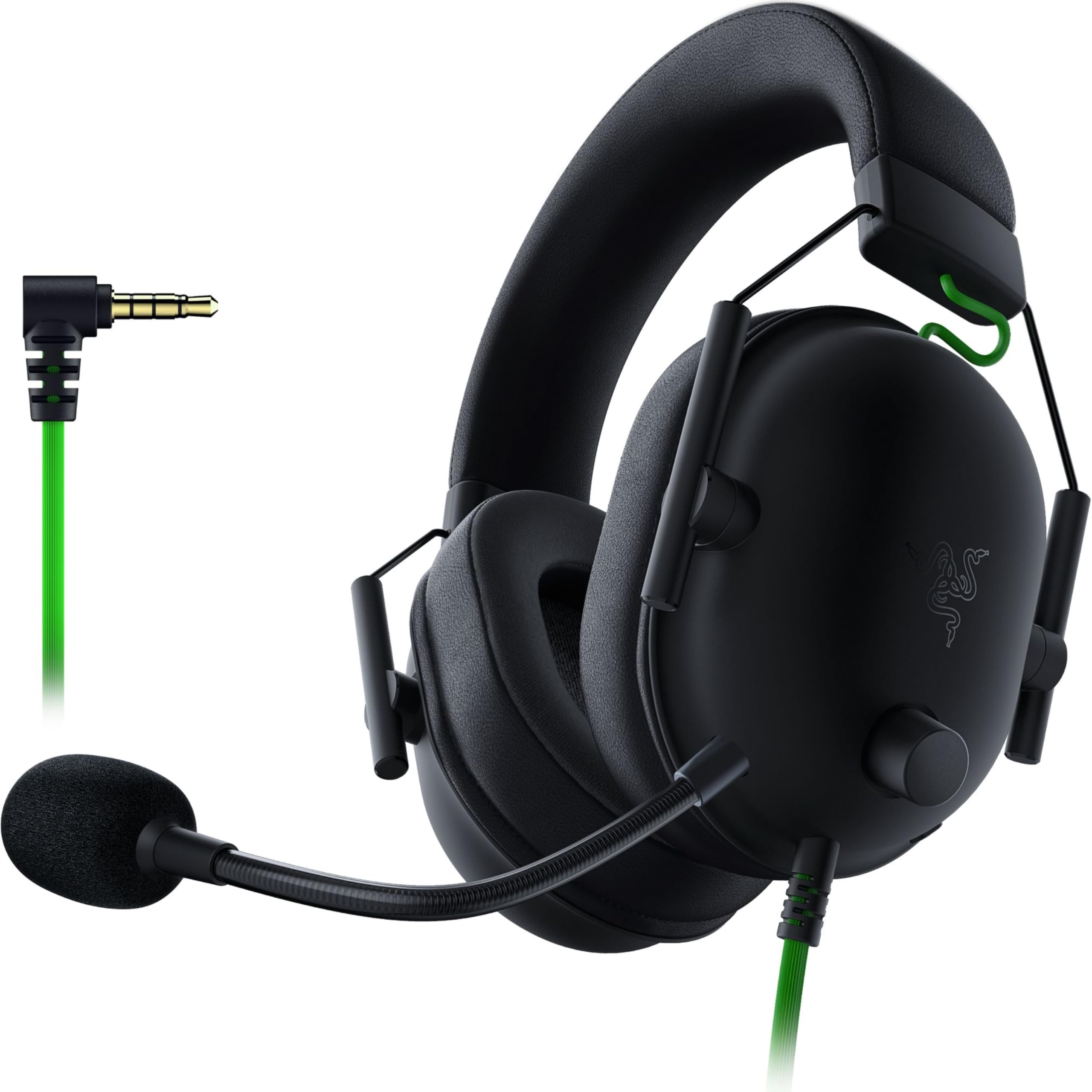
The Razer BlackShark V2 X is built around directional clarity: 50mm drivers, 7.1 surround on Windows, and a HyperClear cardioid boom that keeps voice chat separate from game audio. The included splitter cable separates mic and headphone feeds on desktop, which matters when a PC uses distinct jacks instead of a combo port. Over a single 3.5mm connection, the headset still produces strong stereo imaging, so console players get usable positional cues without the surround layer. The wired design removes battery worry and keeps the price in the mid-range slot, and the over-ear frame handles regular sessions without excessive clamping force.

Buyers who want a wired boom-mic headset for PC or console gaming should put this on the short list. The HyperClear cardioid boom picks up chat while minimizing background noise, which suits players who treat voice as part of the game session. It is not a muted office headset, nor is it wireless. Mic consistency and headband durability vary between units, so the tradeoff fits gamers who want directional audio now and are willing to inspect the unit when it arrives. Those needing a more consistent mic or a firmer headband should look at higher-priced alternatives.

💡 Position the boom near the corner of your mouth for the clearest voice pickup.

Pros

  • Clear directional audio helps you place footsteps and gunfire in games.
  • Solid build quality at this price keeps the frame feeling sturdy.
  • Good value in the mid-range gaming segment, given the surround and boom mic.

Cons

  • Microphone output can land anywhere from clear to muffled depending on the unit.
  • Headband durability may not hold up equally across units after several months.
Our verdict

PC/console gamers who want directional audio and a dedicated boom without paying wireless prices are the right audience for this Razer.

Check Latest Price
6

Best Wireless Office / Call-Center Alternative

Soothielec KH53

86 /100
Sound Score Excellent

Key details

Microphone
ENC boom mic
Form Factor
On-ear wireless
Connectivity
Bluetooth 5.3 + dongle
Noise Cancellation
ENC mic
View on Amazon

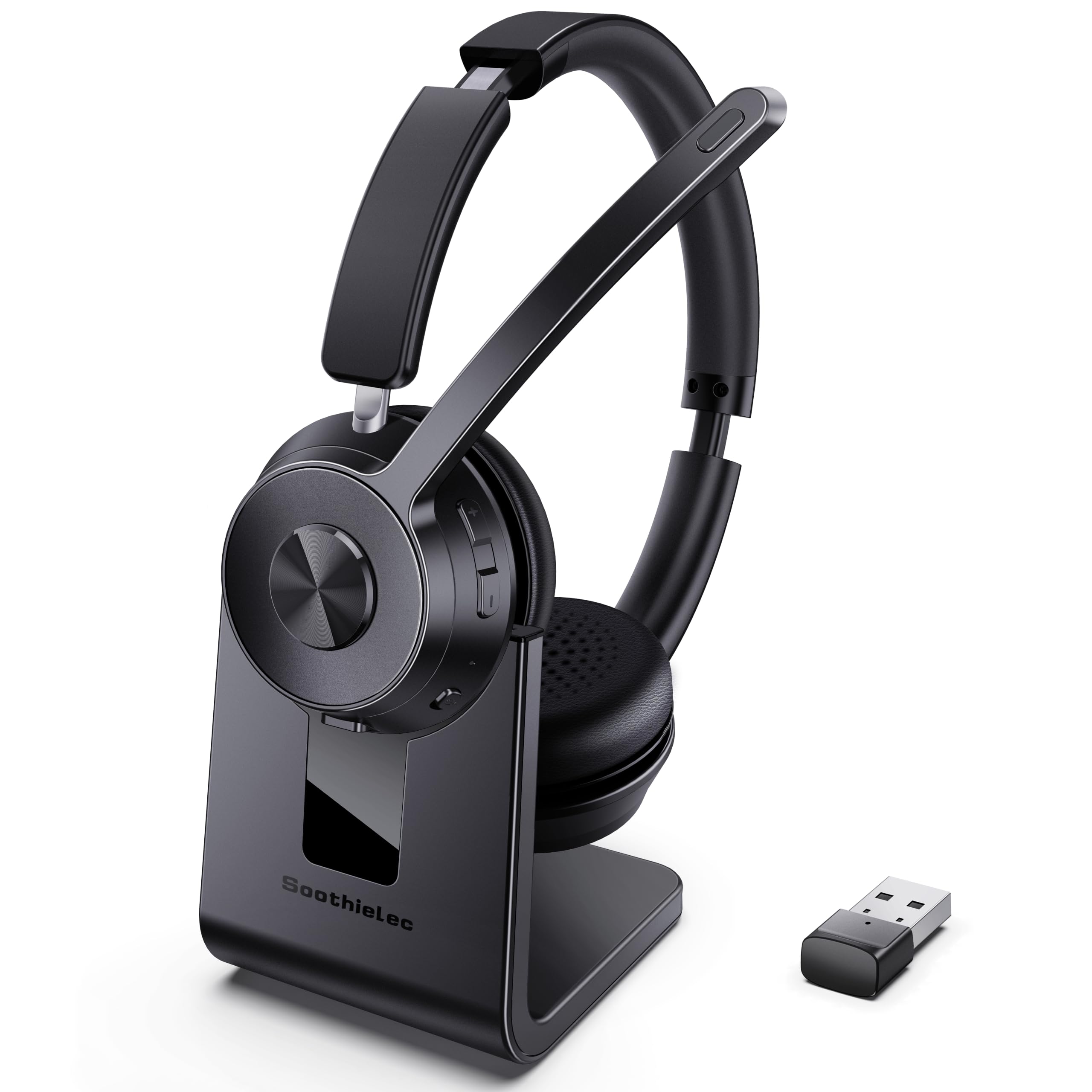
The Soothielec KH53 Wireless is a cord-free office headset built around Bluetooth 5.3 and a USB-A dongle, so a laptop and phone can stay connected without swapping cables. The flexible ENC boom handles the voice side, and the 40-hour talk-time rating covers long stretches between charges.

Call clarity is the headline: the boom isolates the voice path while background chatter and keyboard noise fade out. Voices come across natural rather than muffled, which matters for long calls. Music playback holds up well for an on-ear model, and the memory-foam pads keep the fit comfortable through full workdays. Setup is quick, and the build feels solid for a mid-range wireless headset.

This is the right fit for remote and hybrid workers who move between a laptop and smartphone during meetings. Dual pairing lets the headset stay attached to both, which matters when a call jumps from a softphone to a mobile device.

Battery life is a practical strength: a full day of calls won't force a mid-day charge, and the quick-charge recovery fits between sessions. The lightweight frame keeps it from becoming a distraction during long meetings.

Pros

  • Call and music audio come through clearly, which is what stands out on first use.
  • Memory-foam earpads and a light on-ear frame stay comfortable through full workdays.
  • The ENC boom filters background chatter and keyboard noise on the caller's end.
  • Battery life covers long shifts, and quick charging fits between back-to-back meetings.

Cons

  • On-ear design lacks over-ear ANC, so noise reduction applies to the mic path rather than the sound reaching your ears.
  • The USB-A dongle is computer-only, so desk phone and landline setups need a different headset.
Our verdict

For computer-first remote and call-center work, the KH53 combines clear calls, comfortable all-day wear, and battery stamina without wire clutter.

Check Latest Price
7

WFH, Classes

JIAMQISHI EH01

86 /100
Sound Score Excellent

Key details

Microphone
270° unidirectional boom
Form Factor
On-ear wired
Connectivity
USB-A and 3.5mm
Noise Cancellation
Mic noise reduction
View on Amazon

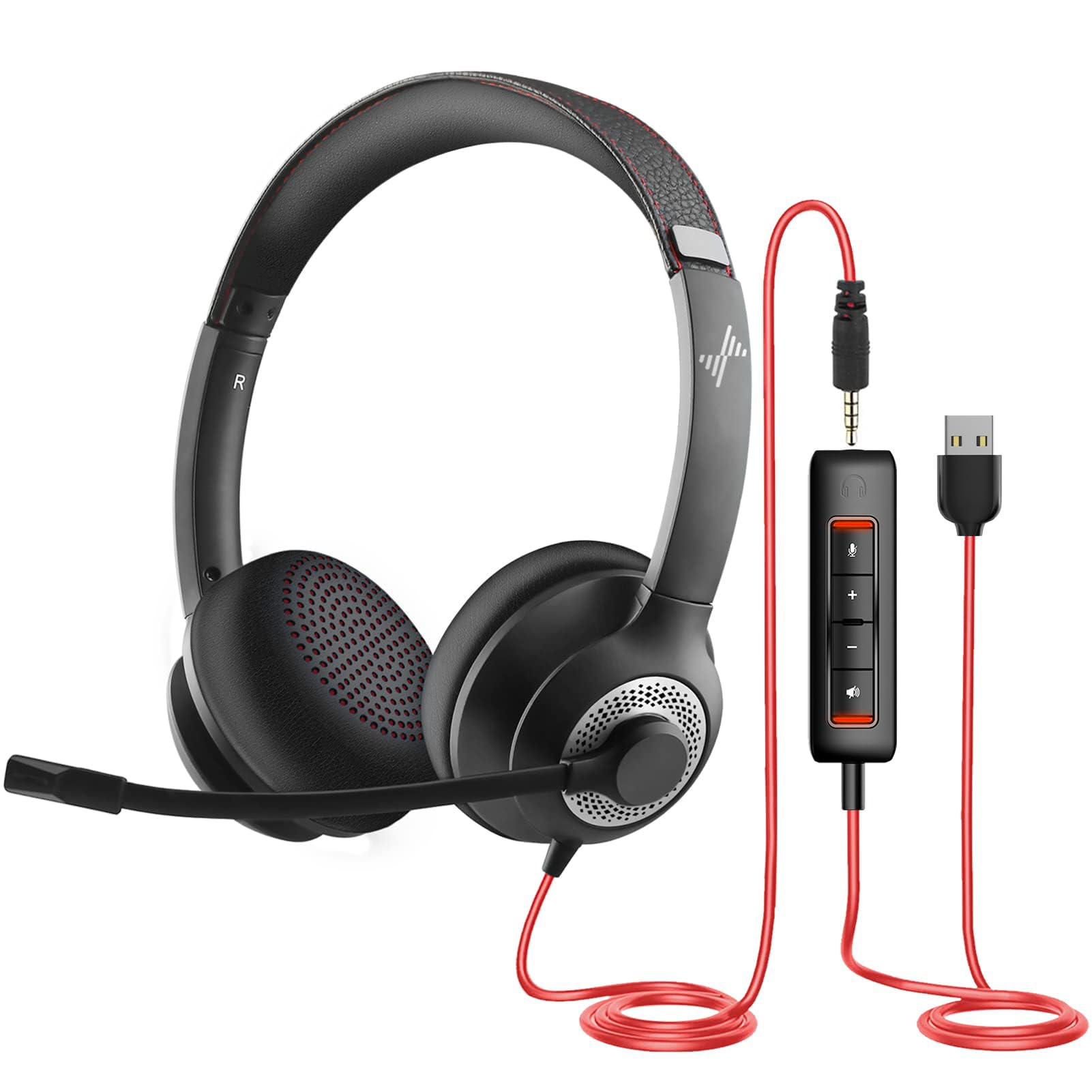
This JIAMQISHI EH01 brings USB-A and 3.5mm connectivity together in a budget headset, with memory-foam earpads that make long meetings easier than the price suggests. Voice clarity is clear for calls and media, and the adjustable boom mic reduces background noise well during classes and video chats. The main tradeoff is consistency: the microphone can become quiet or drop out on certain units, and clamp pressure can feel tight on larger heads. Buyers who need premium comfort for very large heads or plan to rely on one headset for years may want to look elsewhere. The Logitech H390 remains the more established wired office pick; this model is better suited to mixed USB/3.5mm use than all-day call-center work.

Pros

  • Clear voice and media sound for calls, classes, and everyday listening.
  • Memory-foam earpads keep long sessions comfortable for extended classes and calls.
  • Solid build for the price, with USB and 3.5mm covering more devices.

Cons

  • Clamp pressure can feel tight on larger head sizes during longer sessions.
  • Microphone output can turn quiet or drop out on certain units.
Our verdict

Best for budget-focused buyers who need USB and 3.5mm in one headset and can confirm the mic and fit early.

Check Latest Price
8

Casual Listeners

Sony ZX110AP

89 /100
Sound Score Excellent

Key details

Microphone
In-line remote
Form Factor
Wired on-ear
Connectivity
3.5mm
Noise Cancellation
Passive isolation
View on Amazon

Sony's 30mm wired on-ear delivers clear audio for casual music and mobile calls, and the swiveling ear cups fold flat for easy travel. At a budget-friendly price, it is a sensible throw-in bag headphone. The plastic shell and 3.5mm jack are the weak points, and larger heads may feel the clamp, so this suits shorter sessions rather than all-day office work. It remains a strong everyday pick for budget buyers who want a simple wired Sony without overthinking the purchase.

Pros

  • Clear audio for music and phone calls.
  • Good everyday performance at a budget price.
  • Swivel-fold design packs small for travel.

Cons

  • No noise-isolating boom mic, so background chatter can bleed through in busy rooms.
  • In-line mic can sound quiet on some units.
Our verdict

For commutes, travel, and casual listening, this budget Sony is easy to live with.

Check Latest Price
9

Console Gamers

JBL Quantum 100M2

80 /100
Sound Score Excellent

Key details

Microphone
Detachable directional boom
Form Factor
Over-ear wired
Connectivity
3.5mm
Noise Cancellation
Passive isolation
View on Amazon

The Quantum 100M2 wraps a detachable boom mic, memory-foam pads, and a light frame into a low-cost wired package for console and PC players. It is comfortable enough for long sessions and keeps the setup simple through a 3.5mm jack.

This is a first-time budget gaming headset for casual console/PC players who value light memory-foam comfort more than bass-heavy playback or broadcast-grade chat. The 3.5mm cable is short, so a desktop tower may need an extension cord; controller play avoids that issue. The wired Razer alternative in this set has more consistent mic and sound behavior for buyers who want a sharper competitive edge.

Pros

  • Memory-foam pads and a light frame keep longer game sessions comfortable.
  • Budget-friendly wired package delivers solid performance for the price.
  • 3.5mm connection covers console and PC game chat without extra software.

Cons

  • Bass-light tuning can leave music and quieter game audio feeling thin.
  • Detachable boom can sound muffled in some cases, affecting chat clarity.
Our verdict

For a first-time console/PC gamer who wants light memory-foam comfort and a budget price, the Quantum 100M2 fits — provided music isn't the main use and a short cable won't cramp the desk setup.

Check Latest Price

How to Choose

Microphone Type and Noise Rejection

Microphone placement is the first and most consequential choice. A boom mic sits close to your mouth, so it captures less room noise and keeps your voice at a consistent level; an in-line mic on the cable is farther away and more likely to pick up rustling or background chatter.

For noisy rooms, choose a boom or beamforming mic; a noise-reducing mic filters only so much background.

Form Factor: Over-Ear vs. On-Ear

On-ear headphones press the pads directly against your ears; over-ear models enclose them. The difference appears after about the first hour: on-ear clamp concentrates pressure on the ridge of the ear, while over-ear pads spread it across a larger surface.

Memory foam earpads help, but they do not change the physics of on-ear design. If your workday includes four-plus hours of continuous wear, treat over-ear with plush pads as the safer default.

Connectivity: Wired vs. Wireless

Wired USB headsets use a digital audio path, so the computer sees the mic and speakers as one device with no pairing step. Bluetooth adds a second radio link, and offices packed with wireless devices can cause dropouts or crackle.

The practical difference is scheduling: wired is deterministic for meetings, while Bluetooth gives you mobility. Hybrid options with a USB dongle split the difference, but confirm the dongle works with the exact device you use.

Battery Life and Charging

Wireless battery life depends on driver efficiency and ANC circuitry. Turning on noise cancellation usually cuts runtime because the feedback mics and DSP run continuously.

A headset rated for 50 hours of playback may deliver less with ANC on and at high volume. Look for quick charging so a short desk break can get you through the rest of the day.

Noise Cancellation and Isolation

Active noise cancellation uses microphones and inverted sound waves to reduce continuous low-frequency noise like HVAC hum or airplane engines. It does almost nothing for sudden sounds, and it does not make your microphone quieter on calls unless the headset also has ENC or beamforming.

Passive isolation comes from the earpads themselves and works across all frequencies. Many headsets labeled 'noise-cancelling mic' only clean up the signal the other person hears, not the sound entering your ears.

Frequently Asked Questions