13 Best Podcast Mixer of 2026: Choose Real Multi-Mic Inputs

Find the best podcast mixer for your show by matching true XLR mic inputs, mix-minus for remote guests, and recording workflow—not channel-count marketing.

Many mixers marketed for podcasting count every stereo line input as a channel, so an '8-channel' board can still handle only one or two real XLR microphones. That distinction matters the moment more than one person sits down at the table. The right console is defined by its mic preamps, not its marketing label.

Remote guests raise a second issue: without mix-minus, phone or video call audio loops back and echoes. The mixers worth buying either handle that routing internally or make it simple to set up.

This guide sorts out the differences that actually change your recording, from XLR input count and headphone mixes to USB versus standalone SD capture. Match those choices to how your show is recorded, and the rest is setup detail.

About the Sound Score: This comparative score is calculated from a product's published customer rating and review volume. It is not a laboratory measurement or a hands-on test result.

1

Best Overall

Zoom PodTrak P4

93 /100
Sound Score Outstanding

Key details

Recording Path
USB interface
XLR Mic Inputs
4 XLR
Sound Pads & FX
Sound pads
Remote Call Support
Mix-minus + phone
View on Amazon

Four XLR mic inputs with clean preamps and phantom power give multi-guest recordings a quiet and clear capture path without a single full-size mixing board. Independent headphone outputs let each participant control their own monitor mix, and the phone and USB inputs include mix-minus to keep remote callers clean. Sound pads sit near the channel controls, so a host can trigger a jingle or transition mid-sentence. The 2-in/2-out USB interface connects directly to a computer for recording or streaming, and the whole compact console fits in a backpack.

This is the right console for mobile podcasters and in-person interview shows that need four live mics plus a remote guest in one package. Smartphone callers connect over TRRS, and the mix-minus routing keeps their return audio clean. It is best used on USB power for full sessions, and a quick recording check before guests arrive keeps live interviews safe. For budget creators who already own mics and a laptop, this replaces a rack of separate gear. For a two-person interview with a phone caller, the P4 is effectively the whole studio.

💡 Use USB power for full sessions and battery mode for quick grab-and-go recordings.

Pros

  • Four XLR mic preamps with phantom power deliver clean, quiet recordings for multi-person interviews.
  • Setup is intuitive enough that first-time podcasters can have four mics recording within minutes.
  • It undercuts dedicated podcast consoles on price while adding phone and USB mix-minus call-in support.

Cons

  • Battery life can be short when the P4 is powering microphones, so USB power is the safer long-session choice.
  • On certain units, recording can stop without warning, so a quick test before a live session is worth doing.
Our verdict

The P4 matches four real mic inputs, independent monitoring, and remote call-in support to a portable shell — a practical central hub for mobile interview podcasts.
Check Latest Price
2

Best for Multi-Mic Group Shows

Zoom PodTrak P8

91 /100
Sound Score Outstanding

Key details

Recording Path
USB + SD recording
XLR Mic Inputs
6 XLR
Sound Pads & FX
9 pads, 36 clips
Remote Call Support
View on Amazon

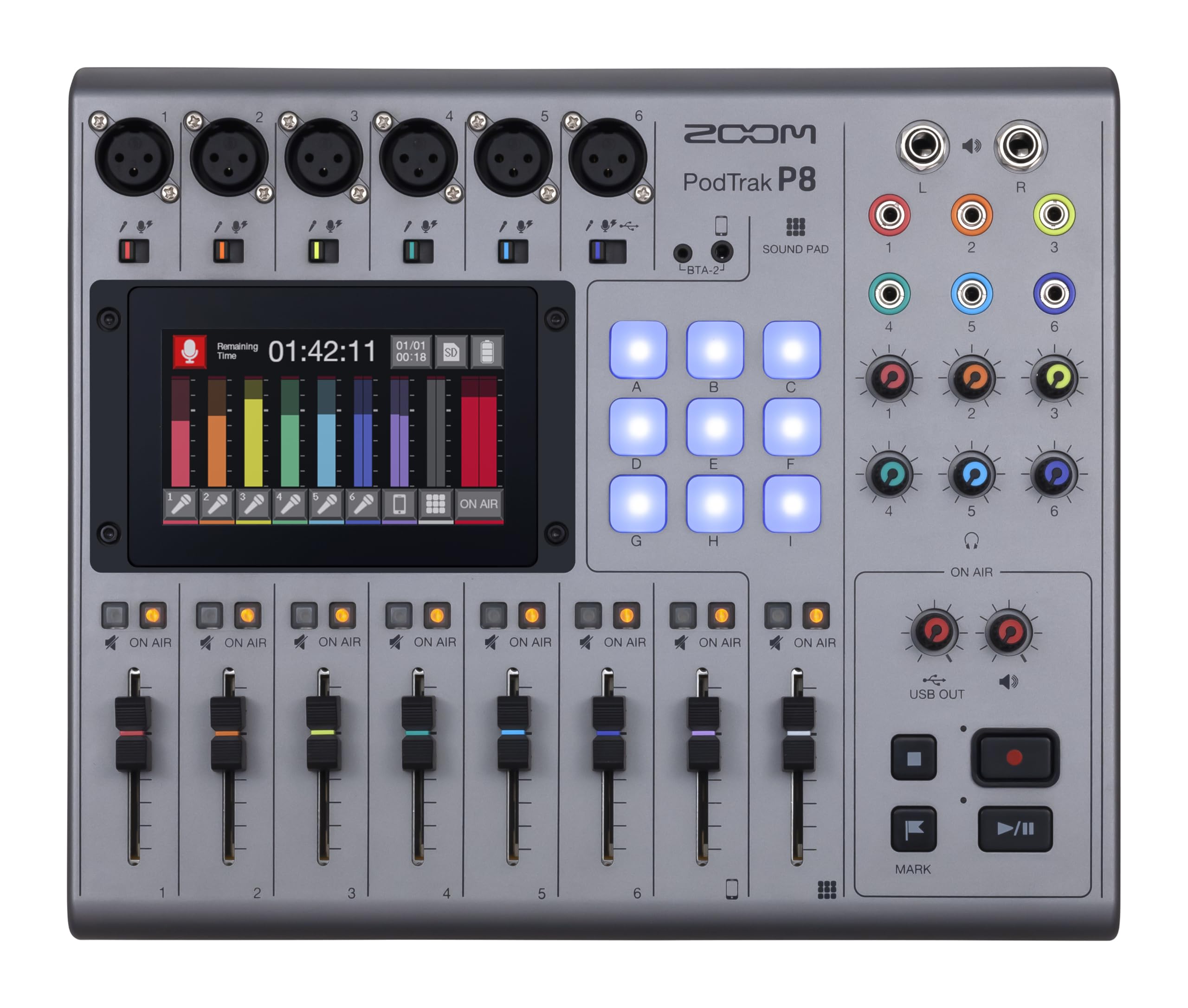
Six XLR inputs, six independent headphone outputs, a 4.3-inch touchscreen, and SD card recording establish the PodTrak P8 as a desktop hub for full in-person productions, with nine sound pads across four banks for intro music and effects. This suits audio-first interview and group shows where each guest needs a mic and a headphone mix. Video-first creators should treat the SD recorder as a 44.1 kHz source and convert for 48 kHz edit timelines. If you need a portable unit, the four-mic console in this lineup is the lighter alternative.

Pros

  • Six XLR inputs capture up to six voices cleanly, with independent headphone mixes for each seat.
  • Touchscreen and labeled controls make multi-mic sessions fast to set up.
  • Sound pads, six headphone outputs, and SD recording keep a live show self-contained.

Cons

  • Battery life is limited for long sessions; AC power is the practical route for full-day recordings.
Our verdict

Audio-first podcast teams that regularly host four or more guests in one room get a dedicated recording hub that runs without software.

Check Latest Price
3

Best Digital Mixer for Solo/Small Setups

Behringer FLOW 8

92 /100
Sound Score Outstanding

Key details

Recording Path
USB interface
XLR Mic Inputs
2 XLR
Sound Pads & FX
2 FX processors
Remote Call Support
Bluetooth input
View on Amazon

The FLOW 8 is a compact digital mixer that combines Bluetooth music input, app-based channel control, and dual FX processors in an 8-input frame. It records over USB, so a solo podcaster can capture the processed mix without extra gear.

Solo and duo podcasters or musicians get the modern digital workflow without buying a full-size board: two Midas preamps handle microphones, while the app manages EQ and effects from a phone or tablet. The single-device Bluetooth pairing and two-XLR layout cap it at two live mics and one connected phone, so shows with four or more XLR inputs need a different console.

Pros

  • Compact 8-input frame fits on a small desk without sacrificing build feel.
  • Two Midas preamps and built-in effects deliver a clean mic path for podcast or music recording.
  • Bluetooth and app control let you stream music and adjust channels from a phone or tablet.

Cons

  • No full per-channel gain/EQ control, so advanced adjustments need a larger digital mixer.
Our verdict

For solo and duo creators, the FLOW 8 is a compact way to bring app control and digital effects into a podcast or music setup.

Check Latest Price
4

Best Analog Multi-Purpose Workhorse

Yamaha MG10XU

92 /100
Sound Score Outstanding

Key details

Recording Path
USB interface
XLR Mic Inputs
4 XLR
Sound Pads & FX
SPX effects
Remote Call Support
None
View on Amazon

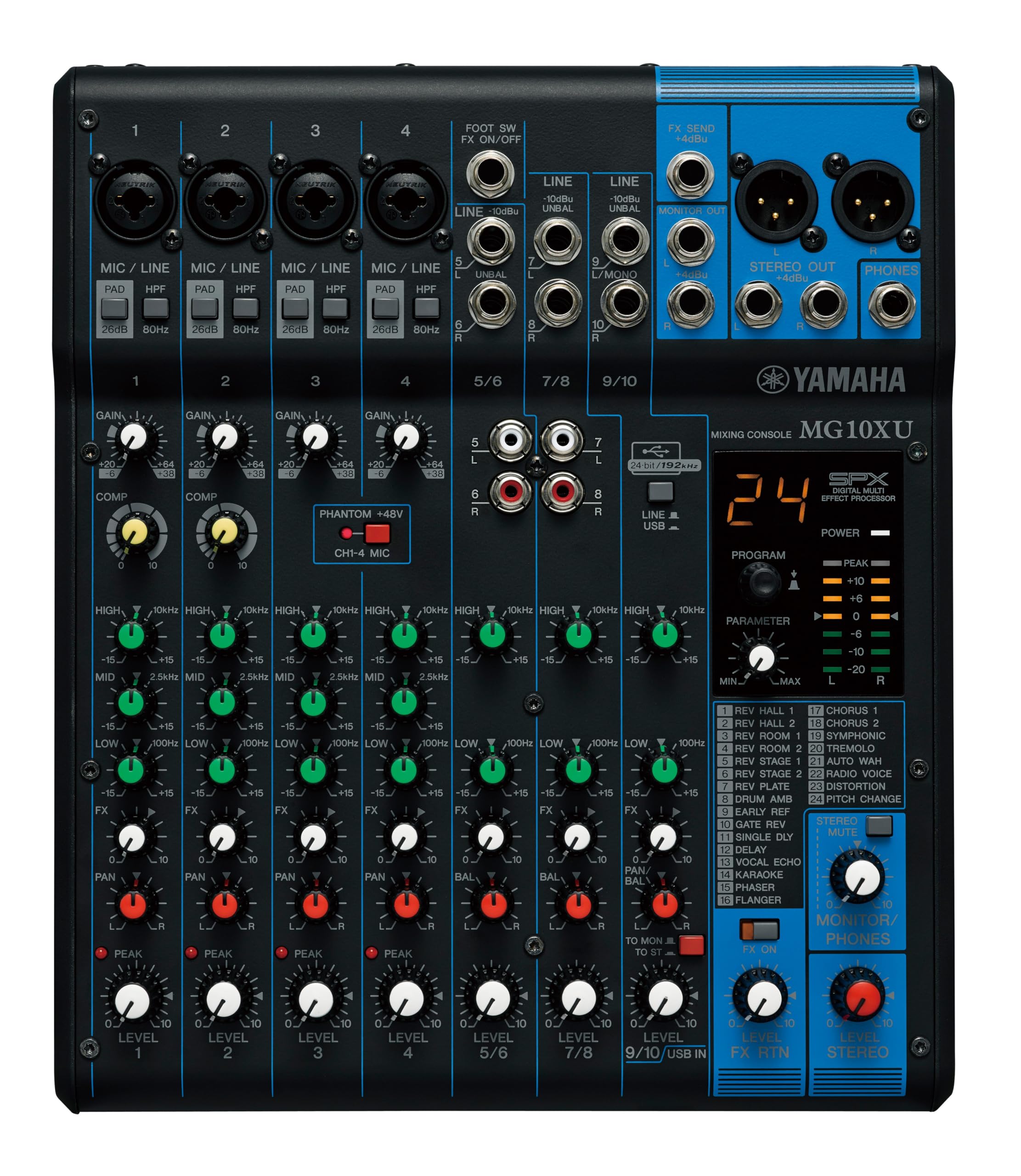
The MG10XU pairs four D-PRE XLR preamps, 3-band EQ, SPX effects, and a USB interface in a rugged 10-channel analog board. It is not the ultra-compact option in this set; the full-width layout gives you physical faders and high-pass filters for hands-on live mixing.

It fits musicians, small venues, and podcasters who want an analog board feel without buying a podcast-specific console. There is no mix-minus, sound-pad support, or standalone recording; the USB output can be low or drop out on some units, so a dedicated recorder is safer for session-critical audio.

Pros

  • Rugged build handles regular gigs and permanent studio setups.
  • Clear, quiet preamps keep voices and instruments intelligible.
  • SPX effects and USB give live and recording setups one less box to buy.

Cons

  • The USB output is best handled as a secondary capture path.
Our verdict

A dependable analog board for live and podcast use when you want faders, effects, and no dedicated podcast console.

Check Latest Price
5

Best Budget Streaming Starter

FIFINE SC3

89 /100
Sound Score Excellent

Key details

Recording Path
USB-C interface
XLR Mic Inputs
1 XLR
Sound Pads & FX
4 pads, voice changer
Remote Call Support
View on Amazon

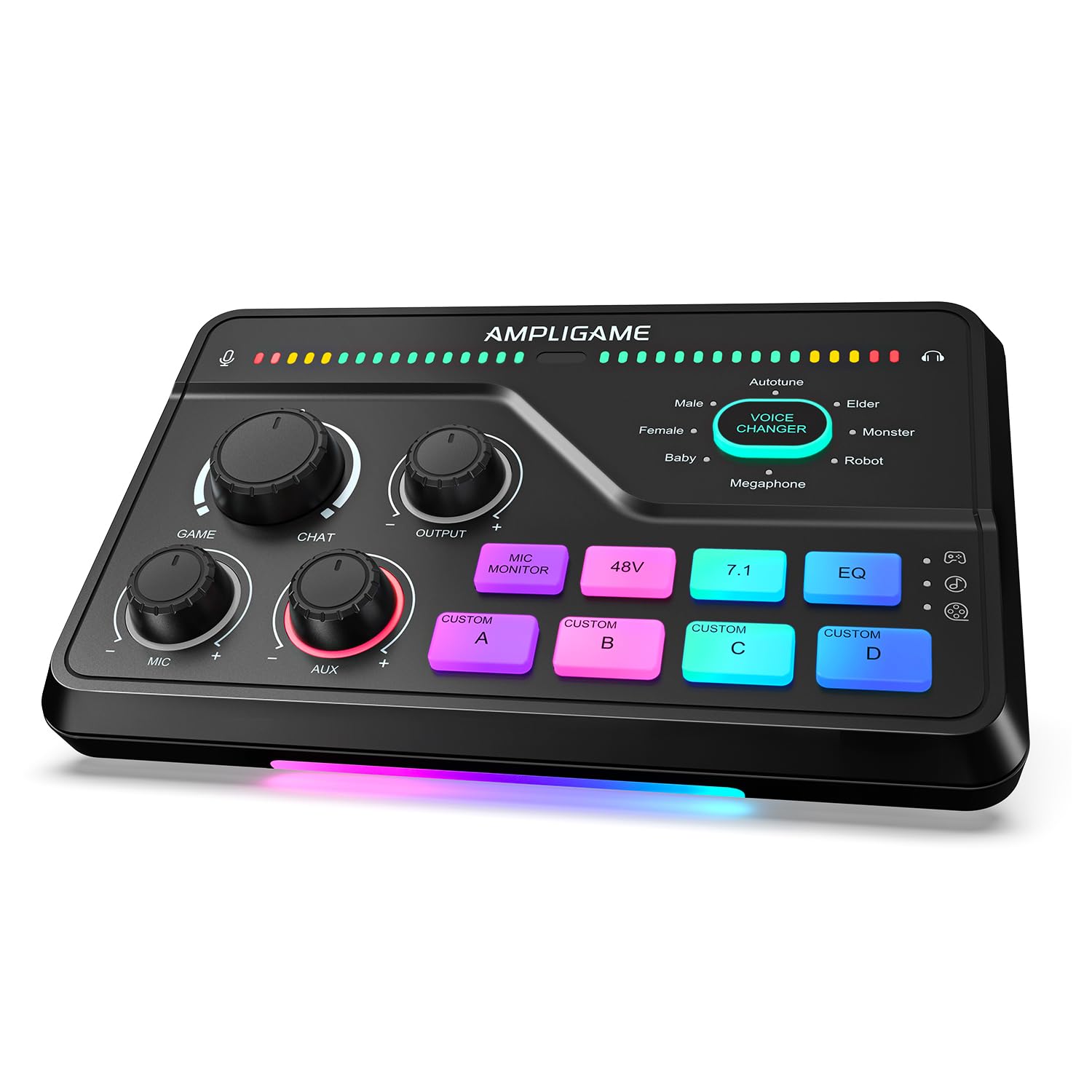
The SC3 wraps a 4-channel fader bank, six voice modes, four sound pads, and 48V phantom power into an affordable USB-C desktop mixer aimed at first-time streamers. It gives budget gamers a physical control surface without the menu-diving of pricier all-in-one consoles, and the labeled faders keep the learning curve short.

It fits solo streamers who want voice effects, RGB, and hands-on controls in a compact desktop setup. The single XLR input limits you to one mic, which is a boundary for multi-mic podcasts but not for a first-time broadcaster.

💡 Keep input gain moderate to leave headroom for voice effects and loud moments.

Pros

  • One-cable setup with clearly labeled faders gets a new streamer live fast.
  • Entry-level pricing plus physical controls and voice effects suits starter streams.
  • Pairs with common XLR mics, including Fifine's own, without a separate audio interface.

Cons

  • Sound-pad clips can sound muffled and low-fi over stream audio.
  • Sensitive XLR mics may pick up static or sound underpowered; choose a higher-output dynamic mic.
Our verdict

A budget-friendly first mixer for solo streamers who want faders, voice effects, and RGB without a steep learning curve.

Check Latest Price
6

Pro Podcasters

Rode RODECaster Pro II

87 /100
Sound Score Excellent

Key details

Recording Path
USB, microSD, storage
XLR Mic Inputs
4 XLR
Sound Pads & FX
8 SMART pads, APHEX
Remote Call Support
Dual USB, Bluetooth
View on Amazon

Four combo inputs, APHEX processing, eight SMART pads, and multi-track capture combine in a chassis that anchors a fixed home studio. The premium price and occasional boot or USB connection quirks make it a considered upgrade for Rode-centric creators rather than a default pick next to the top portable mixer.

Pros

  • Four combo inputs and APHEX processing deliver clear audio for multi-mic shows.
  • Eight SMART pads, deep routing, and multi-track capture support complex live production.

Cons

  • Boot and USB connection stability can vary between units, which matters most when a stream depends on uninterrupted capture.
Our verdict

For a fixed studio with room for setup time, this console's processing depth and pad control reward Rode-focused workflows; budget-tight or travel-heavy buyers are better served by the top pick.

Check Latest Price
7

Solo/duo Podcasters

Rode RODECaster Duo

85 /100
Sound Score Excellent

Key details

Recording Path
USB multi-track
XLR Mic Inputs
2 XLR
Sound Pads & FX
6 SMART pads
Remote Call Support
USB, Bluetooth
View on Amazon

Compact footprint with two XLR combo inputs, a touchscreen, SMART pads, and Rode studio processing makes this a solid desk console for solo and duo podcasters. The two-mic input count and occasional power-on or USB recognition variance keep it behind the four-mic top pick for most buyers. Headphone outputs may add noise in quiet monitoring.

Pros

  • Small chassis frees desk space while keeping touchscreen controls and SMART pads within reach.
  • Rode's processing and six SMART pads cover voice treatment and sound drops without extra gear.

Cons

  • During initial setup, Wi-Fi or firmware update glitches can stall the process.
Our verdict

For a solo or duo show that values Rode processing and a smaller footprint, this is the fit.

Check Latest Price
8

Karaoke, Small Gigs

Yamaha MG06X

92 /100
Sound Score Outstanding

Key details

Recording Path
None
XLR Mic Inputs
2 XLR
Sound Pads & FX
Digital effects
Remote Call Support
None
View on Amazon

The MG06X packs a clean analog signal path into a compact body, with 3-band EQ and two XLR mic preamps for home karaoke and small gigs. Controls are laid out clearly. No USB means direct computer recording or streaming is off the table, and two mic inputs limit multi-mic shows. For karaoke or line-level work, this board works well.

Pros

  • Compact body sits comfortably on a keyboard and moves easily between home and small venues.
  • Good value for the preamp quality and live-sound performance.

Cons

  • Karaoke vocals get effects, but line-in keyboards or music players run dry.
Our verdict

Use it in a purely analog setup where the mixer is the last box in the chain; anyone routing a computer into the show needs a different console.

Check Latest Price
9

Budget Podcasters

MAONO AME2

85 /100
Sound Score Excellent

Key details

Recording Path
USB-C interface
XLR Mic Inputs
2 XLR
Sound Pads & FX
11 sound pads
Remote Call Support
Bluetooth, TRRS
View on Amazon

The MAONO AME2 packs two XLR inputs, an instrument input, Bluetooth streaming, and 11 programmable sound pads into a budget console for solo or duo podcasters. The sound-pad layout and live phone output make it a playful tool for streamers experimenting with effects. Its ceiling is the tradeoff: phantom power can introduce hiss, and long-term control durability is uncertain.

Pros

  • All-in-one setup with two XLR inputs, Bluetooth, and sound pads suits entry-level podcast production.
  • Setup is fast, and the controls are approachable for first-time streamers.

Cons

  • Phantom power can introduce hiss in quiet studio recordings with condenser mics.
Our verdict

Worth considering for budget podcasters and streamers who want programmable pads and are comfortable with a starter-grade console.

Check Latest Price
10

Casual Streamers

MAONO G1 Neo

86 /100
Sound Score Excellent

Key details

Recording Path
USB-C interface
XLR Mic Inputs
1 XLR
Sound Pads & FX
4 pads, voice modes
Remote Call Support
Bluetooth, TRRS
View on Amazon

This budget-friendly mixer handles solo game streams and TikTok voice work well, with a clean XLR preamp, voice modes, four sound pads, and Bluetooth for background audio. The single XLR input and occasional reverb buzz can keep it from serving multi-mic podcasts; it is a casual streaming companion rather than a podcast production console.

Pros

  • Clean voice capture with a broadcast-style tone at a budget price.
  • Plug-and-play setup gets game streams going fast with voice effects and sound pads.

Cons

  • PS5 and certain headset setups may not pass chat audio as expected; compatibility depends on the exact console wiring.
Our verdict

For a solo streamer starting on PS5 or TikTok, this is a cost-effective entry into voice effects and sound pads; a growing multi-mic podcast should move on to a four-XLR console.

Check Latest Price
11

Budget Multi-Input

Pyle PMXU83BT

86 /100
Sound Score Excellent

Key details

Recording Path
USB recording
XLR Mic Inputs
4 XLR
Sound Pads & FX
DSP effects
Remote Call Support
Bluetooth input
View on Amazon

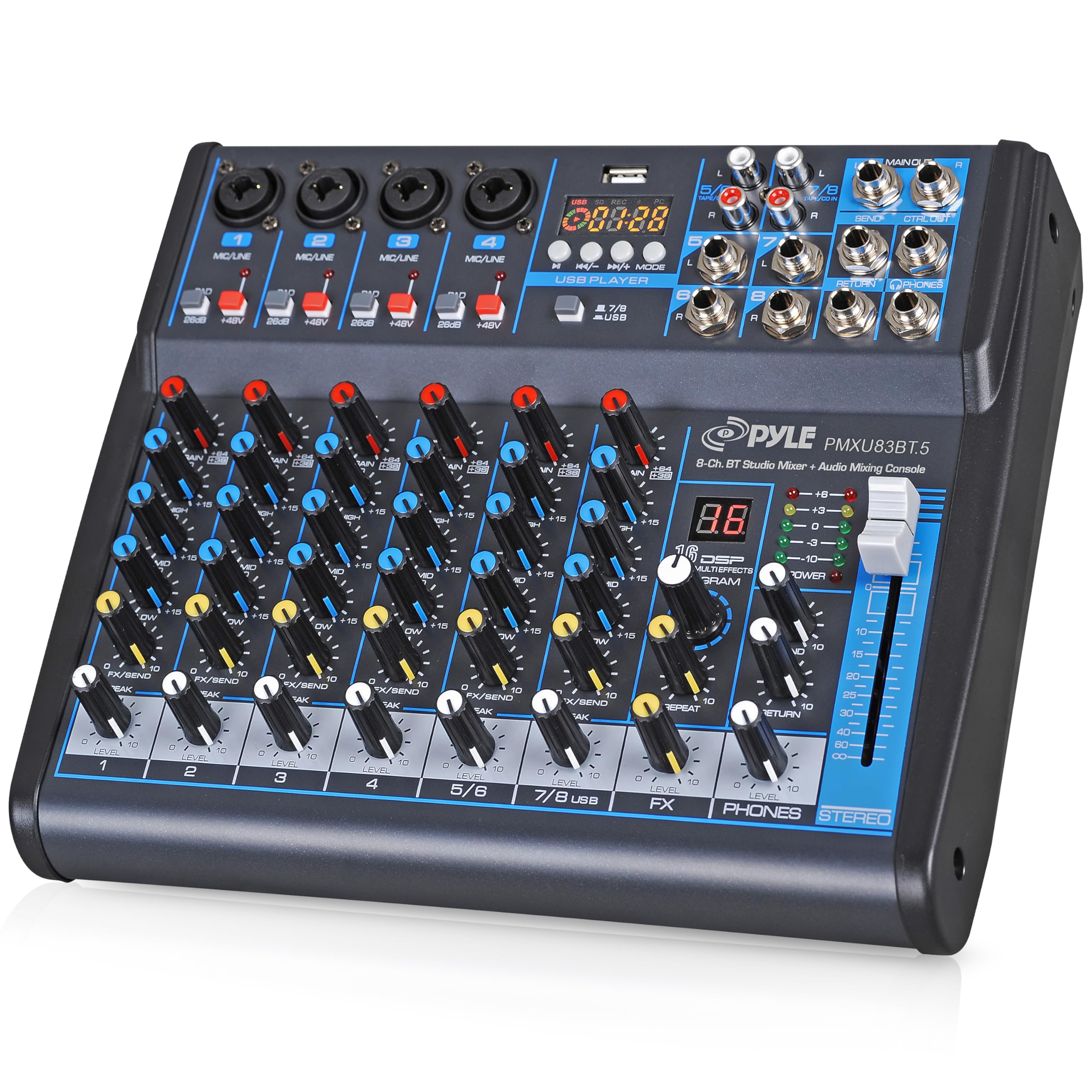
Four XLR combo inputs put real multi-mic connectivity on a budget board, with Bluetooth, USB recording, and MP3 playback covering typical podcast sources. The catch: channels have no pan/balance controls, and Bluetooth/USB pairing can be inconsistent, so it suits home karaoke and casual small-venue use rather than mix-critical live productions.

Pros

  • Four XLR combo inputs alongside Bluetooth, USB recording, and MP3 playback cover multi-source podcast and karaoke setups.
  • Easy setup and an intuitive layout get a multi-input board running quickly for home karaoke or a starter podcast.

Cons

  • No pan/balance controls on channels, so stereo placement is locked for music and post work.
Our verdict

A practical match for home karaoke and casual podcast setups that need several XLR mics without spending much.

Check Latest Price
12

PC Gamers

FIFINE SC8

85 /100
Sound Score Excellent

Key details

Recording Path
USB-C interface
XLR Mic Inputs
1 XLR
Sound Pads & FX
4 pads, voice changer
Remote Call Support
View on Amazon

For PC gamers and streamers with a single XLR mic, the SC8 offers 7.1 surround, optical input, and game/chat balance controls at a budget price. The control layout is aimed at focused solo streaming. A single XLR input and limited Mac support keep it out of multi-mic podcast production.

Pros

  • Plug-and-play setup gets an XLR mic running without complex configuration.
  • 48V phantom power and a clean XLR preamp keep vocals clear for entry-level streaming.

Cons

  • When relying on the voice-changer for character streaming, some modes may not audibly change your voice.
Our verdict

For a solo PC streamer on a budget, the SC8 covers the core single-mic streaming workflow.

Check Latest Price
13

Karaoke, DJs

Pyle PMXU46BT

89 /100
Sound Score Excellent

Key details

Recording Path
USB soundcard
XLR Mic Inputs
2 XLR
Sound Pads & FX
Built-in effects
Remote Call Support
Bluetooth input
View on Amazon

Two XLR combo inputs, Bluetooth, USB soundcard, effects, and 12-segment LED metering suit home karaoke, mobile DJ work, and small hybrid live/podcast setups. Long-term durability can vary; some units may develop headphone or main output issues after months. USB recording is a stereo mix rather than multitrack, which keeps it behind dedicated podcast consoles.

Pros

  • Bluetooth input pairs cleanly with phones and tablets for karaoke tracks and DJ cues.
  • Cost-effective two-mic board with built-in effects, USB soundcard, and 48V phantom power.

Cons

  • In-person panels top out at two mics; a four-person podcast needs a bigger mixer.
Our verdict

Best for one- or two-mic karaoke and DJ work where Bluetooth convenience and built-in effects are the priority.

Check Latest Price

How to Choose

Count the True Mic Preamps

Channel counts include stereo line inputs, and several budget boards advertise eight or more channels while carrying only one or two XLR mic preamps. Microphones need preamps to bring a low-level signal up to line level; a line input cannot do that work.

An in-person two-host show needs two XLR inputs; adding a guest needs another. Buy the input count you will need in a year, not today's.

Independent Headphone Mixes

Every headphone output needs its own amplifier and routing path, which is why budget mixers often stop at one. Once two people need different monitor levels, a shared output becomes a compromise for everyone.

Independent outputs let each guest hear the mix they want while the host monitors the main feed, which is why multi-mic consoles list four or six as a headline feature.

Remote Call Handling

Mix-minus removes the remote caller's audio from the feed that goes back to them, preventing echo and feedback. Without it, a phone or video guest hears their own voice repeated through the speakers and your audience gets a hollow ring.

Consoles with built-in mix-minus handle this routing automatically. Traditional analog boards need an aux-send setup that is easy to miswire.

Recording Path

A USB interface sends the mixed audio straight into a computer, while standalone SD recording captures to a memory card with no software in the chain. SD recording is a safety net if the computer or interface drops out.

Battery-powered consoles can record in the field, but USB power is the reliable default when XLR mics draw 48V phantom.

Sound Pads and Processing

Sound pads trigger pre-recorded clips or jingles instantly, while onboard processing shapes the voice before it hits the recorder. These features save editing time, but they add menus and configuration that analog-only users may not want.

Entry-level mixers often store custom pads at low sample quality, so uploaded clips can sound muffled. Test the pad upload format before relying on it live.

Frequently Asked Questions