4 Best Sonos Soundbar of 2026: Match the Bar to Your TV Setup

Find the best Sonos soundbar for your TV, room, and budget: HDMI eARC, Atmos, and optical input determine the right match.

Soundbars in this lineup share the same app and multiroom controls, but the range spans a 22-inch optical-only bar and a 46-inch flagship with 9.1.4 channels. Price matters, but the more meaningful split is HDMI eARC and Atmos versus older optical connections, and small-room fit versus dedicated-theater scale. Choosing the wrong input means sacrificing the feature you paid for.

Most standard TV setups pair well with a compact Atmos bar with eARC, because it delivers modern surround without dominating the room. Larger rooms can justify a flagship's higher channel count and built-in bass, but that only matters if the space actually lets those drivers work. Match the bar to the TV output and room volume first; the extra immersion follows.

Connectivity separates the experience more than any spec sheet. Most dropouts trace back to Wi-Fi congestion and app handoffs, so a stable router or Ethernet connection matters as much as driver count.

About the Sound Score: This comparative score is calculated from a product's published customer rating and review volume. It is not a laboratory measurement or a hands-on test result.

1

Best Overall Sonos Soundbar
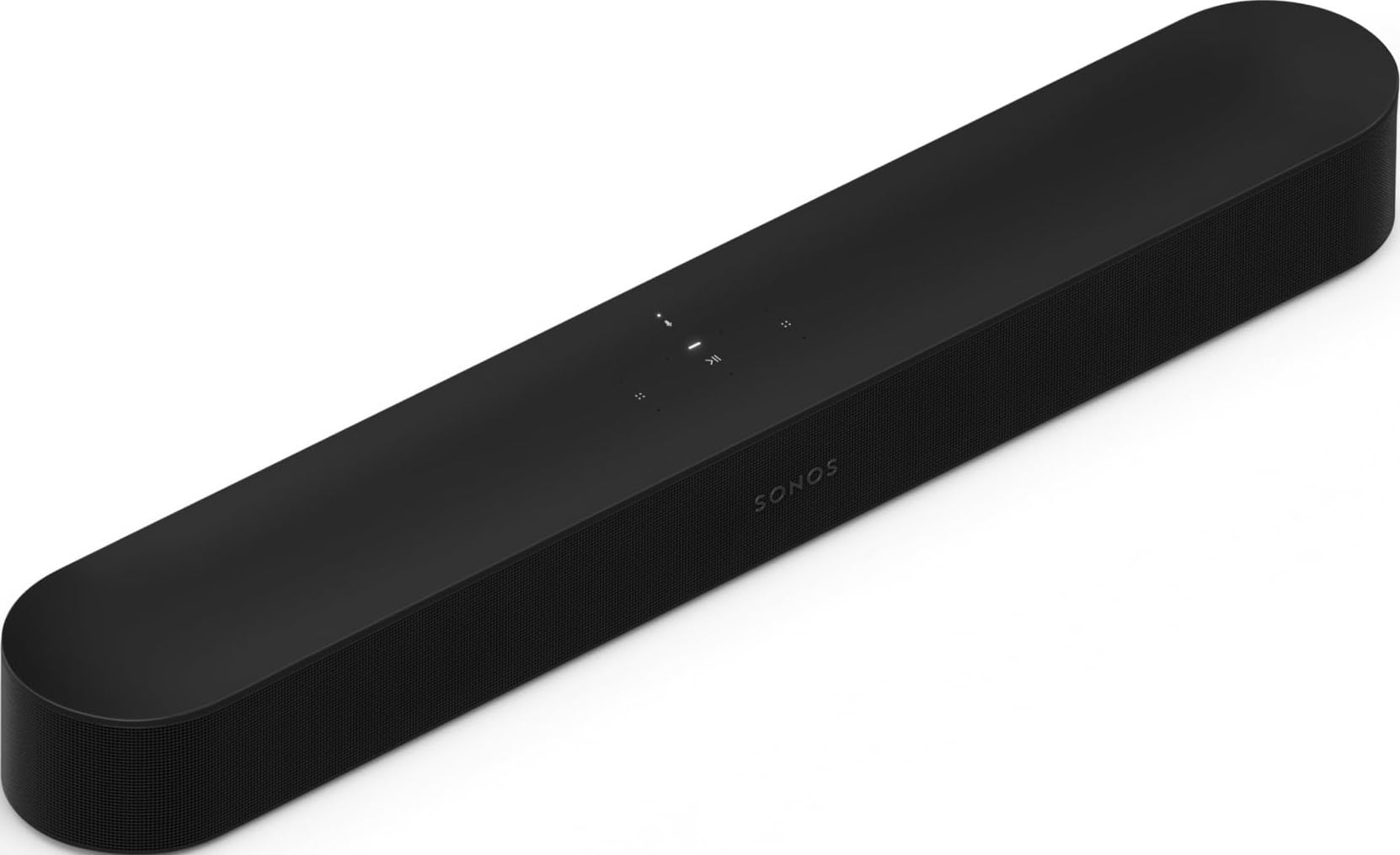
Sonos Beam Gen 2

88 /100
Sound Score Excellent

Key details

Input
HDMI eARC
Streaming
Wi-Fi, AirPlay 2
Width & Fit
25 in, small-medium rooms
Expandability
Sub, surrounds
View on Amazon

The five-driver array in a 25-inch cabinet produces clear dialogue and believable Atmos height effects in typical room conditions. It doesn't have the width of the larger Arc, but for a standard living-room console the compact form is an advantage, not a compromise.

Setup runs through the Sonos app, and the bar handles Atmos over a single HDMI eARC cable. It also groups with other Sonos speakers for whole-home audio, which makes it a sensible entry point to that ecosystem.

The Beam Gen 2 fits small-to-medium living rooms where a 45-inch Arc would feel oversized. It suits buyers with an eARC-capable TV who want Atmos without a full surround system now, and who may add a Sub Mini and rear speakers later.

Wi-Fi/app connectivity varies on some units, and there is no Bluetooth for direct phone pairing. Neither is a blocker for a household that streams from the Sonos app or AirPlay, but both are worth confirming before you rely on them.

Pros

  • Clear dialogue and Atmos effects for a cabinet that fits under most TVs.
  • Setup through the Sonos app and a single HDMI eARC connection keeps cabling minimal.
  • Compact 25-inch footprint leaves room on small-to-medium TV consoles.
  • Can grow into a surround system by adding Sonos Sub Mini and rear speakers.

Cons

  • Sound output is sized for small-to-medium rooms; large open-plan spaces will need a bigger stage.
  • Long-term reliability varies between units; some may become unresponsive after extended use.
Our verdict

The Beam Gen 2 is the compact Atmos bar that fits normal living rooms without the footprint of a larger Arc.

Check Latest Price
2

Best Premium Home Theater

Sonos Arc Ultra

90 /100
Sound Score Outstanding

Key details

Input
HDMI eARC
Streaming
Wi-Fi, Bluetooth, AirPlay 2
Width & Fit
46 in, large rooms
Expandability
Sub, Era 300 surrounds
View on Amazon

The Arc Ultra packs 9.1.4-channel Atmos, Sound Motion bass, and Bluetooth into a 46-inch flagship aimed at large home-theater rooms. That scale separates it from the compact Beam for typical living rooms and from the slimmer Arc for mid-size spaces; this is the Sonos bar you choose when a dedicated theater feel is the goal.

Atmos staging is the reason to consider it: effects move with clear height and width, and dialogue stays sharp even in dense action sequences. Built-in Sound Motion bass adds low-end weight without a separate sub, while the optional Sub and Era 300 surrounds extend the system into a full home-theater layout. Setup is easy through HDMI eARC and the Sonos app, so moving up from a smaller Sonos bar comes down to room size and budget.

This is the Sonos bar for buyers with a large living room or dedicated media room and a home-theater budget. The luxury price and occasional TV/LAN connection dropouts are part of the deal, so this is not the entry point into Sonos; the Beam and Ray cover that ground. If you want a full surround layout, plan on adding the Sub and Era 300s to get the payoff this bar is built for.

Pros

  • Immersive Dolby Atmos staging with distinct height and width in large rooms.
  • Fast setup through HDMI eARC and the Sonos app gets the bar running quickly.
  • Dialogue clarity and speech enhancement keep vocals crisp in action-heavy mixes.

Cons

  • 46-inch width is too large for small media consoles.
  • Full surround effect assumes add-on Sub and Era 300 speakers.
  • Occasional TV or LAN connection dropouts can interrupt playback.
Our verdict

For a large, dedicated space with Sonos surrounds on the plan, the Arc Ultra is the Sonos bar to start from; the compact Beam remains the better everyday value.

Check Latest Price
3

Best Premium Value

Sonos Arc

90 /100
Sound Score Outstanding

Key details

Input
HDMI eARC
Streaming
Wi-Fi, AirPlay 2
Width & Fit
45 in, mid-large rooms
Expandability
Sub, surrounds
View on Amazon

The Sonos Arc pairs a 45-inch, 5.1.2 channel design with Dolby Atmos to open up mid-to-large rooms. It wall-mounts cleanly, and the width creates a genuine front soundstage that the compact Sonos soundbars cannot match. It stops short of the flagship Arc Ultra's 9.1.4 channels and Sound Motion bass, so think of it as the intermediate Atmos step in the lineup rather than the maximum.

Dialogue stays articulate during busy action scenes, and music has more body than a typical compact soundbar. Voice enhancement is available for difficult mixes, and the broad placement keeps center-channel detail from getting buried. Setup runs through the Sonos app and is mostly a case of connecting the HDMI eARC cable; some TVs need eARC enabled manually before Atmos audio switches on.

Buyers with a mid-to-large living room will get the most from the Arc, especially when wall-mounted. It costs more than the compact Sonos option in this lineup, and the extra price buys width and stage depth rather than extra height channels. App-based control, Wi-Fi pairing, and occasional auto-unmute behavior are all part of ownership, so a buyer who wants a purely remote-driven bar should weigh the slimmer, lower-priced option instead.

Pros

  • Wide soundstage fills a large seating area with room-filling movie and music audio.
  • Setup takes minutes and is guided by the Sonos app once the HDMI eARC cable is connected.
  • Dialogue clarity and voice enhancement keep speech intelligible through action-heavy scenes.

Cons

  • For small rooms, the 45-inch width and wide stage are wasted; the compact Sonos soundbar fits better.
  • Premium pricing sits above the mid-range Sonos soundbar, so casual TV buyers may pay for width they do not need.
Our verdict

The Arc's 5.1.2 stage and wall-mountable width make it the realistic middle ground between compact Atmos and the flagship Arc Ultra.

Check Latest Price
4

Best Budget / Compact

Sonos Ray

84 /100
Sound Score Excellent

Key details

Input
Optical
Streaming
Wi-Fi, AirPlay 2
Width & Fit
22 in, secondary rooms
Expandability
Sub, surrounds
View on Amazon

The Ray is the budget-friendly way to bring Sonos multiroom into a bedroom or office TV, and its 22-inch, 4.3 lb frame leaves plenty of room on a dresser or shelf. Stereo output is clear and direct, so dialogue stays intelligible in a small room without needing a separate subwoofer or surround pair.

At this size, the sound has more body than the footprint suggests. Music carries enough warmth for casual listening, and TV dialogue comes through without cranking the volume. Stereo stays honest instead of pretending to be surround, which suits a bedroom or office.

The Sonos app handles grouping, volume, and music playback, and AirPlay 2 streams from a phone without extra setup. Once connected, the Ray appears alongside other Sonos speakers in the same app, so a bedroom can join the living room system without a second interface. That multiroom integration is the main reason to go with Sonos for a secondary room.

The Ray fits a TV with an optical output, and that connection standard means no HDMI eARC or Dolby Atmos. If your TV only has HDMI, you'll need an optical adapter. For buyers who need those HDMI features, the Beam Gen 2 is the next compact step up.

Pros

  • Clear stereo sound keeps dialogue intelligible in small rooms.
  • 22-inch width and 4.3 lb weight fit a dresser or shelf without dominating the space.
  • Lowest entry point into Sonos multiroom for a secondary TV.

Cons

  • No built-in voice assistant; control stays in the Sonos app or through an existing assistant speaker.
  • Wi-Fi can drop or refuse to connect during setup; a distant router makes that more likely.
Our verdict

For the spare room, this is the Sonos that gets out of the way: small, budget-friendly, and tuned for everyday TV. Treat it as a second-room bar, not a home-theater centerpiece.

Check Latest Price

How to Choose

HDMI eARC or Optical

The soundbar's input port decides what audio formats actually reach the drivers. HDMI eARC carries lossless Dolby Atmos and lets the TV control volume with one remote; optical is limited to compressed stereo or Dolby Digital 5.1 at best. A TV with only HDMI ARC can still use a Ray via optical adapter, but the bar then misses Atmos and some HDMI-CEC conveniences.

Atmos and Channel Count

Dolby Atmos needs more than a label. The bar has to angle drivers or use virtual processing to place sounds above and around you, so channel count and driver arrangement directly affect the bubble of immersion. A compact 5-driver bar with Atmos can make a bedroom TV sound far larger than the cabinet suggests, but a 9.1.4 flagship with dedicated upward-firing drivers fills a large room much more convincingly.

Width and Room Fit

Physical width is a room-fit issue, not a looks issue. A 46-inch bar sits below a 55-inch TV but can overhang a 40-inch set and look out of place in a bedroom. Measure the TV stand or wall-mount area before choosing a bar, and remember that the Arc and Arc Ultra are built for mid-to-large rooms while Beam and Ray fit smaller spaces.

Streaming Options

Streaming options affect everyday convenience more than sound quality. Sonos bars use Wi-Fi for the app, AirPlay 2, and multiroom audio; only the Arc Ultra adds Bluetooth for direct phone pairing. Because the bar depends on the same network as the app, a weak Wi-Fi signal or a congested router can cause dropouts that have nothing to do with the speaker itself, so use Ethernet when possible.

Expandability

A Sonos soundbar is usually the beginning of a system. Sub and rear speakers are added later through the app, and the lineup's expandability differs: Ray and Beam work with Sub Mini and surrounds, while Arc and Arc Ultra pair with the full Sub and Era 300 rears. Budget for the whole system, not just the bar, because most buyers report the biggest upgrade comes from adding a Sub, not from swapping bars.

Frequently Asked Questions