8 Best USB Audio Adapter of 2026: Clean Output, Usable Mic Input

The best USB audio adapter for your exact headset setup, covering split jacks, TRRS combos, and USB-C phones without the hiss or mic surprises.

Most USB audio adapters carry the same 24-bit/96kHz 'Hi-Fi' label, but the audible difference appears only after plugging in: a background hiss, a microphone that barely registers, or an adapter that stops working when connected through a hub.

The first decision is the jack layout. A separate headphone and mic jack works with older two-plug headsets and desktop mics, while a single TRRS combo jack matches modern gaming headsets and phone earbuds. Choose based on your headset before comparing DAC specs.

This guide focuses on adapters that hold up in daily use: a clean noise floor, a usable mic input, and plug-and-play behavior on the machines you already have. The right match depends on whether your headphones use separate plugs or a single combo jack, not on the boldest label on the box.

About the Sound Score: This comparative score is calculated from a product's published customer rating and review volume. It is not a laboratory measurement or a hands-on test result.

1

Best Overall

UGREEN USB Sound Card

89 /100
Sound Score Excellent

Key details

DAC Spec
16-bit / 48kHz
Mic Input
3.5mm mic input
3.5mm Jacks
2x headphone + mic
Compatibility
Windows, Mac, Linux, PS4, PS5
View on Amazon

UGREEN's USB Sound Card adds a pair of 3.5mm jacks to any USB-A computer or console, and Windows, macOS, Linux, PS4, and PS5 all recognize it without a driver. The separate headphone and microphone outputs match the dual-plug headset layout PC gaming has used for years, so there is no splitter or TRRS combiner to manage.

The DAC runs at 16-bit/48kHz, a step below the 24-bit/96kHz numbers on some competing adapters. For game audio, voice chat, and everyday music, the practical difference is small; the output stays stable at normal listening levels, and the system-level integration feels like a plain onboard audio device rather than a finicky external card.

The plug-and-play behavior extends to Linux and Raspberry Pi environments, where some USB audio devices require module loading or configuration. This one shows up as a standard audio interface, which makes it a useful fallback for desktop builds, retro gaming setups, and console sessions that need a quick audio port.

This adapter fits general desktop users replacing a dead audio jack, gamers on PC/PS4/PS5 with separate headset and mic plugs, and Linux/Raspberry Pi users who want a no-driver audio port. It is not a USB-C phone dongle, and single-plug TRRS headsets need a splitter. In some units, a high-pitched hiss can appear; testing a rear USB port before replacement is worthwhile.

Pros

  • Maintains a consistent USB audio connection across ordinary desktop and console sessions.
  • Output stays clean enough for game audio and voice chat at a mid-range price.
  • Recognized on Windows, macOS, Linux, PS4, and PS5 without separate driver packs.
  • Plugging it in creates an immediate audio device, no reboot or configuration step.
  • Sturdy shell and cost-effective pricing make it a low-risk replacement for a laptop's dead audio jack.

Cons

  • USB-A only; USB-C-only laptops need a dongle or a native USB-C adapter.
  • Microphone input may become inaudible after several weeks on some units.
Our verdict

For a split-jack USB-A adapter, this is the one to choose when the same port has to serve a desktop PC, a console, and a Raspberry Pi without driver fuss.

Check Latest Price
2

Most Proven Value

SABRENT AU-MMSA

88 /100
Sound Score Excellent

Key details

DAC Spec
16-bit / 48kHz
Mic Input
Mono TRS mic
3.5mm Jacks
2x headphone + mic
Compatibility
Windows, Mac, Linux
View on Amazon

The SABRENT AU-MMSA is a driverless USB-A sound card with a separate stereo headphone jack and a mono mic jack. Windows, Mac, and Linux desktops recognize it without extra software, which makes it a direct replacement for a dead onboard audio jack. It needs no driver installation and draws power through the USB-A connection, so it also pairs with older desktops and laptops that still have standard USB ports. The split-jack layout suits the common setup where one 3.5mm plug feeds a headset and another feeds a standalone microphone.

This adapter is aimed at desktop users, IT work, and repair benches where the peripheral already uses separate 3.5mm plugs. The mic input is mono, which is fine for everyday voice chat, but it is not a stereo line-in. That boundary is acceptable when the goal is restoring basic audio to a machine without opening the case.

Long-term durability can vary between units, so an inexpensive utility adapter like this is worth checking shortly after arrival. At its price tier, the tradeoff is easier to accept when the adapter is a spare or a quick fix rather than a permanent studio component. The low price makes it easy to keep one as a spare.

Pros

  • Basic audio output works as intended in standard desktop setups.
  • Works with a wide range of computers and operating systems.
  • Strong value for its entry-level price.
  • Driverless operation on Windows, Mac, and Linux.

Cons

  • Mic input can be too quiet for some microphones without a preamp.
  • Single-plug TRRS headsets need a separate splitter for both audio and mic.
Our verdict

For IT work and desktop audio fixes, the AU-MMSA restores headphone and mic output without drivers or a case-side repair.

Check Latest Price
3

Best for Linux/Raspberry Pi

Plugable USB Audio Adapter

89 /100
Sound Score Excellent

Key details

DAC Spec
16-bit / 48kHz
Mic Input
3.5mm mic input
3.5mm Jacks
2x headphone + mic
Compatibility
Windows, Mac, Linux, RPi
View on Amazon

The Plugable USB Audio Adapter is the warranty-backed USB-A option in this split-jack lineup, with 2-year coverage, an aluminum body, and confirmed Linux/Raspberry Pi support. It is a 16-bit/48kHz utility device rather than a high-res DAC, so the appeal is simple: install without drivers and keep a single adapter in active use through multiple machines.

Everyday audio through the 3.5mm speaker/headphone jack is clean enough for calls, lectures, and casual listening. The separate mic input handles voice work without extra software, which is the main reason this class of adapter exists. On Windows, Linux, and Raspberry Pi OS it shows up as a standard USB sound device, so routing audio to it is a matter of selecting it once.

The natural owner is a Raspberry Pi or Linux hobbyist, or a laptop user replacing a missing audio jack on a machine with USB spacing to spare. On a tightly packed edge, the wide side-facing body can cover the adjacent port. That boundary keeps it off ultraportables with zero USB clearance.

Pros

  • Durable aluminum body with a 2-year warranty.
  • Driverless operation on Windows, Linux, and Raspberry Pi.
  • Clean output for calls, lectures, and casual playback.
  • Good value for a utility USB sound card.

Cons

  • A low-level static or hum can appear on some units with sensitive earbuds.
  • Mic input is mono, which rules out stereo recording.
Our verdict

Where the top pick covers more consoles, this adapter wins for Linux and Raspberry Pi users who want a 2-year warranty and a metal shell.

Check Latest Price
4

Best Sound Upgrade

Creative Sound Blaster Play! 3

91 /100
Sound Score Outstanding

Key details

DAC Spec
24-bit / 96kHz
Mic Input
Headset mic via combo or split
3.5mm Jacks
1x combo or split
Compatibility
Windows and Mac
View on Amazon

The Sound Blaster Play! 3 is a USB-A audio adapter built around a 24-bit/96kHz DAC and the Sound Blaster control panel. That combination adds EQ, headphone profiles, and preset sound fields that generic adapters in this category do not offer, so it earns attention from headphone listeners who want control over the signal rather than a plain port replacement.

Compared with motherboard audio, the Play! 3 produces a quieter background and more defined instrument separation through good headphones. The software lets you shape the response to match specific headsets, which is the main reason to pay more than a basic utility adapter. Occasional pops or brief cutouts can happen when audio starts or stops, so plugging directly into a computer USB-A port instead of a hub is the safer setup.

The best fit is a laptop or desktop headphone user who will install the Sound Blaster software and use its profiles; gamers get the most from the package. Low-impedance headphones can hiss until the driver and control panel are configured, so this is not for pure plug-and-play minimalists who skip installs. It also sticks to USB-A, leaving smartphone and tablet users on USB-C with the single-jack option in this set.

💡 Use the Sound Blaster control panel to pick a headphone profile before regular listening; the driverless USB audio mode is only the starting point.

Pros

  • Better-than-motherboard sound quality with enough detail to make music and games more involving.
  • Sound Blaster control panel adds EQ and headphone profiles that generic adapters do not offer.
  • Build quality feels solid enough for desk use or bag carry.

Cons

  • Brief audio pops or cutouts can occur when playback starts or stops.
  • With low-impedance headphones, the signal may need the Sound Blaster software setup before it sounds clean.
Our verdict

A worthwhile premium for headphone listeners who will use Sound Blaster profiles; a poor fit for those who refuse to install software.

Check Latest Price
5

Best USB-C Dongle

UGREEN USB-C to 3.5mm Adapter

91 /100
Sound Score Outstanding

Key details

DAC Spec
24-bit / 96kHz
Mic Input
TRRS mic
3.5mm Jacks
1x TRRS combo
Compatibility
USB-C phones/tablets/laptops
View on Amazon

The UGREEN USB-C to 3.5mm adapter packs a 24-bit/96kHz DAC and a TRRS combo jack into a braided, pocket-sized dongle. It converts any USB-C phone, tablet, or laptop into a device that can drive wired earbuds with inline mic support, no drivers required. While the dual-jack USB-A sound card handles desktop setups, this one is built around the single-plug headsets that travel well.

Inline controls on four-pole TRRS earbuds pass through the jack, so call answering and track skipping keep working on supported headsets. Audio routes as soon as the dongle is plugged in, and the 24-bit/96kHz rating gives headroom for high-resolution files when the source and phone deliver them. For calls, the inline mic path stays active, which makes it a direct replacement for a phone's missing analog jack. The braided cable keeps the dongle easy to grab from a bag without added bulk.

This is for the person with a single-plug TRRS headset — earbuds or a gaming headset with one 3.5mm connector — who needs a USB-C device to accept it. The dongle does not merge separate headphone and mic plugs; a two-plug desktop headset requires a TRRS splitter. For that one-plug crowd, it is an easy fit and a purposeful upgrade from a dead headphone jack.

💡 For longer sessions, top up the battery before connecting the dongle.

Pros

  • Driverless operation lets a USB-C phone or laptop start using wired earbuds immediately after plugging in.
  • TRRS combo jack passes inline mic and remote signals through, so calls and media controls work on supported headsets.
  • Braided cable and compact shell make it easy to keep with a phone or tablet without adding bulk.
  • 24-bit/96kHz decoding supports high-resolution playback on devices and files that actually output at that rate.

Cons

  • Requires a USB-C port; older USB-A-only computers need a separate USB-A adapter.
  • Cannot charge while listening because the adapter occupies the USB-C port.
Our verdict

For single-jack TRRS earbuds on a USB-C phone or laptop, this dongle delivers the core connection with 24-bit/96kHz decoding and inline mic support. If you juggle separate headphone and mic plugs, the dual-jack desktop sound card is the one to choose.

Check Latest Price
6

Budget TRRS Combo

MOSWAG USB Audio Adapter

88 /100
Sound Score Excellent

Key details

DAC Spec
16-bit / 48kHz
Mic Input
TRRS mic
3.5mm Jacks
1x TRRS combo
Compatibility
Windows, Mac, Linux
View on Amazon

The MOSWAG USB Audio Adapter fits a narrow but common task: restoring a single-plug TRRS headset to a laptop with a dead audio jack. Aluminum shell, nylon braided cable, and driverless detection make it a portable spare for Windows, Mac, or Linux machines. Some units add audible hum in quiet settings, and the first moment of audio may clip after a pause; those quirks are tolerable for casual calls and gaming headsets. The entry price and plug-and-play ease are the appeal, but the noise floor is looser than the tier-leading adapters, so critical listeners should spend a bit more.

Pros

  • Aluminum shell and braided cable make it feel sturdier than a typical entry-level dongle.
  • Driverless detection gets headset audio working in seconds on Windows, Mac, and Linux.
  • Entry price makes it a low-cost spare for a broken laptop audio jack.

Cons

  • Single TRRS combo port does not accept separate headphone and microphone plugs without a Y-splitter.
  • USB-A plug will not fit USB-C-only devices without an additional adapter.
Our verdict

This fits the budget single-headset repair job; anyone needing separate jacks or a quieter noise floor should choose one of the tier-leading alternatives.

Check Latest Price
7

PS4/PS5 Budget

CableCreation USB Audio Adapter

87 /100
Sound Score Excellent

Key details

DAC Spec
16-bit / 48kHz
Mic Input
Mono mic input
3.5mm Jacks
2x headphone + mic
Compatibility
PC, PS4, PS5
View on Amazon

This CableCreation adapter is a practical USB sound card for anyone replacing a dead audio port or adding console chat support. It presents separate 3.5mm headphone and mic jacks to Windows, Mac, Linux, PS4, and PS5, and the driverless setup means it works on the first insert. The wide body can cover the USB port beside it on compact laptops, and audio output may vary from unit to unit. That makes it a budget utility rather than a high-fidelity or space-saving upgrade, which is why it sits below the slimmer and more consistent split-jack options.

Pros

  • Restores audio and mic output through two 3.5mm jacks when the built-in sound port fails.
  • Driverless on Windows, Mac, Linux, PS4, and PS5, so setup is just plug and select the device.
  • Entry-level pricing makes it a low-cost fix for desktop and console audio needs.

Cons

  • The mic input is mono-only, which limits stereo mic setups.
  • Apple EarPods inline microphones are not supported.
Our verdict

Use it when the goal is a low-cost USB audio fix for a PC or console with separate headphone and mic plugs.

Check Latest Price
8

Office/Chromebook Audio

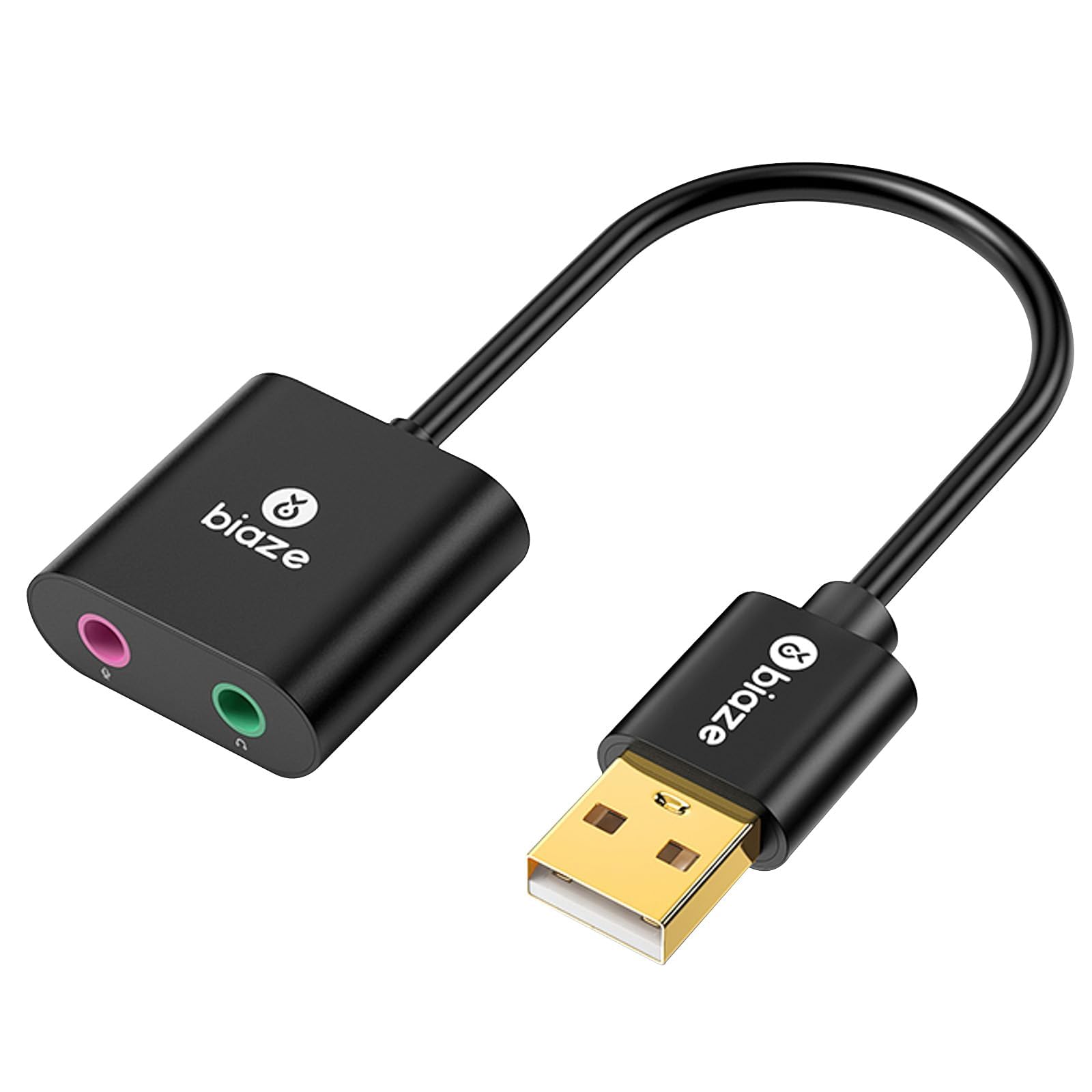
biaze USB Audio Adapter

88 /100
Sound Score Excellent

Key details

DAC Spec
16-bit / 48kHz
Mic Input
Mono TRS mic
3.5mm Jacks
2x headphone + mic
Compatibility
Chromebook, Windows PC
View on Amazon

The biaze adapter gives Chromebook and standard PC owners a driverless route back to separate headphone and mic jacks: two 3.5mm inputs, one USB-A plug, and an 18-month warranty at a mid-range price. The system picks it up without drivers, and the audio quality for calls, meetings, and general listening is clean for the price. Its scope is deliberately narrower than the leading USB sound card in this class — it is a general utility adapter built around the office-meeting lane, which is why it sits a step lower in this guide.

Pros

  • Restores separate headphone and mic jacks on Chromebooks and standard PCs through one USB-A plug.
  • Basic audio playback and voice calls come through with pleasant sound for the price.
  • Driverless plug-and-play keeps setup to a single USB connection on supported systems.

Cons

  • TRRS combo headsets with a single plug won't work; this adapter expects separate headphone and mic plugs.
  • Latency in Windows 11 is too high for music production, so timing-based recording is not an option.
Our verdict

For a driverless way to restore separate headphone and mic jacks on a Chromebook or office PC, this adapter fits — provided the job stays in general audio.

Check Latest Price

How to Choose

USB Connector Type

USB-A adapters fit older laptops and desktops; USB-C versions are the only option for many modern ultrabooks and phones. A USB-C adapter reaches a USB-A host only through a converter, adding another connection that can drop signal.

If your machine has both ports, weigh portability against strain relief: a short USB-C dongle tucks into a pocket, while a USB-A cable puts less torque on a worn socket. Match the connector to the device you use most.

Headphone and Mic Jacks

A dual-jack adapter has separate 3.5mm headphone and microphone ports, which suits older two-plug headsets and desktop mics. A single TRRS combo jack accepts the 4-pole plug used by modern gaming headsets and phone earbuds.

The trade-off is wiring: a combo adapter cannot feed a separate desktop mic, and a split-jack adapter cannot carry both audio and mic from a TRRS headset without a splitter. Check the plug before buying.

DAC Bit Depth and Sample Rate

A 16-bit/48kHz adapter matches CD-quality audio and handles meetings, gaming, and streaming without audible problems on most gear. A 24-bit/96kHz adapter has more digital headroom, but that only matters if the analog output stage is quiet.

Sample rate is a ceiling, not a guarantee. Some high-sample-rate adapters still hiss at low volume or cut the very start of audio after silence, because the analog circuit limits the result.

Microphone Input Standard

TRRS combo jacks route mic audio on the same 4-pole plug as phone earbuds, while separate mic jacks usually expect a mono TRS 3.5mm mic. That difference decides whether your current headset mic works without an adapter.

The trade-off is preamp gain. USB bus power limits clean gain, so low-sensitivity mics sound distant even when compatible. Raise OS input gain first; some cheap adapters need more.

Plug-and-Play Compatibility

Driverless adapters use the USB audio class built into Windows, macOS, Linux, and most consoles, so they show up in seconds without installers.

OS support and console support are not the same. Some chips work on PC and Mac but not on PS5 or Android, and some USB-C dongles only work when plugged directly into the host. Verify the device list before relying on a setup.

Frequently Asked Questions