10 Best 2.1 Computer Speakers of 2026: Bass and Inputs That Last

Which 2.1 computer speakers deliver real bass, usable inputs, and lasting reliability for desktop gamers and multi-device desks.

Desktop 2.1 buyers are usually weighing raw output against input flexibility. One setup delivers proven room-filling bass; the other adds optical and simultaneous connections for a PC, TV, and console desk. Both of those priorities mean little if the subwoofer or right channel starts acting up after a year of hard use.

That durability gap is the part of the category that marketing rarely mentions. Small amplifiers run hot when pushed, and sustained high-volume playback is the common factor behind early subwoofer problems. So the practical goal is to match a system's power reserves to the way you actually listen.

The picks here are organized around RMS power, subwoofer size, and input flexibility, with a focus on systems that keep working under real desktop use. Peak-wattage numbers don't tell you how loud a system can stay; the subwoofer driver and bass controls do.

About the Sound Score: This comparative score is calculated from a product's published customer rating and review volume. It is not a laboratory measurement or a hands-on test result.

1

Best Overall

Logitech Z623

93 /100
Sound Score Outstanding

Key details

Power
200W RMS, 400W peak
Inputs
RCA, 3.5mm
Controls
Volume, bass on satellite
Durability
Some channel/sub wear reports
View on Amazon

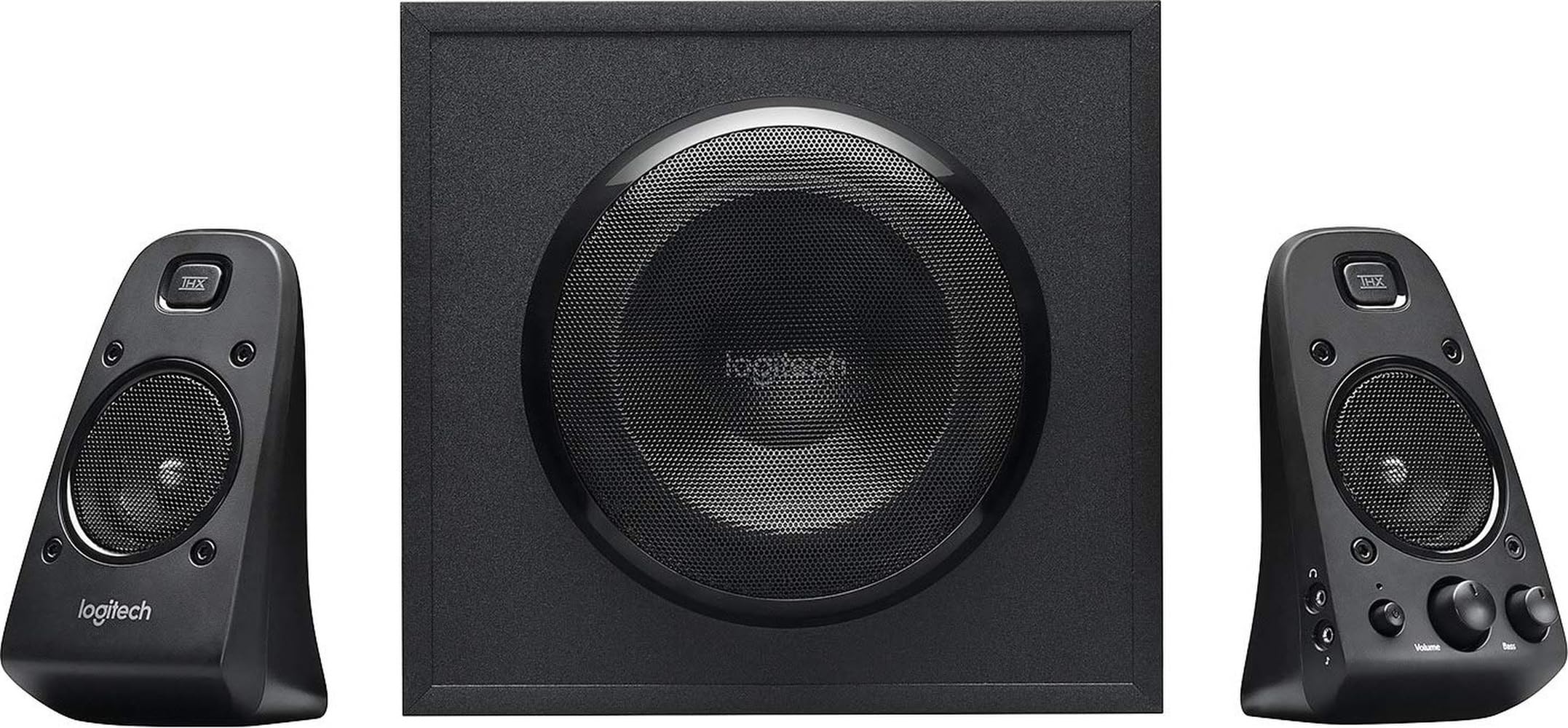
The Z623 delivers 200W RMS and 400W peak through a THX-certified 2.1 layout, with the 130W sub carrying the low end. The THX certification matches the tuning: this is a home-theater and gaming voice, not a flat studio reference. Clear highs and full mids sit above a bass shelf with real authority, and the system keeps composure at high volume where smaller desktop rigs start to sound strained. Explosions, score swells, and game audio all get physical weight without turning mushy. High-volume playback stays controlled enough that dialogue and sound effects remain intelligible, not just loud. That output and control are the strongest raw-performance case in the desktop 2.1 category.

The subwoofer is the centerpiece. It produces deep lows with good control for its class, and the bass knob on the right satellite lets you dial the low end down for late-night listening or push it for room-filling playback. Output is enough for medium rooms and parties, not just a desk. Color-coded cables keep setup simple: sub to satellites, then a single 3.5mm or RCA connection to the source. The right satellite also carries the volume knob and a headphone jack, so the controls sit where your hand already is. For a 2.1 system built around impact, the satellites still carry dialogue and sound effects cleanly enough for movies and games.

The intended buyer runs analog sources from a desktop or small-room setup and cares more about low-end weight than connection options. This is not a neutral studio monitor; the tuning is entertainment-first, with a deliberate lift in the low frequencies. It is also analog-only, so anyone with an optical-only TV or console should look at the THX sibling with digital inputs. There is no power switch; a switched power strip is the practical workaround. For a dedicated desktop system with one main source, those boundaries are easy to live with, and the analog inputs cover typical PC sound cards and portable players.

At a mid-range price, the Z623 delivers more bass and headroom than typical alternatives, and the front-mounted bass knob plus headphone jack keep the essentials within reach. The system does not try to be a feature hub; it focuses on the core 2.1 experience and does it directly. That focus is why newer competitors still measure themselves against it. For buyers who want a serious subwoofer on a desktop or small room, this is the category benchmark.

Pros

  • Clear highs and full mids sit above a low end that gives games and movies physical weight.
  • Raw output holds composure at high volume, with enough headroom for medium rooms and parties.
  • The 130W subwoofer delivers deep, room-filling bass with control for its class.
  • Color-coded analog hookup gets the system running in minutes from a 3.5mm or RCA source.
  • Strong value: the output and bass authority justify a mid-range price.

Cons

  • No Bluetooth input, so wireless sources require an external transmitter.
  • Some units develop subwoofer or right-channel output loss after extended high-volume use.
Our verdict

For desktop and small-room listeners running analog sources, the Z623 still sets the 2.1 benchmark: bass that fills the room and headroom that stays clean.

Check Latest Price
2

Best for Sound Quality

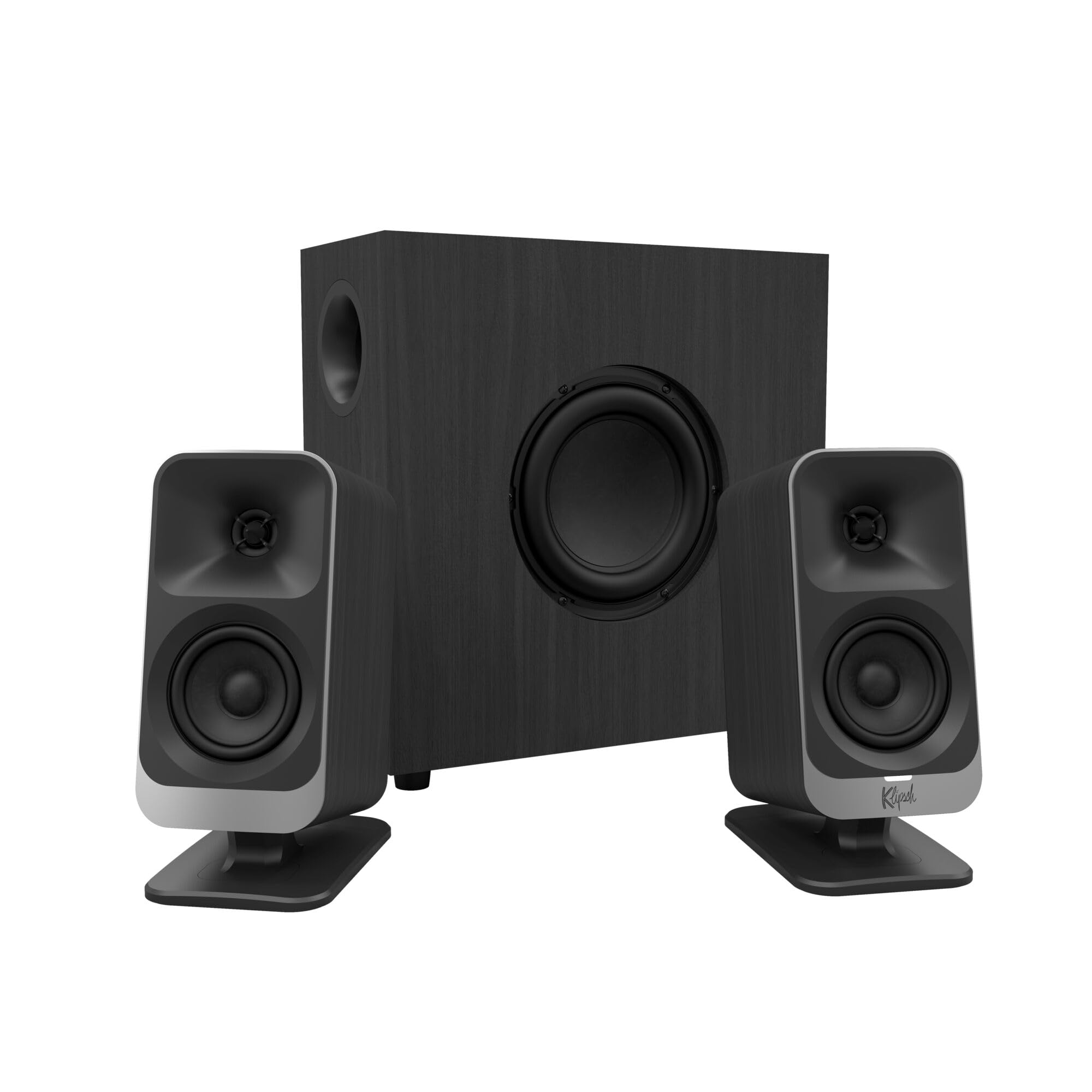
Klipsch ProMedia 2.1

91 /100
Sound Score Outstanding

Key details

Power
200W peak, 110dB
Inputs
3.5mm
Controls
Pod volume, sub gain
Durability
Some amp/driver wear reports
View on Amazon

MicroTractrix horn tweeters give the ProMedia 2.1 a crisp, articulate top end that pulls out fine details in music, dialogue, and game audio. THX certification and roughly 110dB of headroom let it fill a large room without strain, and the 6.5-inch ported sub adds controlled low end instead of one-note boom.

Setup is plug-and-play with clearly marked cables, and the control pod keeps volume and subwoofer gain within reach. The cabinets feel dense enough for long-term desk duty, a clear step up from the hollow plastic of the entry-level tier.

This system is wired-only and has no power switch, so it sits in standby whenever the sub is plugged in — a minor trade for listeners who leave desk audio powered up daily. Some units can develop amp or driver wear after years of high-volume use, so it suits buyers who want a long-term desk component with polished sound rather than a disposable speaker set.

Where the newer lifestyle Klipsch adds more connection options, the ProMedia stays focused on raw sound quality for a dedicated listening position. That focus makes it a better fit for critical listeners than the feature-first alternatives in this set.

💡 Plug the subwoofer into a switched power strip to cut standby draw when the desk is idle for days.

Pros

  • Crisp, detailed horn-loaded highs make vocals, footsteps, and instruments stand out.
  • Sturdy, premium-feeling cabinets that hold up to daily desk use.
  • Strong value for performance
  • Plenty of volume and headroom to fill a large room without strain.

Cons

  • No on/off switch
  • Amp or driver wear can surface after extended high-volume use, so one channel may go quiet.
Our verdict

For listeners who prioritize detail and imaging over connectivity extras, the ProMedia 2.1 delivers the Klipsch horn signature at a mid-range price.

Check Latest Price
3

Best Multi-Input / Optical

Logitech Z625

93 /100
Sound Score Outstanding

Key details

Power
200W RMS, 400W peak
Inputs
Optical, 3.5mm, RCA
Controls
Volume, bass on satellite
Durability
Some channel/sub wear reports
View on Amazon

The Z625 takes the THX-certified 2.1 platform and adds optical input, making it the multi-device version of the category benchmark. RCA and 3.5mm inputs stay live alongside the optical connection, so a PC, console, and TV can be wired at once without swapping cables. That simultaneous input handling is the reason this version exists.

Because all three inputs stay active, the Z625 can act as a simple audio switcher: lower one source, raise another, and no cable needs to move. The right satellite adds a headphone jack for private listening without muting the desktop feed.

This setup fits buyers building a PC/console/TV hub who want one 2.1 set for all three. Optical volume follows the source device, so the speaker knob does not adjust digital audio; in a quiet room, occasional hum or buzz may appear at certain frequencies. Neither blocks normal desktop listening, but both are part of the buying decision.

Pros

  • Optical, RCA, and 3.5mm inputs stay active at once, so switching sources means no cable swapping.
  • THX-certified 200W RMS output delivers clean highs and high overall volume without strain.
  • Normal listening sits below half on the dial, leaving ample headroom for louder mixes and movies.
  • At this price tier, the THX tuning and optical input make it a stronger value than non-optical alternatives.

Cons

  • No bundled remote or desktop control pod; the right satellite is the only control station.
  • Extended high-volume use can eventually produce output loss in a subwoofer or one satellite.
Our verdict

The Z625 is the right 2.1 when optical input and simultaneous multi-device wiring are the priority.

Check Latest Price
4

Best Budget / USB-Powered

Creative Pebble Plus

88 /100
Sound Score Excellent

Key details

Power
8W RMS total
Inputs
3.5mm only
Controls
Knob on speaker
Durability
View on Amazon

The Pebble Plus packs a 2.1 channel layout into a footprint that disappears under most monitors, pairing 45-degree elevated 2-inch satellites with a compact 4-inch down-firing sub — all powered by 8W RMS over a single USB connection.

The angled drivers point sound toward your ears from a typical sitting position, so dialogue and vocals stay clear without much effort. It uses the 3.5mm AUX input for audio, with the USB cable handling power only. Build quality feels solid for the price, and the small satellites leave the desktop clear for work.

Casual music, podcasts, and video calls sit comfortably in its range. The sub adds low-end texture without booming over the satellites, and the down-firing design lets you place it on the floor or desktop without adding clutter.

This is a near-field desk accessory, not a room-filler. It suits budget-conscious laptop users with minimalist desks or small offices who want USB power convenience and a clean look; in this setting the 8W USB power supply and 4-inch sub are enough. For large rooms or bass-heavy listening, a wall-powered 2.1 is the better fit.

💡 Place the down-firing sub on a solid floor surface rather than a hollow shelf to avoid unwanted boom.

Pros

  • Budget-friendly 2.1 setup that feels substantial and looks good on a small desk.
  • Compact Pebble styling fits under most monitors without stealing the show.
  • Solid plastic construction with a premium feel at this price.
  • Tiny footprint leaves room for a keyboard, papers, or coffee.

Cons

  • Some units can emit a high-pitched squeal at low volume.
  • The 4-inch sub is more a desk rumbler than a true bass unit.
  • USB power caps overall volume and headroom, so higher output is limited.
Our verdict

Compact, clean-looking, and genuinely budget-friendly, the Pebble Plus is a sensible near-field 2.1 for small desks and laptops.

Check Latest Price
5

Best Budget Bluetooth/RGB

Bluedee SK900 Pro

88 /100
Sound Score Excellent

Key details

Power
80W peak
Inputs
Bluetooth, USB-C, AUX
Controls
All-in-one control knob
Durability
Limited long-term data
View on Amazon

The Bluedee SK900 Pro brings Bluetooth 5.4, USB-C and AUX inputs, an all-in-one knob, RGB, and 80W peak together at a budget-friendly price for a modern desk setup. Unlike the USB-only space savers in this range, it runs on wall power and offers full-size connections, so it can anchor a work-from-home rig rather than a laptop bag.

DSP tuning gives the system a clean, balanced character at normal listening levels: vocals cut through, the sub adds punch, and highs stay smooth. Bluetooth 5.4 pairing is quick and holds steady, and the all-in-one knob keeps volume, playback, lighting, and mode adjustments in one place. At moderate volume, bass is present but not bloated, and the sub integrates cleanly with the satellites.

This is a near-field system for desks, bedrooms, and small offices. The USB-C connection suits a modern laptop, and the AUX input covers older PCs without extra adapters. RGB lighting can be adjusted from the same knob, so the glow can be changed to match the room. Durability over many years of heavy use is the one open question here, but the 18-month warranty is a reasonable safety net. Budget buyers who want style and connectivity now get a lot for the money.

Pros

  • Punchy DSP-tuned sound with clear vocals and smooth highs at moderate desk volumes.
  • Budget-friendly feature set: Bluetooth 5.4, USB-C, AUX, RGB, and a single control knob.
  • Bluetooth 5.4 pairs quickly and holds a steady connection during long sessions.
  • Plug-and-play setup with no driver hunting; the knob handles volume, playback, lighting, and mode.

Cons

  • The DSP voicing favors a boosted consumer curve, so critical listeners after flat response won't find reference neutrality.
  • The 80W peak delivers tidy desk volumes but leaves little headroom for a large living room or open office.
Our verdict

The Bluedee SK900 Pro suits a modern desk where Bluetooth, USB-C, and balanced sound are the priorities.

Check Latest Price
6

Budget Desktop Users

Logitech Z313

89 /100
Sound Score Excellent

Key details

Power
25W RMS
Inputs
3.5mm, RCA
Controls
Wired control pod
Durability
Some channel/sub wear reports
View on Amazon

The Z313 delivers genuine subwoofer presence and clean low-to-mid volume sound at a budget price. The compact 5.9-inch bass reflex sub adds weight that most entry-level 2.1 systems skip, and the wired control pod keeps setup simple. It suits desktop users who listen at modest levels and want a first subwoofer experience without spending much. The 25W amp and non-adjustable bass cap its headroom, so this is not a room-filler, and durability is a unit-variance matter. Those limits keep it below the higher-output systems in this comparison, but for a small desk or office at low-to-mid volume it remains a value-focused entry point.

Pros

  • Clean, surprisingly full sound for the price
  • Strong bang-for-buck at the budget tier.
  • Effortless setup with color-coded connections and a wired control pod.

Cons

  • No dedicated bass control; the subwoofer can dominate at some settings.
  • Some units may develop channel or subwoofer problems after extended use.
Our verdict

If your desk stays at low-to-mid volume and you want a genuine sub for very little money, the Z313 fits that specific place in this lineup.

Check Latest Price
7

Office or Classroom

Cyber Acoustics CA-3610

87 /100
Sound Score Excellent

Key details

Power
30W RMS, 62W peak
Inputs
3.5mm aux
Controls
Desktop pod with bass
Durability
Some channel/sub wear reports
View on Amazon

The CA-3610 is a compact angled 2.1 with a 5.25-inch down-firing sub and a desktop pod that keeps volume, bass, aux, and headphone output within reach. The wired pod alone is a practical win over bare-wire budget systems, and the angled satellites with dual 2-inch titanium drivers keep the desk footprint tidy. Sound is decent, though not a class leader. Durability varies between units; in some cases a channel or subwoofer output is lost within the first months, so this is an affordable desktop tool rather than a long-term audio investment.

Pros

  • Desktop control pod keeps volume, bass, aux, and headphone output on the desk.
  • Angled satellites with dual 2-inch titanium drivers keep a compact footprint.
  • Entry-level price includes a real 5.25-inch down-firing subwoofer.

Cons

  • Sub and midrange tuning can sound disconnected or muddy on bass-heavy tracks.
  • A channel or subwoofer output can be lost in the first months in some units.
Our verdict

Pick it for a first desktop setup, classroom, or office desk where budget matters more than peak performance.

Check Latest Price
8

Budget High Volume

Cyber Acoustics CA-3810

85 /100
Sound Score Excellent

Key details

Power
40W RMS, 80W peak
Inputs
3.5mm aux
Controls
Desktop pod with bass
Durability
Hum and wear reports
View on Amazon

At 80W peak and 40W RMS with a side-firing 5.25-inch ported sub and a desktop control pod, this is the Cyber Acoustics line's budget volume play. The output fills a large desk or shared room at a price that undercuts comparable 2.1 sets, and the pod keeps volume, bass, aux, and headphone jack within reach. It sits below the CA-3610 in consistency; hum and early output loss can appear in some units. For a buyer who wants maximum wattage per dollar and can accept those variables, the tradeoff is acceptable.

Pros

  • Room-filling output and bass for the price make it easy to drive a larger desk or shared room.
  • Solid build — heavy cabinets and cloth-grilled satellites
  • Desktop pod keeps volume, bass, aux input, and headphone jack within arm's reach.

Cons

  • A low-level hum or buzz can be audible in quiet rooms at low volume.
  • Build quality can vary; a satellite or subwoofer channel may lose output within months, so warranty terms are worth checking.
Our verdict

Fits larger desks and shared rooms where max wattage per dollar is the priority; for quiet bedrooms or long-term certainty, the CA-3610 is the steadier budget pick.

Check Latest Price
9

Soundbar-Style Desks

Nylavee SK100 Pro

86 /100
Sound Score Excellent

Key details

Power
30W RMS, 60W peak
Inputs
Bluetooth, 3.5mm, RCA
Controls
Side knob controls
Durability
Limited long-term data
View on Amazon

The Nylavee SK100 Pro puts a 60W peak 2.1 system in a soundbar-style bar plus a separate 5.25-inch subwoofer, so a desktop stays clear of bulky satellites. Bluetooth 5.4 pairs fast. The side knob controls power, input, and volume, and voice clarity holds up at normal desk levels. The fixed bass tuning is the main tradeoff: the sub acts as a second speaker rather than a true LFE channel, which limits how much low-end control you get. That makes the SK100 Pro a fit for Bluetooth-first desk setups and soundbar-style fans, not for bass tuners or high-end audio buyers.

Pros

  • Compact soundbar profile fits under a monitor and frees the desk from satellite speakers.
  • Dialogue and vocal clarity stay clean at typical desk listening levels.
  • Wireless pairing is quick and holds a connection for laptop or tablet use.

Cons

  • No independent subwoofer control, so low-end balance depends on source EQ rather than a knob.
  • Movie and game bass lacks the dedicated low-frequency weight of a true subwoofer channel.
Our verdict

For Bluetooth-first desk setups where the soundbar shape matters more than subwoofer tuning, this is the compact choice.

Check Latest Price
10

Design-Focused Gamers

Klipsch ProMedia Lumina

80 /100
Sound Score Excellent

Key details

Power
Inputs
USB-C, AUX, Bluetooth
Controls
App EQ + sub gain
Durability
Limited long-term data
View on Amazon

The Klipsch ProMedia Lumina brings a design-forward 2.1 package to a gaming desk: USB-C single-cable audio, Bluetooth 5.3, subtle RGB, and EQ control through the Klipsch Control app. FPS audio is balanced, with clear treble and bass that adds weight to firefights without masking footsteps. The premium price and the wireless/software friction are why it isn't the value pick — Bluetooth can sound scratchy or drop in some environments, and the companion app can feel glitchy. A wired USB-C connection is the better path for stable desktop audio. This is a lifestyle-first system for buyers who want the look and single-cable convenience, not maximum sound-per-dollar.

Pros

  • USB-C single-cable audio keeps a modern Mac or PC desktop clean.
  • Subtle RGB lighting fits RGB-focused desks without looking overdone.
  • FPS game sound is balanced, with treble and bass that keep footsteps clear.

Cons

  • Bluetooth can sound scratchy or time out, so USB-C is the safer route.
  • The companion app can feel glitchy, and the manual leaves functions unexplained.
Our verdict

If your desk centers on RGB and a single USB-C cable, the Lumina fits; for raw sound-per-dollar, the cheaper ProMedia is the better buy.

Check Latest Price

How to Choose

Power: RMS vs Peak

Peak wattage is the marketing number; RMS is the wattage a speaker can sustain. A 400W peak system is usually a 200W RMS system, and the subwoofer is where that power matters most.

Sustained high volume pushes the amplifier's output stage hard, and heat accelerates wear on the power supply. If you listen loud for long sessions, buy RMS headroom rather than a bigger peak figure.

Subwoofer Size and Tuning

A 4-inch down-firing sub can add low-end weight at modest volume, but it moves too little air to pressurize a room. A 5.25-inch or larger ported driver is the real entry point for audible, physical bass.

Ported subwoofers have a tuning frequency; below that frequency output drops quickly, which is why some subs feel disconnected from the satellites. Match the sub size to your room and listening level, not to the bassiest demo track.

Input Flexibility

3.5mm and RCA are universal analog connections; optical adds a lossless digital path from TVs and consoles; Bluetooth adds convenience at the cost of latency.

Optical bypasses the computer's internal sound card, which can reduce ground-loop hum, but the speaker's own DAC becomes the signal path. Choose a system with simultaneous inputs if you need your PC and console connected at the same time.

Bass and Volume Controls

A separate bass knob is the difference between tuning a sub to your room and living with whatever balance the factory chose. Sub placement changes bass response dramatically, especially under a desk.

Control pods make the volume knob easy to reach, but the potentiometer inside can get scratchy after heavy use. Satellite-mounted controls avoid extra cabling but are often tucked behind monitors; think about reach before you buy.

Durability Under Real Use

Subwoofer and channel wear is the category's quiet pain point, and high-volume playback is the common denominator. Small amplifiers run hot when pushed, and that heat stresses the capacitors in the power supply.

A system with more RMS headroom can outlast a cheaper one, even if the cheaper one has a flashier peak number. If you plan on daily high-volume use, prioritize proven long-term performance over feature count.

Frequently Asked Questions