10 Best 25-Key MIDI Controller of 2026: Picks That Fit Your DAW

Find the 25-key MIDI controller that actually fits your DAW and playing style — from beat-making pads to wireless portability.

Most 25-key controllers look interchangeable on a spec sheet: the same mini-key count, a few pads, and a handful of knobs. The real differences show up in key action, DAW integration, and how much setup the bundled software actually requires.

Compact keyboards make deliberate trade-offs. A lighter, thinner board fits in a laptop bag but often pairs with a mushy keybed. A full-size-action controller feels more familiar under the fingers but takes up more desk and costs more. DAW-specific models are strong in their home software and only average elsewhere.

This guide sorts those trade-offs by use-case: which controllers suit beat-making, which belong in an Ableton or FL Studio setup, and which justify full-size keys in a compact frame. Buy for the DAW you use and the way you play, not for the spec sheet alone.

About the Sound Score: This comparative score is calculated from a product's published customer rating and review volume. It is not a laboratory measurement or a hands-on test result.

1

Best Overall

Akai MPK Mini MK3

93 /100
Sound Score Outstanding

Key details

Key Size
Mini velocity-sensitive
Pads / Knobs
8 pads, 8 knobs
DAW Integration
Generic MIDI
Software / Sounds
Bundled software
View on Amazon

The MPK Mini MK3 pairs 8 MPC-style pads, 8 knobs, a 4-way thumbstick, and an arpeggiator in a 25-key shell small enough for a laptop bag. The bundled software adds synths, sounds, and a production environment without a separate purchase, which makes the package feel complete for someone starting out.

The chassis holds up through travel and desktop use, and the pads respond cleanly for programmed drums. The body tolerates airline-bag handling and tight desks without flex. That portability is the point: the MPK fits a backpack more easily than the full-size-key controllers in this set.

This is a natural first controller for beginners and intermediate producers, and a portable main for beat-makers who want MPC-style pads on the road. For producers moving between home and studio, it fills the travel slot without giving up pads or knobs. Accept that the mini keybed can have variable consistency and that the software/DAW setup is not truly plug-and-play; the first hour is configuration time. Players who need full-size keys or a sustain pedal jack, or who want USB-C and a color display, should look at larger or newer alternatives.

Pros

  • MPC-style pads, eight knobs, thumbstick, and arpeggiator form a complete beat-making hub.
  • Bundled software gives first-time producers instruments and effects without extra purchases.
  • Compact body fits in a bag and stays steady on a desktop.

Cons

  • Bundled software install and DAW mapping take longer than the plug-and-play claim suggests.
  • Mini keys can feel stiff or cramped, and keybed quality may vary between units.
Our verdict

The MPK Mini MK3 is the broad all-purpose 25-key pick: pads, knobs, portability, and bundled software at a fair mid-range price. Ableton users chasing deep clip control may prefer the Launchkey Mini; general-purpose producers get a balanced controller.

Check Latest Price
2

Best for Ableton Live

Novation Launchkey Mini MK3

92 /100
Sound Score Outstanding

Key details

Key Size
Mini synth-action
Pads / Knobs
16 pads, 8 knobs
DAW Integration
Ableton Live
Software / Sounds
View on Amazon

The Launchkey Mini MK3 is the Ableton-first compact controller in this 25-key set: 16 RGB pads map to clip launching, eight knobs control devices, and the velocity-sensitive keys feed a workflow that can capture MIDI after the fact. The arpeggiator and chord mode stretch the small footprint further without adding bulk.

Producers building a compact MIDI setup around Ableton Live get the deepest integration here, and beginners will find the clip-launch workflow approachable. The mini keys are decent, not premium, so players with an expressive touch should weigh that boundary. FL Studio-first producers will get more from a controller mapped to that DAW.

Pros

  • 16 RGB pads and clip-launch controls put Ableton session navigation under your fingers.
  • Arpeggiator, chord mode, and capture MIDI add performance and songwriting options to a compact board.
  • Approachable for new producers without stripping out the features working performers need.

Cons

  • Velocity response is fixed on the unit, so expressive playing needs software-side curve adjustment.
Our verdict

For Ableton Live producers who want a compact 25-key controller with 16 pads and clip control, the Launchkey Mini MK3 turns a tiny footprint into a performance surface.

Check Latest Price
3

Best for FL Studio

Novation FLkey Mini

93 /100
Sound Score Outstanding

Key details

Key Size
Mini keys
Pads / Knobs
16 pads, 8 knobs
DAW Integration
FL Studio
Software / Sounds
View on Amazon

The FLkey Mini maps directly to FL Studio's channel rack and step sequencer, so beat-making starts without a mapping session. The 16 pads, 8 knobs, scale and chord modes, and arpeggiator are all aimed at FL Studio producers.

This is for FL Studio producers who want hands-on control of drum patterns and step sequencing in a small footprint. It assumes the controller stays plugged in at the desk: the unit is active whenever connected because there is no power or standby switch. A USB power switch provides a clean shutdown for anyone who needs one.

Pros

  • Channel rack and step sequencer mapping put FL Studio's core beat tools on hardware.
  • Build quality suits the mid-range price, with a steady chassis for drumming.
  • FL Studio mapping is ready to go, so setup time stays short.

Cons

No consistent drawbacks identified in the available review data.

Our verdict

For FL Studio producers, this is the board that brings channel rack and step sequencer work under your hands instead of your mouse.

Check Latest Price
4

Best Full-Size Keys in a 25-Key Frame

Nektar Impact LX25+

91 /100
Sound Score Outstanding

Key details

Key Size
Full-size synth-action
Pads / Knobs
8 pads, 8 knobs, fader
DAW Integration
Broad DAW integration
Software / Sounds
Bitwig 8-track
View on Amazon

Full-size synth-action keys separate the LX25+ from the mini-key controllers in this category. Nektar's DAW integration maps transport, mixer, and instrument controls to Ableton, Reason, FL Studio, and others with minimal setup, and the 8 pads, 8 knobs, and fader give hands-on control beyond simple note entry.

This is the pick for keyboard players who want a true 25-key footprint without sacrificing real key size. It is bulkier and heavier than the slimmer options here, and the key action can feel stiff or springy to certain hands, so a hands-on trial settles that. If weight or budget is the deciding factor, look at the compact mini-key boards instead.

Pros

  • Full-size synth-action keys preserve a familiar playing feel.
  • Broad DAW integration maps to Ableton, Reason, FL Studio, and more without heavy setup.
  • Solid controls give hands-on access to transport, mixer, and instrument parameters.

Cons

  • The printed manual can confuse beginners who need detailed setup instructions.
Our verdict

For keyboard-first players in the 25-key class, this is the one that feels most like a real instrument.

Check Latest Price
5

Best Standalone / Built-In Sounds

Akai MPK Mini Play MK3

90 /100
Sound Score Outstanding

Key details

Key Size
Mini dynamic keybed
Pads / Knobs
8 pads, 4 knobs
DAW Integration
Generic MIDI
Software / Sounds
Built-in sounds
View on Amazon

The MPK Mini Play MK3 adds built-in sounds, a speaker, and battery power to the familiar compact Akai layout, turning a MIDI controller into a self-contained practice instrument. It still works as a standard 25-key controller with MPC-style pads and four knobs, so it covers production basics when you do plug it in.

This is the version for songwriters and travellers who want to sketch ideas without launching a DAW, and for players who want battery-powered practice on the move. The internal speaker volume is modest and the mini keys can feel cramped for larger hands, so it is best treated as a close-up practice tool rather than a room-filling sound source.

💡 Give yourself a moment to scroll the built-in sound bank; the OLED names each sound, but there is no direct numeric selector.

Pros

  • Built-in sounds and speaker allow standalone play without a computer.
  • Battery power and compact size make it easy to carry and practice anywhere.
  • Functional MIDI controller with responsive pads and knobs when connected.

Cons

  • Internal speaker volume is polite
  • Mini keys can feel cramped, and keybed consistency may vary between units.
Our verdict

The Play MK3 is the standalone practice pick — use it when you want to play without setting up software.

Check Latest Price
6

Best Budget Wireless

M-VAVE K5 White

91 /100
Sound Score Outstanding

Key details

Key Size
Velocity-sensitive
Pads / Knobs
8 pads, 8 knobs
DAW Integration
iOS / GarageBand
Software / Sounds
View on Amazon

The M-VAVE K5 White combines Bluetooth, a built-in battery, 8 velocity pads, 8 knobs, and touch strips in a compact 25-key shell. The wireless link is especially effective with iOS and GarageBand, so cable-free sketching works without a laptop on the desk.

GarageBand-first beginners on an iPad will get the core value from the K5 White. The pad and knob layout is thumb-friendly for beat-making, and the built-in battery removes one more cable from a mobile setup. It is not aimed at full-size-key players or anyone needing low-latency wireless across every DAW.

💡 Keep the K5 charged before wireless sessions; USB operation remains available when the battery runs low.

Pros

  • Bluetooth and a built-in battery make wireless sketching with iOS and GarageBand a practical option.
  • The 25-key layout includes 8 pads, 8 knobs, and touch strips without taking up much bag space.
  • Well-built shell that survives travel without feeling flimsy.

Cons

  • Pads need firmer hits than softer MPC-style pads, so light finger drumming can feel stiff.
  • Bluetooth setup beyond GarageBand can be a struggle; wired USB is the safer fallback in other DAWs.
Our verdict

For GarageBand-first beginners, the K5 White delivers cable-free sketching and all the essential controls at a budget-friendly price.

Check Latest Price
7

Analog Lab Producers

Arturia MiniLab 3

94 /100
Sound Score Outstanding

Key details

Key Size
Mini synth-action
Pads / Knobs
8 pads, 8 knobs, fader
DAW Integration
Generic MIDI
Software / Sounds
Analog Lab
View on Amazon

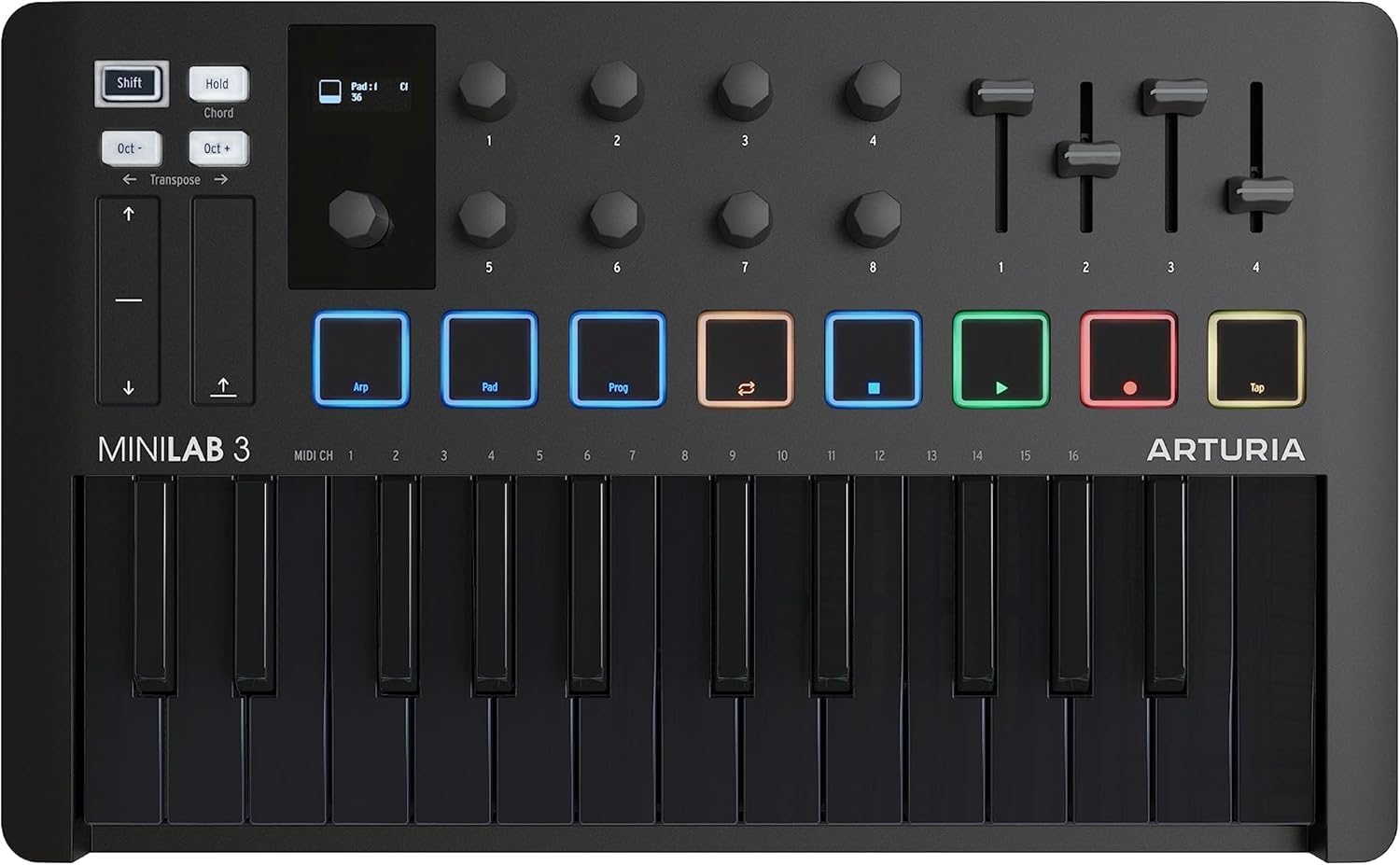
The 25-key action feels more polished than typical mini-key boards, and the touch strips keep pitch/mod expressive without external wheels. It lands below the top pick because its control layout serves keyboard players and Analog Lab users, while the category standard stays centered on MPC-style beat pads.

Pros

  • USB-C connection and bus power cut the setup down to one cable.
  • Bundled Analog Lab software reduces the need for immediate plugin purchases.

Cons

  • The pad layout is secondary, so beat-makers who want MPC-style pads as the main focus will find it less direct.
Our verdict

Choose this when Analog Lab sounds and a refined keyboard feel matter more than pad-first beat production.

Check Latest Price
8

Basic Melody Entry

Korg nanoKEY2

89 /100
Sound Score Excellent

Key details

Key Size
Low-profile velocity-sensitive
Pads / Knobs
None
DAW Integration
Generic MIDI
Software / Sounds
View on Amazon

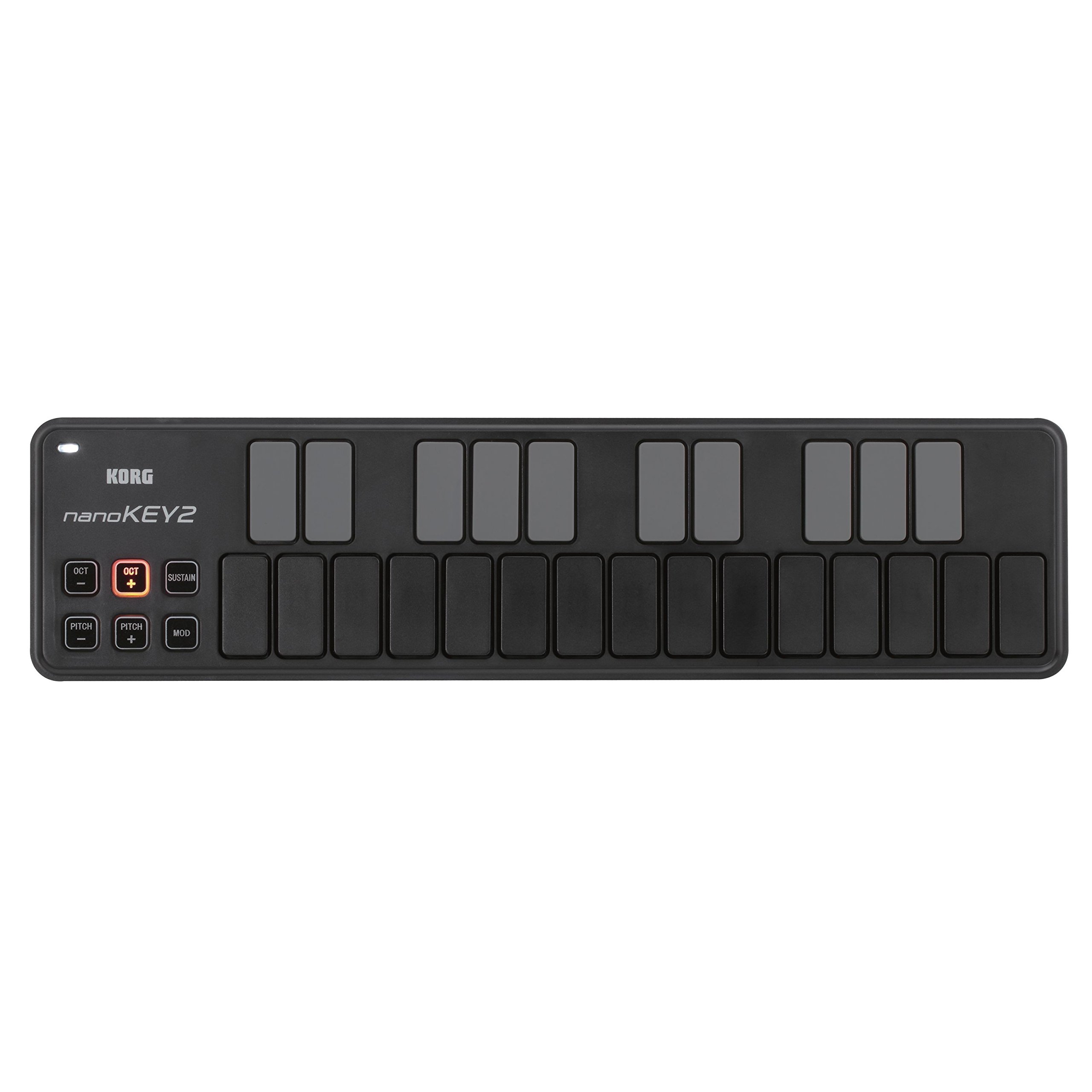
The nanoKEY2 disappears into a laptop bag while still giving you a usable 25-key layout for melody entry and DAW transport. The low-profile membrane keys feel mushy, and the slim chassis can warp under pressure, so expressive playing is not its lane. That keeps it behind fuller 25-key controllers for beat-making.

Pros

  • Slips into a laptop bag and takes up almost no desk space.
  • Handles simple note entry without adding weight to a travel kit.

Cons

  • No pads or knobs, so beat-making and plugin tweaks require extra hardware.
Our verdict

The nanoKEY2 fits neatly into a travel setup where melody entry matters more than beat-making.

Check Latest Price
9

Travel and Notation

Nektar SE25

88 /100
Sound Score Excellent

Key details

Key Size
Mini keys
Pads / Knobs
None
DAW Integration
Nektar DAW integration
Software / Sounds
Bitwig 8-track
View on Amazon

Sturdy, pocket-sized keys-only MIDI input with Nektar DAW integration and Bitwig 8-track included. It pairs with a travel-focused setup and handles simple notation tasks cleanly. Pads and knobs are absent, so production and beat-making workflows fall outside its lane; that simplicity keeps it a capable sketchpad for melody capture.

Pros

  • Compact shell slides into a backpack for portable note entry.
  • Driverless USB connection gets basic MIDI input working in common DAWs.

Cons

  • Mini keys can feel stiff and springy, which matters most during fast or expressive playing.
Our verdict

This is the right fit for a traveler who needs basic keys in a compact shell; the all-purpose 25-key options in this set cover pad-and-knob production far better.

Check Latest Price
10

Budget Beginners

Donner N-25

82 /100
Sound Score Excellent

Key details

Key Size
Mini velocity-sensitive
Pads / Knobs
None
DAW Integration
Generic MIDI
Software / Sounds
40 lessons
View on Amazon

This is the least expensive way to get a working 25-key USB-C MIDI controller into a student setup. The lack of pads or knobs means beat-making and plugin tweaking require a second controller. The plastic build and bundled software account setup underline the entry-level price. Best as a first keyboard for notation or lesson work, not for pro-level production.

Pros

  • Budget-friendly price delivers a functional keys-only USB-C MIDI controller.
  • Compact body fits into a backpack for travel between home and studio.

Cons

  • When playing softly and expressively, the mini keys feel narrow and mushy.
Our verdict

For notation and lessons on a strict budget, this is a usable first keyboard.

Check Latest Price

How to Choose

Key Size and Action

Mini keys are the category norm. The trade-off is physical: shorter key travel means less leverage, so chords feel more crowded and quiet dynamics take more control. Full-size synth-action keys add desk footprint but give your hands a familiar target. Keybed quality varies more than any other spec, so hands-on play matters more than a rating.

Pads and Knobs

Eight pads and eight knobs are the practical baseline for beat-making and plugin tweaking. Sixteen pads help organize one-shots across a drum rack; four knobs are enough for filter moves but limiting for mixer work. If you build drums from hardware, pads are the difference between finger-drumming and mouse-clicking every sound.

DAW Integration

DAW-specific integration is the biggest hidden factor. Ableton-native controllers add clip launch and device control; FL Studio-native models map channel rack and step sequencer functions to hardware. Those mappings do not transfer when you switch DAWs. Generic MIDI controllers work anywhere, but 'plug-and-play' often means the keys are live, not that the knobs and pads are mapped.

Power and Portability

USB bus power is reliable and needs no battery, but it ties you to a laptop or power bank. Battery-powered Bluetooth models cut the cable at the cost of extra weight and potential latency or pairing hiccups. Keep a USB cable in the bag for sessions where timing matters.

Bundled Software and Sounds

Bundled software is part of the real purchase price. It can offset the hardware cost, but registration and download friction can eat an evening. Decide whether the bundle is something you will actually use. Built-in sounds matter only if you plan to play away from a computer; the onboard engine rarely replaces a serious soft synth.

Frequently Asked Questions