12 Best Bluetooth Computer Speakers of 2026: Keep a Wired Backup

The best Bluetooth computer speakers for desk setups that need stable pairing, usable bass, and a wired backup when Bluetooth drops.

Most Bluetooth computer speakers will spend their working life on a desk, not a shelf. That means the deciding factors are mundane: whether pairing survives a reboot, whether the drivers can produce usable volume from a few feet away, and whether there is a wired input for the day Bluetooth does not cooperate.

The category also splits by shape. A two-piece set gives true left/right separation; a soundbar saves space but concentrates the sound; a monitor-clip bar keeps the desk clear. The strongest setups treat Bluetooth as a convenience, not the only connection, because a USB or 3.5mm cable avoids the dropouts that still show up across price points.

The main trade-off is between a compact USB-C pair with cleaner sound and a conventional stereo pair with a headphone jack and easy device switching. The right choice depends on which daily convenience you value more. Bluetooth should still have a wired backup for the days it drops.

About the Sound Score: This comparative score is calculated from a product's published customer rating and review volume. It is not a laboratory measurement or a hands-on test result.

1

Best Overall

Creative Pebble V3

89 /100
Sound Score Excellent

Key details

Inputs
USB-C, AUX
Controls
Gain switch
Form Factor
2-piece angled desktop
Power And Drivers
8W RMS, 2.25-inch drivers
View on Amazon

The angled 2.25-inch drivers and Clear Dialog processing give the Creative Pebble V3 a voice-forward character that typical desktop speakers at this size miss. Speech in video meetings stays intelligible even with the volume low, and the two-piece arrangement places each driver at a natural angle for a seated listener. USB-C carries audio and power over one cable, which keeps a laptop edge clean and removes one wall-wart from the desk.

At a typical desk distance, the 8W RMS output is enough for YouTube, casual music, and light gaming. The gain switch on the back boosts the signal when a source runs quiet, and the included USB-A adapter makes the speaker compatible with older PCs. Bluetooth 5.0 pairs quickly with phones and laptops, while the wired USB-C path covers meeting days without depending on a wireless handshake. There is no software to install and no external power brick, so the whole setup is a two-cable affair.

Separate left and right cabinets do more for immersion than a single soundbar can at this price: a footstep in a game or a guitar panned across a mix has a clear side. Clear Dialog adds presence to vocals without shoving the rest of the track backward, so voice-heavy content stays easy to follow at moderate volume.

The Pebble V3 is for the desk-first listener who wants one compact pair of speakers for calls, background music, and the occasional game session. Sound from a few feet away is clear, but low-end weight and top volume stay modest because of the driver size; push it in a large room and it will run out of breath. Bluetooth dropouts have been noted on some units, so the USB-C connection is the safer choice when a meeting can't be interrupted. For buyers whose music library skews toward bass, a 2.1 system with a subwoofer will serve that need better.

Compared with the other 2.0 desktop pair in this lineup, the Pebble V3 sounds cleaner and costs less, which gives it the edge for common desk setups.

The value case is simple: it does not pretend to be a 2.1 system, and that honesty shows in the balance it strikes. For a desk that needs everyday audio without a subwoofer budget, this is the pair that gets out of the way and stays clear.

💡 Keep the USB-C cable connected during work calls; the wired input is the least interruptible path for a meeting.

Pros

  • Clear, loud sound for the size keeps dialogue intelligible on a crowded desk.
  • Cost-effective price undercuts comparable 2.0 desktop setups without sacrificing everyday usability.
  • Plug-and-play setup needs no driver installation and works over USB-C or the included USB-A adapter.
  • Compact two-piece footprint fits a small desk without crowding the monitor or keyboard.
  • General-purpose PC speaker handles calls, YouTube, and casual gaming from one wired or wireless connection.

Cons

  • No front headphone jack or two-device switching, a compromise next to the other 2.0 desktop pair in this lineup.
  • Some units can lose audio output after months of use, so checking the return policy before buying is worth your time.
Our verdict

Keep the Pebble V3 on the short list for any compact WFH desk where speech clarity and price carry more weight than max volume.

Check Latest Price
2

Best Multi-Device Stereo Pair

Logitech Z207

89 /100
Sound Score Excellent

Key details

Inputs
3.5mm AUX, Bluetooth
Controls
Easy-Switch, headphone jack
Form Factor
2-piece stereo desktop
Power And Drivers
10W peak, passive radiators
View on Amazon

The Z207 is a two-piece desktop stereo that wins on input flexibility rather than sound pressure. Easy-Switch lets you pair two devices and move between them without re-pairing, while the front headphone jack doubles as a quick privacy switch for calls. On-speaker controls put volume, source, and pairing within reach, and the 3.5mm AUX input serves as a wired backup.

At near-field distances, the Z207 delivers clean, clear sound with active drivers and passive radiators adding more body than the compact cabinets suggest. Bass is modest, and pushing toward the top of the 10W output can make busy tracks sound thin. That tradeoff sets expectations: it is a desk speaker for everyday audio, not a living-room system.

The Z207 is best for office and work-from-home setups where a desktop, laptop, and phone all need to share one speaker. Pair a computer over AUX and keep a phone on Bluetooth, then use the front jack as a headphone shortcut when a call comes in. Sound is not class-leading; it can sound thin with weak bass at its limits, and speaker-to-speaker consistency may vary. Those limitations matter less if you prioritize multi-device workflow over audio fidelity.

💡 Keep the Z207 at desk-level volume for best clarity; it is happiest within arm's reach.

Pros

  • Easy-Switch Bluetooth handles two paired devices and moves between them without re-pairing.
  • Front headphone jack offers an instant privacy switch for calls or late-night listening.
  • Setup is quick, and volume, source, and pairing controls sit on the speaker.
  • Solid everyday build holds up well on a shared desk.

Cons

  • Bass is modest, so low-end-heavy genres lack weight.
  • Maximum volume suits near-field desks, not large rooms.
  • Speaker-to-speaker consistency can vary; a unit may lose power or audio output.
Our verdict

For multi-device desks, the Z207's Easy-Switch and headphone jack are the deciding factors; critical listening belongs elsewhere.

Check Latest Price
3

Best Compact Soundbar

Nylavee SK100

88 /100
Sound Score Excellent

Key details

Inputs
3.5mm AUX
Controls
One-knob control, mic
Form Factor
Under-monitor soundbar
Power And Drivers
5W, four drivers, dual bass
View on Amazon

The SK100 puts clear dialog first inside a slim under-monitor bar, pairing four speaker units with dual bass diaphragms and a built-in mic for everyday calls. The low-profile shape fits neatly beneath a display, and the single-bar layout keeps a desk free of separate satellites.

Setup is simple over Bluetooth 5.0 or AUX, and the one-knob control handles volume and playback while the front headphone jack gives an instant path to private listening. Voice-forward sound is loud enough for a typical desk workspace, and dialog stays clear for video meetings and media alike.

Four speaker units and dual bass diaphragms add body to music and movies without demanding much desk space. The built-in mic keeps voices intelligible on calls, and the one-knob control plus headphone jack cover the day-to-day controls buyers expect. No software or app is required, so the bar works straight from a laptop or monitor.

Buyers with a tight desk who want one tidy bar for WFH calls and casual media will get the most from this design. It is not a large-room speaker, and Bluetooth may need an occasional reconnection; those limits fit a focused under-monitor setup better than a home theater arrangement.

Pros

  • Clear, crisp dialog for calls and media.
  • Simple setup over Bluetooth or AUX with one-knob control.
  • Compact under-monitor size keeps desk clutter down.
  • Built-in mic and headphone jack cover everyday WFH needs.

Cons

  • Single-bar design cannot produce true left/right stereo separation.
  • Inputs are limited to Bluetooth and AUX; no USB audio hookup.
Our verdict

The SK100 settles into a desk setup with clear call audio and a low-profile bar that does not crowd the workspace.

Check Latest Price
4

Best With Subwoofer

Logitech Z407

87 /100
Sound Score Excellent

Key details

Inputs
Micro USB, 3.5mm
Controls
Wireless dial
Form Factor
2.1 system, subwoofer
Power And Drivers
80W peak, 20W subwoofer
View on Amazon

The Z407 separates itself from compact 2.0 speakers with 80W peak output and a 20W down-firing subwoofer. Music, games, and movies get a weightier low end than any soundbar or small stereo pair in this lineup. The satellites can sit in two positions, and inputs include Bluetooth, micro USB, and 3.5mm, so it can anchor a desktop with multiple sources. The wireless dial frees you from reaching behind the speakers, and the dual-position satellites let you angle the tweeters toward ear level.

This setup suits a gamer or movie watcher with desk space for a subwoofer and a preference for bass-first sound over a tiny footprint. It also covers multi-device workflows: keep a PC on the 3.5mm or USB input and switch to Bluetooth for a phone or tablet. The tradeoff is that Bluetooth can drop, the wireless dial's volume steps may feel imprecise, and audio output can develop distortion or lose output on individual units over time. For a desk where bass and input flexibility matter more than long-term consistency, the Z407 delivers.

Subwoofer placement matters: the down-firing driver tightens up when set on a firm floor surface rather than buried against a wall. Once positioned, the system fills a mid-size room without strain and keeps dialogue clear during films.

💡 Keep the wireless dial close to the keyboard for finer volume control.

Pros

  • Delivers room-filling bass for games, movies, and music without needing a separate amplifier.
  • Offers a complete 2.1 setup at a price below most component systems.
  • Connects to a PC, phone, and other gear through Bluetooth, micro USB, or 3.5mm.

Cons

  • Wireless dial's volume steps can feel imprecise when making small adjustments.
  • Bluetooth connection may drop during playback, especially when the source is at a distance.
  • Audio output can develop distortion or lose output on individual units over time.
Our verdict

The Z407 is the 2.1 system to choose when bass for games and movies outweighs the need for a small footprint.

Check Latest Price
5

Best Monitor-Clip Soundbar

Cyber Acoustics 2890PRO

82 /100
Sound Score Excellent

Key details

Inputs
USB-C, USB-A
Controls
Built-in mic
Form Factor
Monitor-clip soundbar
Power And Drivers
20W, rear bass radiator
View on Amazon

The Cyber Acoustics CA-2890PRO mounts directly under the display, clearing the desk while still packing 20W of output, a rear bass radiator, and a built-in mic. Smart Voice Enhancement lifts speech for calls, and the USB-C/USB-A connection gives it a simple wiring path on a shared workstation, whether the source is a laptop or a desktop PC.

Voice clarity is the strongest trait: meeting participants come through distinctly, and media playback has more low-end presence than the entry-level clip-on soundbar in this lineup. The build feels solid for a mid-range accessory, and the bass radiator adds depth without the footprint of a separate subwoofer. That balance is exactly what a cramped desk needs from a single speaker.

The built-in mic handles speakerphone duty, so users can take calls without reaching for a headset. Because the bar sits right in front of the user, directional audio stays consistent compared to an under-monitor soundbar pushed back on a crowded desk.

The intended buyer is a work-from-home user with a flat-bezel monitor and limited desk space. Curved or thick monitor housings may not let the clamp seat securely, and Bluetooth can be glitchy, so using the included USB connection is the more dependable path for daily meetings. Audiophiles seeking rich music reproduction are better served by a dedicated stereo pair.

Pros

  • Clear voice reproduction for calls and video meetings, with media playback staying intelligible.
  • Performance stays consistent for everyday desk work without complicated setup.
  • Solid build that suits a mid-range desk setup.
  • Good value for the output and call features it includes.

Cons

  • Bluetooth can cut out during a session; the USB input sidesteps that.
  • Clamp fit is tied to monitor shape; curved or thick bezels may not seat it.
Our verdict

For a flat-bezel WFH desk with limited surface space, this bar delivers call-friendly audio and desktop clearance in one mount.

Check Latest Price
7

Budget Stereo

Amazon Basics 2.0 BT Speakers

87 /100
Sound Score Excellent

Key details

Inputs
USB, AUX
Controls
Control pod
Form Factor
2-piece stereo desktop
Power And Drivers
6W max, 1.75-inch drivers
View on Amazon

The Amazon Basics 2.0 pair delivers surprisingly full sound from a compact cabinet, and the low-profile design slides under most monitor stands without crowding a desk. The control pod handles volume and source switching, while the blue LEDs can be turned off for a cleaner setup. For the price, this is an easy entry into desktop audio for casual meetings, streaming, and light gaming.

Bluetooth pairing can be inconsistent, so keeping the USB or AUX cable nearby is a practical fallback. The 6W output keeps it firmly entry-level: in a large room or with bass-heavy music, these will run out of headroom. That makes it a budget near-field set, not a replacement for a bigger system.

Pros

  • Surprisingly full sound from a small enclosure at a budget-friendly price.
  • Low-profile 2.0 design fits under monitor stands and keeps the desk clear.
  • Blue lighting can be switched off when a cleaner look is wanted.

Cons

  • Bass-heavy genres and large-room listening exceed the 6W output's headroom.
  • Bluetooth pairing can be inconsistent; wired USB or AUX is the more dependable path.
Our verdict

For a compact budget desk setup where wired fallback is acceptable, this pair delivers more sound than its size suggests.

Check Latest Price
8

Minimalist Soundbar

Bluedee SK010

88 /100
Sound Score Excellent

Key details

Inputs
AUX, USB
Controls
Form Factor
Under-monitor soundbar
Power And Drivers
15W, dual drivers, bass diaphragms
View on Amazon

The Bluedee SK010 delivers rich, clear sound for its size, and the build quality reads above the mid-range price. Its eco-friendly, low-profile bar fits neatly under a monitor, and setup is plug-and-play via Bluetooth 5.0, AUX, or USB power. The volume ceiling and occasional Bluetooth drops keep it a step below the stronger WFH soundbar in this group, but for near-field desk listening the tradeoffs are easy to live with.

Shoppers who sit close to the screen for calls, lectures, and casual music will appreciate the tidy footprint and clear output. Buyers expecting loud playback or extended Bluetooth streaming should factor in those boundaries.

Pros

  • Rich, clear audio from a compact bar
  • Build quality feels above its price point, with a clean look that suits minimalist setups.
  • Cost-effective pick for buyers who want a clean under-monitor bar without overspending.

Cons

  • In a large room, pushing the bar to high volume brings hiss
  • During video calls in a wireless-busy office, Bluetooth can drop or take a moment to reconnect.
Our verdict

A quiet desk with moderate listening needs — calls, lectures, background music — is where this bar works best. Room-filling volume and all-day Bluetooth belong to the stronger WFH pick here.

Check Latest Price
9

Budget Monitor Bar

Cyber Acoustics 2890BT

87 /100
Sound Score Excellent

Key details

Inputs
USB
Controls
Mic mute
Form Factor
Monitor-clip soundbar
Power And Drivers
USB-powered, 1.5-inch driver
View on Amazon

The Cyber Acoustics CA-2890BT is a compact monitor-mounted bar with a built-in mic and a USB-A to USB-C adapter, making it a simple addition to a WFH desk. It delivers clear enough sound for calls and moderate listening, and the clip keeps the setup off the desktop. Bluetooth dropouts are possible, and the clamp won't suit every monitor back, so this entry-level bar targets buyers with flat displays and a USB-first workflow. The higher-output PRO version costs more but adds headroom; if that doesn't matter, this budget bar covers the basics without pretending to be a hi-fi system.

Pros

  • Clear sound for video calls and everyday music from a compact bar.
  • Monitor clip frees desk space and keeps the bar out of the way.
  • Budget-friendly price with no complicated setup beyond the included adapter.

Cons

  • During video calls, Bluetooth audio can drop; the USB cable sidesteps it.
  • On monitors with thick or curved backs, the clamp may not seat properly.
Our verdict

For a tight desk where video calls take priority, this monitor-mounted bar is a cost-effective, space-saving fit.

Check Latest Price
10

Budget RGB Soundbar

SOULION R50 Soundbar

83 /100
Sound Score Excellent

Key details

Inputs
USB, AUX
Controls
Form Factor
Under-monitor soundbar
Power And Drivers
10W, dual diaphragms
View on Amazon

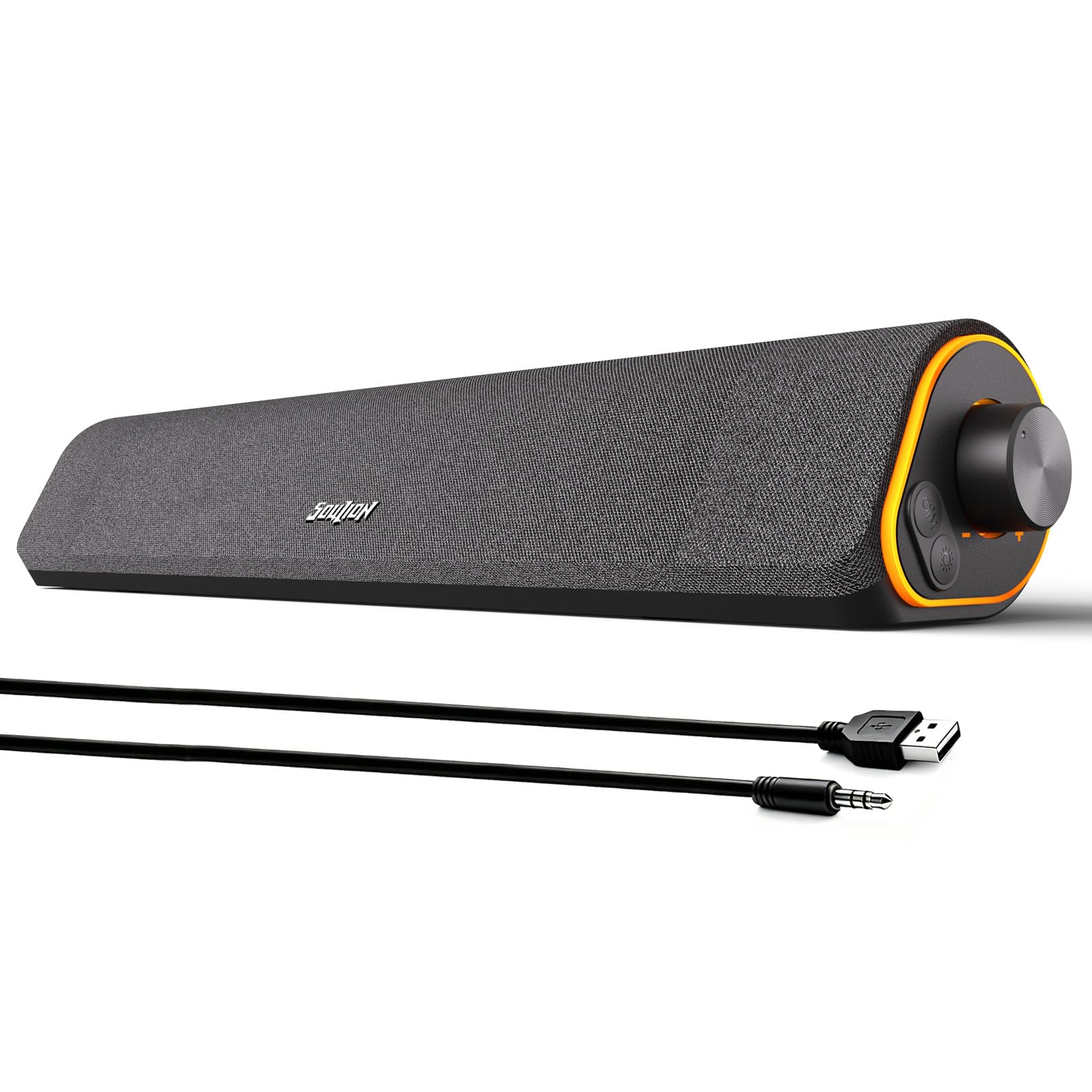
Slim, low-priced, and fitted with four LED lighting modes, the SOULION R50 slides under a monitor and pairs via Bluetooth without fuss. The angled profile directs sound toward the listener, and the LEDs stay subtle enough for a workspace. The performance ceiling is modest: audio can cut out randomly at low volume, and maximum output can sound low or muffled. That makes the R50 a reasonable fit for a tidy desk where the goal is easy background audio and colorful lighting, but not for listeners who need steady signal or balanced stereo at higher volume. Those buyers should consider a compact 2.0 stereo pair with separate left and right channels.

Pros

  • Compact angled design fits under a monitor and four LED modes stay subtle in a workspace.
  • Bluetooth pairing is quick and setup needs only a USB power source.
  • Budget price and acceptable everyday sound make it a low-barrier entry into desktop audio.

Cons

  • Maximum output can sound low and muffled for music or video beyond background levels.
  • Audio can cut out randomly at low volume, which disrupts quiet listening sessions.
Our verdict

For a compact desk that values visual polish and easy Bluetooth at a budget price, the R50 fits — as long as the audio is treated as background rather than the main event.

Check Latest Price
11

Budget Stereo Pair

SOULION C30

84 /100
Sound Score Excellent

Key details

Inputs
USB, AUX
Controls
Control pod
Form Factor
2-piece stereo desktop
Power And Drivers
6W, 2-inch drivers
View on Amazon

The C30 is a budget 2.0 stereo pair with a visual hook: flame-style LEDs and a central control pod set it apart from single-bar soundbars at the same price. Two-piece drivers give desktop audio real left/right separation, and setup is quick enough to move from box to desk in a few minutes. For casual listening, the 2-inch drivers deliver usable near-field volume, though total output stays comfortably entry-level. Bluetooth pairing and dropouts can be inconsistent on some units, so the 3.5mm AUX input is the practical fallback; that wireless quirk is the main reason this sits below the stronger all-around picks in this guide.

Pros

  • Two-piece layout delivers wider stereo separation than a single under-monitor soundbar.
  • Setup is quick, with volume and input controls gathered on a central pod.
  • Flame-style LEDs give the desktop a distinctive look without extra software.

Cons

  • Flame lighting leans decorative and can feel gimmicky in a neutral office.
  • Bluetooth pairing and dropouts can be inconsistent, so the AUX input is the steadier connection.
Our verdict

If flame lighting and channel separation are the priority, the C30 is a budget-friendly 2.0 pick for a desk that can live with decorative LEDs.

Check Latest Price
12

Design-Focused Desktop

KEiiD KD-C02

83 /100
Sound Score Excellent

Key details

Inputs
AUX
Controls
Touch pod, 4 EQ
Form Factor
2-piece desktop stereo
Power And Drivers
20W, silk tweeter, woofer
View on Amazon

The KEiiD KD-C02 is a desktop 2.0 that leads with visual character: steel mesh housing, a silk dome tweeter, and a wireless touch pod that adds four EQ modes to the desk. Sound quality holds up well for a compact pair, with clear highs and enough body for music, games, and calls without needing a subwoofer. The tradeoff is that long-term durability and wireless stability trail the top pick, which makes this a better match for a style-led workspace than for a set-and-forget office.

Pros

  • Strong clarity and detail for a compact 2.0 at a mid-range price.
  • Steel mesh housing and silk dome tweeter give the desk a premium focal point.
  • Wireless touch pod puts EQ switching and volume control within arm's reach.

Cons

  • Bluetooth can drop for a moment in rooms with several wireless devices.
  • Long-term durability can vary between units, and the touch pod may become less responsive over time.
Our verdict

Choose it when the desk's look and touch control matter more than flawless Bluetooth behavior and maximum long-term consistency.

Check Latest Price
13

Minimalist RGB Soundbar

ICOREBEI 2BT3K

78 /100
Sound Score Very Good

Key details

Inputs
USB-C, USB-A
Controls
Built-in controls
Form Factor
Under-monitor soundbar
Power And Drivers
6W, passive radiator
View on Amazon

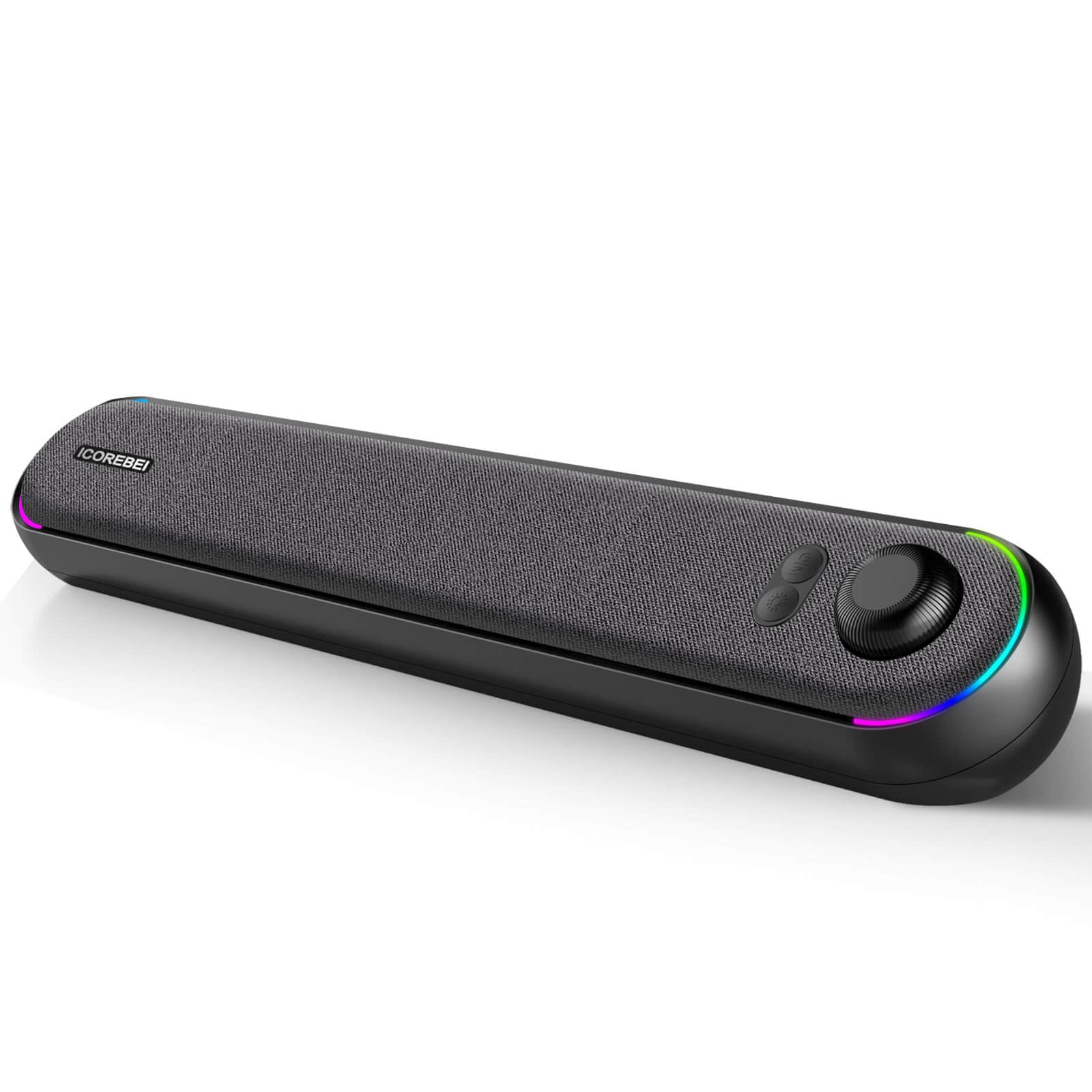
The ICOREBEI 2BT3K is a budget-friendly USB-C soundbar that pairs quickly over Bluetooth 5.3 and lights up with RGB, all in a slim bar that clears the front of a monitor without adding clutter. For basic desktop audio, the dual full-range drivers and passive radiator produce fuller sound than the price suggests, and the built-in controls handle volume and mode changes without reaching around a PC. The main boundary is output: 6W max power and a single-bar footprint keep volume at desk-friendly levels, so large rooms and bass-heavy music are not this speaker's territory. That also makes it an easy, low-stakes option for a first soundbar or a secondary desk setup, rather than a long-term workhorse for demanding listening.

Pros

  • Works the moment it is plugged in, with no setup fuss beyond pairing.
  • Bluetooth 5.3 pairs quickly and keeps the connection simple for casual listening.
  • Sound is fuller than most at this price for a single-bar desktop speaker.

Cons

  • Bass extension is modest; music with heavy low end sounds thin rather than punchy.
  • Output ceiling is modest; in a larger room the bar maxes out before it fills the space.
Our verdict

This fits a small desk, casual listening, and a tidy USB-C connection at a budget price, but not room-filling volume or deep bass.

Check Latest Price

How to Choose

Bluetooth Connectivity

Bluetooth version matters less than how the speaker handles reconnects and dropouts. A speaker with Bluetooth 5.0 or 5.3 can still lose its audio stream when the PC sleeps or the USB power source browns out.

Desktop speakers often draw power from the same USB port that carries audio. If that port shares bandwidth with other devices, the Bluetooth radio can become unstable. Look for a model that also has a 3.5mm or USB wired input so you have a fallback when the wireless link acts up.

Power and Drivers

Wattage figures are marketing numbers unless you know the driver size and cabinet. A 60W-rated pair with 3-inch carbon-fiber woofers can produce real bass because it moves more air; a 10W soundbar with small drivers cannot, no matter what the label claims.

At desk distance, 6W to 20W is usually enough for music and calls. The trade-off appears when you push volume: small drivers distort sooner and lose low end, so if you want room-filling sound, choose a larger two-piece set or a 2.1 system with a subwoofer.

Input Flexibility

A wired backup is not a downgrade. USB audio sends digital data directly to the speaker's DAC, while AUX uses the PC's sound card; both bypass Bluetooth codec compression and the connection drops that can interrupt a meeting.

Check which ports your monitor or PC actually has. USB-C powered speakers often include a USB-A adapter, but if your PC only has USB-A and the speaker's cable is short, placement becomes harder. Plan the cable path before buying.

Form Factor

Two-piece speakers create true left/right separation because the drivers sit apart on your desk. A soundbar consolidates everything under the monitor, which saves space but narrows the stereo image and can make voices sound more centered.

Monitor-clip bars go a step further by attaching to the display, which keeps the desk completely clear. That design depends on your monitor's back shape and thickness, so measure the bezel before assuming a clamp will fit.

Volume Controls

The control method changes daily use more than the sound. A front knob or touch pod is easier to reach than a volume wheel on the back, and a wireless dial is convenient until it loses sync or needs line-of-sight.

Some USB-powered speakers have no physical volume control at all and rely entirely on the OS; that works until the system volume is maxed and the speaker is still quiet. Choose a model with an on-speaker control or a wired remote if you adjust volume often.

Frequently Asked Questions