6 Best Computer Microphone in 2026: Picks That Match Your Room

The right computer microphone depends on pickup pattern and room noise, not noise-canceling labels. Match the mic to your calls, gaming, or streaming.

Many USB mics labeled 'noise-canceling' still pick up keyboard clicks, room tone, and side conversations. That label typically means a cardioid pickup pattern, not active noise cancellation, so the real difference between models is how they behave in your physical space — not what the box promises.

The trade-off that matters most is versatility versus simplicity. A multi-pattern condenser moves from calls to podcasting to instrument recording, but it brings a larger desk footprint and picks up more room tone. A focused budget cardioid is easier to place and far cheaper, yet it covers one job at a time.

This guide sorts mics by pickup pattern, mute control, and desk footprint, so you can match the microphone to the room you already have — a quiet home office, a shared meeting space, or a desk next to a mechanical keyboard.

About the Sound Score: This comparative score is calculated from a product's published customer rating and review volume. It is not a laboratory measurement or a hands-on test result.

1

Best Overall

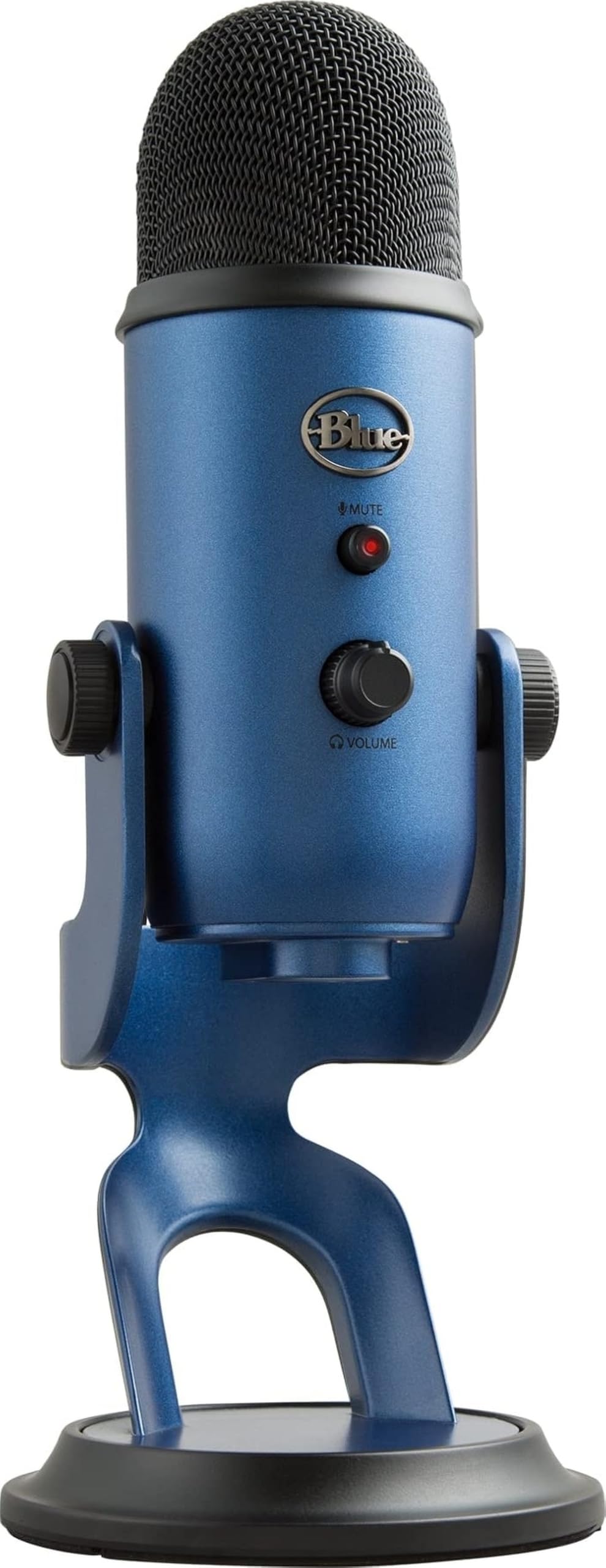
Blue Yeti USB Mic

93 /100
Sound Score Outstanding

Key details

Mute & LED
Mute button, LED
Form Factor
Desktop studio condenser
Polar Pattern
Cardioid, omni, bidirectional, stereo
Noise Handling
No active cancellation
View on Amazon

The Yeti is the only USB mic in this set that can change its pickup behavior without software or extra hardware. Four switchable polar patterns cover cardioid for a solo voice, bidirectional for face-to-face interviews, omni for full-room capture, and stereo for instrument recording. Zero-latency headphone monitoring lets you hear yourself in real time, so you can adjust delivery without the delay that throws off pacing. The front-panel gain, mute, and headphone volume controls put the essentials directly on the body, which matters when you are mid-stream and cannot click through a settings window.

Setup takes less than a minute: connect the USB-A cable, set a pattern, and start speaking. The metal housing and weighted base keep the mic planted on a crowded desk, and the swivel mount lets you angle the capsule toward your mouth without the whole assembly tipping. Blue VO!CE software adds EQ, compression, and preset options for users who want to shape the sound, though the mic already sounds balanced on a flat setting.

This is the pick for podcasters, streamers, and home recordists who need one desktop mic that moves between spoken-word sessions and music capture without swapping gear. It also holds up as a daily driver for conference calls and voiceover work, especially for users who want to buy once and keep it on the desk for years. The tradeoff is sensitivity: in an untreated room, keyboard clicks and HVAC hum can bleed into recordings unless you use a quiet space or noise suppression. That boundary makes it a poor match for minimalist travel setups or for rooms where background tone cannot be controlled.

The pattern flexibility is what separates it from cheaper single-pattern cardioid mics. A streamer can switch from voiceover cardioid to omni for a group reaction, while a podcaster can run bidirectional for two guests and stereo for an acoustic instrument all without adding an interface or moving to a different mic. For users who only need simple calls, that flexibility is more than the job requires, and a smaller, less sensitive mic may be the better buy. But for creators whose recording needs change during a session, the Yeti's range makes the premium desk space and price easier to accept.

💡 Use the mute button when adjusting cables or stepping away; it avoids sending loud bumps to callers.

Pros

  • Clear, studio-grade voice capture for vocals, instruments, and spoken word.
  • Metal body and weighted base stay planted on a desk under daily movement.
  • One USB mic covers calls, streaming, podcasting, and recording without extra gear.
  • Strong value when multipattern work is part of the routine.
  • Plug-and-play USB setup on Mac and PC with no interface needed.

Cons

  • Gain and mute controls can feel imprecise when making small adjustments mid-recording.
  • Intermittent control response may surface on individual units.
Our verdict

For creators whose recording needs change from one session to the next, the Blue Yeti is the desktop mic that stays on the desk and adapts with a switch.

Check Latest Price
2

Best Value All-Rounder

FIFINE K669B

91 /100
Sound Score Outstanding

Key details

Mute & LED
Volume knob, no mute
Form Factor
Desktop condenser, tripod
Polar Pattern
Cardioid
Noise Handling
No active cancellation
View on Amazon

The FIFINE K669B keeps the USB condenser formula simple: a cardioid capsule, one volume knob, and a metal body at a price that undercuts most plastic alternatives. Compared with the multipattern studio classic in this set, it gives up switchable polar patterns and keeps the controls to a minimum. That simplicity is the point for someone who just wants the laptop or headset microphone replaced without an audio interface. The included 6.5-ft cable covers USB-A and USB-C computers, so the first setup is plug-and-play.

The cardioid pickup does its best work close to your mouth, which is exactly how a desk mic should be used for calls and gaming. Voices come through with clarity, and the front volume knob provides quick gain cuts without opening system settings. The metal body and small footprint make it easy to leave in place, and the tripod keeps it stable on crowded desks. Compatibility with PC, Mac, PS4, and PS5 means the same mic can switch between work calls and console sessions.

This is a first USB condenser for someone who wants everyday call and gaming audio without learning studio gear. The right buyer sits close to the mic and wants a hassle-free upgrade from a laptop or headset mic, with the option to move to console gaming later.

💡 Use the front volume knob for quick gain adjustments during calls; it keeps levels in check without opening the OS mixer.

Pros

  • Clear voice capture for calls, gaming, and casual streaming setups.
  • Consistent sound quality in normal use.
  • Budget-friendly price for a metal desktop condenser.
  • Front volume knob gives quick gain control without extra software.

Cons

  • No physical mute button on the body; muting relies on the OS or app.
  • In untreated rooms, keyboard clicks and room tone can be audible unless the mic is placed close.
  • USB electronics can develop issues in some cases, shortening the mic's usable life.
Our verdict

For a first USB condenser, the K669B covers the essential job of clear call and gaming audio at a price that leaves room to upgrade later.

Check Latest Price
4

Best Beginner Streaming Kit

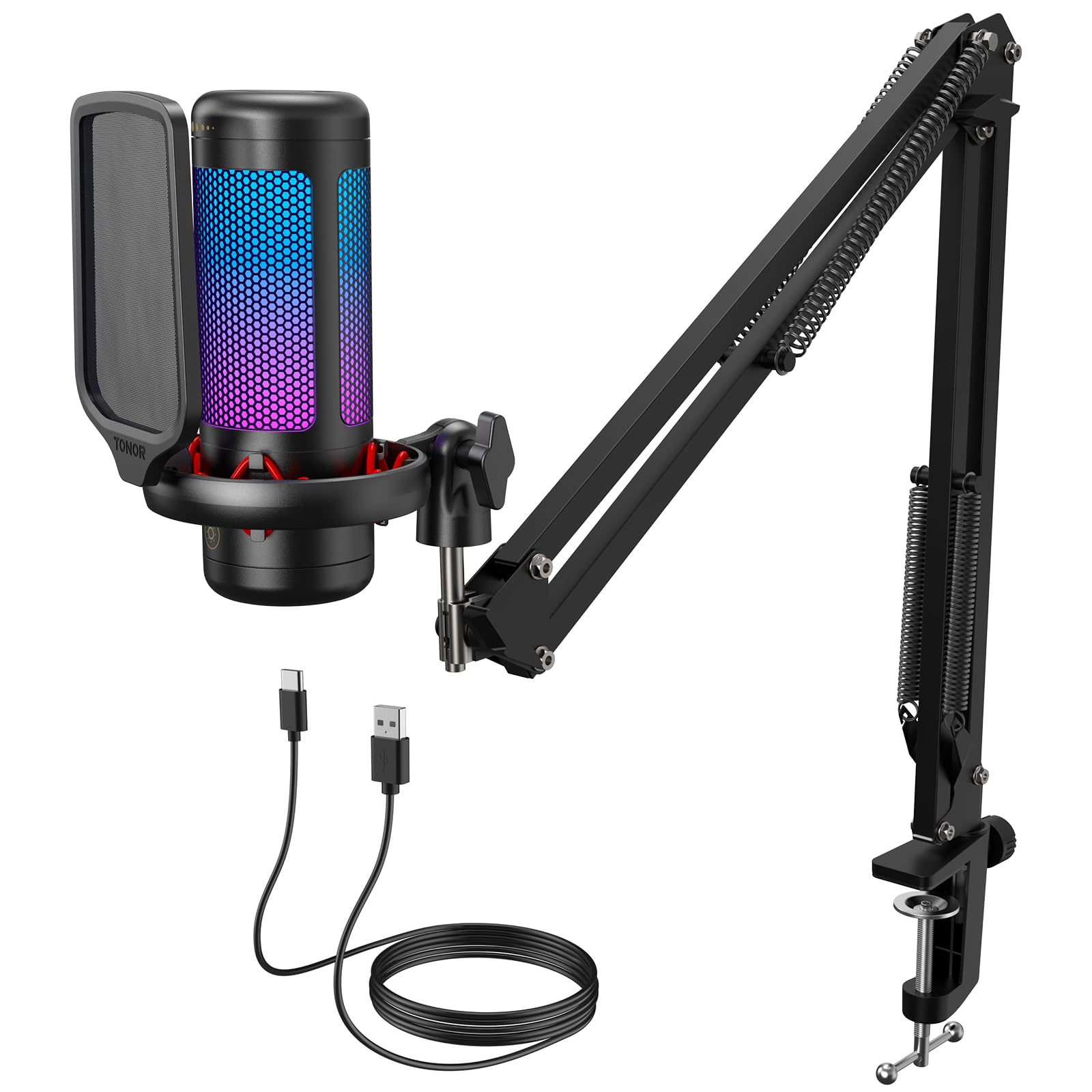
TONOR TC310+

90 /100
Sound Score Outstanding

Key details

Mute & LED
Tap mute, RGB
Form Factor
Boom arm kit
Polar Pattern
Cardioid
Noise Handling
No active cancellation
View on Amazon

The TONOR TC310+ bundles everything a first-time streamer needs — boom arm, pop filter, RGB, gain dial, and tap mute — into one USB kit. That makes it a different proposition from the meeting-room specialist in this set, which focuses on whole-room pickup rather than creator-style control.

Sound quality is clear at desk distance for calls, gaming, and basic podcasting, with a cardioid pattern that keeps the focus on your voice instead of the wall behind the mic. The tap mute and gain dial work without opening software, and the included pop filter keeps plosives in check during longer speaking sessions.

Setup is genuinely easy: the included pop filter, gain dial, and tap mute cover the basics without extra software. The arm clamps to a table edge, keeping the mic close without taking up desk surface, and RGB/color options add a stream-ready look for a creator setup.

This kit is best for budget podcasters and new streamers who want one package instead of separate purchases. The tradeoff is construction: plastic components feel budget-grade, and the USB port placement can make cable routing awkward. That’s acceptable when the goal is a first setup, less so if you expect a premium desk piece.

Pros

  • Great starter quality for new creators.
  • Clear sound for the price.
  • Easy setup, including the boom arm.
  • RGB/color options add a stream-ready look without extra accessories.

Cons

  • Background-noise reduction is modest, so room tone or keyboard clatter can bleed into untreated recordings.
  • The full boom-arm assembly is overkill for a minimalist desk or travel bag.
Our verdict

If you’re setting up a first streaming or podcasting corner, the TC310+ gets you recording with one purchase and leaves room for a nicer mic later.

Check Latest Price
5

Best Compact Gaming Mic

Razer Seiren V3 Mini

90 /100
Sound Score Outstanding

Key details

Mute & LED
Tap-to-mute, LED
Form Factor
Ultra-compact desktop mic
Polar Pattern
Supercardioid
Noise Handling
Tight pickup angle
View on Amazon

The Seiren V3 Mini uses a supercardioid capsule to capture a tight, clean voice while trimming room tone from the rear. It beats a headset mic for game chat and calls without requiring a boom arm, and the body feels denser and more solid than its small size suggests.

Plugging it into a USB-A port gives you a usable mic on PC or Mac without extra software; the top-mounted tap-to-mute is easy to hit mid-sentence. The small footprint also leaves room for a keyboard and mouse, which makes it a natural fit for tight gaming desks.

Best for gamers and remote workers who want a simple voice upgrade over a headset mic and don't need the studio flexibility of a larger multipattern condenser. The supercardioid pattern narrows the pickup, but there is no active noise cancellation, so background noise can bleed through in loud rooms. It also suits people who prefer a no-frills desk setup: no boom arm, no interface, just a USB cable and tap-to-mute.

The cylindrical grille and compact base look like a deliberate desk piece rather than a cheap plastic accessory. At this price tier, the build quality and sound focus make a stronger case than budget condensers that demand more desk space and more software fiddling.

💡 Keep the mic close and angle the grille toward your mouth — the tight pickup performs best at near range.

Pros

  • Supercardioid focusing keeps your voice clear while trimming room tone from the rear.
  • Compact body fits tight desks without the footprint of a larger condenser.
  • Tap-to-mute on top gives an immediate physical mute for calls and streams.
  • Solid build quality makes the price tag feel fair for a branded compact mic.

Cons

  • No headphone monitoring, so creators who need live audio feedback will need extra hardware.
  • Loud rooms can bleed through the supercardioid feed, so this mic rewards close placement.
Our verdict

The Seiren V3 Mini is for buyers who want a compact, clear-voiced desk mic without the bulk of a studio condenser. Gamers and remote workers with tight desks and reasonably quiet rooms will get the most out of it.

Check Latest Price
6

Hobbyist Podcasters

ZealSound K66

89 /100
Sound Score Excellent

Key details

Mute & LED
Mute button
Form Factor
Desktop condenser mic
Polar Pattern
Cardioid
Noise Handling
Noise-reduction mode
View on Amazon

Audio comes through clear and full for spoken-word work, and setup is quick on PC/Mac. The K66's appeal is the hands-on control set: gain, echo, monitoring, and phone/computer adapters are all here at a mid-range price. The caveat is durability: a unit can go silent without warning after weeks or months, so this is not a set-and-forget desktop mic. Apple-device recognition can also be inconsistent. The multipattern studio classic at the top of this set remains the safer all-around choice; the K66 fits creators who want defined voice control and multi-platform recording.

Pros

  • Clear, professional spoken-word tone for the price
  • Gain, echo, and monitoring controls give podcasters hands-on voice shaping
  • Phone/computer compatibility via USB-C/Lightning adapters simplifies multi-platform recording

Cons

  • The noise-reduction switch trims rear pickup but cannot remove loud room sound
  • The gain, echo, and monitoring controls are more than a gamer looking for basic desktop audio needs
Our verdict

Buy the K66 for podcasters and voice-over hobbyists who want gain, echo, monitoring, and phone/computer recording from one desktop USB mic; if those controls are not the priority, the multipattern studio classic is the better fit.

Check Latest Price
7

Travel and Backup

DUNGZDUZ CGS-M3

87 /100
Sound Score Excellent

Key details

Mute & LED
No mute button
Form Factor
Flash-drive stick
Polar Pattern
Omnidirectional
Noise Handling
No active cancellation
View on Amazon

The DUNGZDUZ CGS-M3 turns a laptop's weak built-in audio into clear call sound from a flash-drive-sized stick that slips into a pocket. Plug-and-play operation works without drivers on most systems, and the carrying case keeps it ready for travel. Windows 11 recognition can be inconsistent, and noise isolation is minimal because of the tiny omnidirectional element, so this is a travel/backup companion rather than a studio fixture. The call-first tuning means it stays in the basic-calls lane, not serious recording.

Pros

  • Great quality for its size and price.
  • Clear sound for calls.
  • True plug-and-play operation.

Cons

  • No physical mute button, so muting happens in the app rather than on the mic.
  • Not a match for podcasters or streamers who need a cardioid desk mic for voice capture.
Our verdict

Best as a travel or backup mic for remote workers who need clear call audio in a pocketable package; leave podcasting and streaming to a larger cardioid desk mic.

Check Latest Price

How to Choose

Pickup Pattern and Direction

Cardioid mics capture what is in front and reject most sound from behind, so they dominate single-user desktops. Omnidirectional mics capture evenly in all directions — good for a meeting table, but they also record side conversations and room tone. Supercardioid designs narrow the front pickup further and fit gaming desks better.

The underlying trade-off is distance: every condenser gets quieter as the source moves away, so a mic two feet from your mouth sounds distant regardless of pattern.

Mute Control and LED Status

Physical mute is the only mute that works before the operating system does. Software mute stops working when a game grabs audio control, which is why buyers praise a tactile mute button on the body.

The trade-off is mechanical: a mute switch is another moving part where components get cut. If you rely on mute for privacy, test it after unboxing and prefer a clear LED state change.

Form Factor and Desk Footprint

Desk stands transmit keyboard thumps and mouse clicks straight into the capsule. Gooseneck mics sit low and suit lean-in talk; boom arms get the capsule closer to mouth height.

The real trade-off is between footprint and distance. A compact mic saves space but may sit too far from your mouth; a boom arm floats the capsule six to twelve inches from your face without touching the desk.

Noise Handling and Background Rejection

'Noise-canceling' on a USB microphone is not the active cancellation you get in headphones. It is usually a cardioid pattern that rejects rear sound while still capturing room tone and clicks.

Placement matters more than the badge: put the mic between you and your keyboard, or use a boom arm to shorten the distance. No consumer USB mic erases loud HVAC hum or a barking dog.

Platform Compatibility and Driver-Free Setup

Most USB mics are class-compliant, so they work without drivers on Windows and macOS. The trade-off is USB power management: after sleep, some PCs stop re-enumerating and need a replug.

Front-panel USB ports deliver less stable power than rear motherboard ports, which can cause crackles. If you switch between a PC, laptop, and phone, confirm the cable and adapter before buying.

Frequently Asked Questions