9 Best Conference Room Microphone in 2026: Match Pickup to Room Size

Find the best conference room microphone for your room size, meeting platform, and budget - without overpaying for pickup you don't need.

Most conference room microphones claim 360-degree pickup and AI noise cancellation, but those claims rarely say how far the pickup actually reaches. In practice, multi-mic room coverage tops out around 3-5 meters, which means a single unit fits small and mid-size rooms - not a 20-foot boardroom table.

Bluetooth convenience is the other common trap. The same speakerphone that sounds excellent over USB can drop, stutter, or pair oddly over Bluetooth in office environments. Wired USB remains the most predictable connection for softphone meetings, so the real decision is whether wireless freedom matters more than connection certainty.

The right choice comes down to room size, table shape, and whether you already have speakers. Mic-only pucks work well when your room has sound covered, while all-in-one speakerphones replace both. A satellite mic or daisy-chainable unit solves longer tables; a single 4-mic device does not.

This guide separates those use cases clearly, so you buy only the coverage your room actually needs.

About the Sound Score: This comparative score is calculated from a product's published customer rating and review volume. It is not a laboratory measurement or a hands-on test result.

1

Best Overall

Anker PowerConf A3301

89 /100
Sound Score Excellent

Key details

Connectivity
Bluetooth 5.3, USB-C
Pickup Range
5 m
Microphone Array
6 mics, 360°
View on Amazon

Anker's PowerConf A3301 packs a six-microphone 360-degree array, 24-hour battery, Bluetooth 5.3, and USB-C into one mid-range speakerphone. Voice pickup stays clean and evenly balanced around a small-to-mid-size conference table, and far-field behavior holds up when a full room is on the call. The six-mic layout separates it from budget pucks that lose voices as soon as someone leans back or speaks from the other side of the table. That combination of pickup radius and connection options puts it ahead of the simpler alternatives in this comparison.

Setup runs under a minute in standard conferencing apps. Mute, volume, and call controls sit where any participant can reach them without taking over the meeting, and a 15-person Teams call stays intelligible with people spread around a standard table. The unit behaves like a dedicated room device rather than a laptop accessory, so no one spends the first five minutes checking drivers or hunting for the right cable.

This is the right pick for small-to-mid-size meeting rooms, Zoom-heavy home offices, and Teams users who want USB-C or Bluetooth flexibility. Large boardrooms that need satellite microphones and buyers who require Microsoft Teams certification should weigh other options. Bluetooth can be the weak link in some environments; USB-C is the stable fallback, so keeping the included cable on the table protects critical meetings.

Voice Radar 3.0 handles the usual office soundtrack, so keyboard clatter and paper shuffling stay out of the far end. The speaker also carries enough output for a small-to-mid-size room, and the controls are simple enough that a visitor can mute the call without asking for help. At a mid-range price, the A3301 becomes the value anchor in this group, undercutting modular satellite-mic systems while covering the room sizes teams actually use.

Battery life reaches a full workday, which lets the unit shuttle between a huddle room and a home desk without a charger. The build feels stable on a table rather than hollow, and the connection choices cover both a laptop dock and a phone. Buyers who want a permanent USB-only desk setup can save with the wired option in this set, but the A3301's wireless flexibility removes the need to choose a single cable system.

💡 Keep the USB-C cable on the table for high-stakes calls; Bluetooth is the convenient mode for quick sessions.

Pros

  • Six-microphone 360-degree array captures voices evenly around a small-to-mid-size room.
  • Setup is fast, and controls are easy for any participant to use.
  • Bluetooth 5.3 and USB-C let the same unit move between laptop dock and phone.
  • Solid build keeps the unit stable on a table and consistent in daily meetings.
  • Mid-range price undercuts satellite-mic systems without giving up room coverage.

Cons

  • In loud rooms, noise suppression can let static or echo reach the far end.
  • Bluetooth can produce static or pairing quirks in certain environments; USB-C avoids that.
Our verdict

The A3301 gives small-to-mid-size rooms the pickup, battery, and connection options that make conference calls feel less like an audio experiment.

Check Latest Price
2

Best for Larger Meetings

EMEET Luna Plus Kit

88 /100
Sound Score Excellent

Key details

Connectivity
Bluetooth 5.3, USB, dongle
Pickup Range
4 m
Microphone Array
8 + satellite mic
View on Amazon

The Luna Plus Kit pairs an 8-microphone array with a satellite pod, so the pickup zone covers a full 14-person conference table instead of relying on one central puck to hear everyone. This is the main distinction from the top pick's single-unit approach, and it matters most in rooms where people sit at the far end of a long table.

Voice pickup stays clear with the satellite mic placed at the far end of the table, while the main unit balances near-field speakers and the built-in speaker. The 89 dB output is loud enough for a busy meeting room, and the 10-hour battery handles consecutive meetings before needing the charger. Construction feels solid, and the controls are easy to reach during a call.

Meeting rooms that seat 10 to 14 people and regularly mix in-room and remote participants will benefit most from the split pickup. USB, Bluetooth 5.3, and dongle connections cover laptop-centric and BYOD setups, so it suits offices that switch between softphone clients and video platforms. Setup is fast over USB or Bluetooth, and the dongle gives an alternate path for PCs with locked-down Bluetooth stacks. It is not a budget fix for a small huddle room; a single compact speakerphone creates less desktop clutter there.

Pros

  • The 8-mic array and satellite pod handle large 14-person conference rooms without huddling around a single puck.
  • Remote participants hear clear speech across the table, with the satellite pod catching talkers at the far end.
  • USB, Bluetooth 5.3, and dongle connections cover laptop meetings and BYOD setups with no extra drivers.
  • A 10-hour battery carries through back-to-back meetings without hunting for a charger at midday.

Cons

  • Expanding the system to 25 people requires the separately sold EMEET daisy-chain cable, which does not come in the box.
Our verdict

For a wide conference table, the Luna Plus Kit closes the gap between the near-field main unit and the far side of the room; it is the stronger pick than a single puck for 10 to 14 people.

Check Latest Price
3

Best Wired USB Option

Anker PowerConf S330

88 /100
Sound Score Excellent

Key details

Connectivity
USB-C, USB-A included
Pickup Range
3 m
Microphone Array
4 mics, 360°
View on Amazon

The S330 delivers clear, loud conference audio from a compact puck, with a 4-mic array that captures voices around a full 360 degrees. The 1.75-inch driver and twin passive radiators put enough sound in a small room without strain, while the DSP trims background noise and keeps speech intelligible. Voices come through with natural tone rather than the thin output heard from smaller speakerphones. Noise reduction handles keyboard clatter and HVAC hum without making voices distant.

Setup is a USB-C connection, and an adapter covers older USB-A laptops. Windows and Teams recognize the unit immediately, with no pairing menu or battery cycle to manage. Skipping Bluetooth and battery means no pairing handshake and no charging habit to keep track of. Voice pickup holds up for a handful of people clustered around the device without anyone having to shout.

This is the right speakerphone for a fixed desk meeting spot or a small huddle room where the laptop stays plugged in. Buyers who prefer a USB-only workflow can settle in without hunting for a dongle or charging cable. It is not for roaming presenters, and that boundary matters more than its wired frame. The price sits in the mid-range, which fits teams that need solid multi-person pickup without moving into premium conference gear.

💡 Center the S330 on the table and keep talkers nearby for even voice pickup.

Pros

  • Clear and loud speaker output for conference calls and media playback.
  • Plug-and-play USB-C with a USB-A adapter gets calls running quickly.
  • Teams and Windows devices connect without extra drivers or software.
  • Setup takes only a few seconds, and daily use stays simple.

Cons

  • Mic pickup can sound uneven depending on table placement or the particular unit.
  • The 3m pickup range restricts this to small tables and huddle rooms.
Our verdict

For fixed meeting spots, the S330 pairs clear pickup with loud sound over a simple USB connection.

Check Latest Price
4

Best Budget Mic-Only

TONOR G11 USB Mic

89 /100
Sound Score Excellent

Key details

Connectivity
USB
Pickup Range
11.5 ft
Microphone Array
Single omni capsule
View on Amazon

The G11 is a desktop omnidirectional USB condenser with an 11.5-foot pickup radius, and it connects to a laptop with a single cable at a fraction of speakerphone prices. Meeting apps recognize it without driver setup, which makes it one of the easier entry-level room mics to deploy. It sits upright rather than lying flat like a boundary mic, so the table footprint differs from the slimmer option in this lineup.

Group calls hold voice separation around a small conference table, and normal speech at ordinary levels stays intelligible across the pickup radius. The capsule handles the huddle-room use case without the thin, distant tone found in some inexpensive desktop mics.

Buy the G11 for budget huddle spaces, court reporting, or lecture capture when the room already has external speakers. It is a microphone only; remote participants still need a speaker, so it replaces the laptop's built-in mic rather than acting as an all-in-one speakerphone. Keep speaking positions within 12 ft; larger rooms will exceed the coverage area.

Pros

  • True plug-and-play USB setup with no driver or interface fiddling.
  • Clear omnidirectional sound for full-group conference calls.
  • Wide voice pickup around a small table without close talker positioning.
  • Sturdy build for the price.

Cons

  • Plastic build quality can vary between units, with some feeling cheaper than others.
  • Mute control can be inconsistent on some units; the indicator light is worth a glance.
Our verdict

The G11 brings table-wide USB pickup to a budget huddle room without the cost of a speakerphone.

Check Latest Price
5

Best Portable Speakerphone

Jabra Speak 510

90 /100
Sound Score Outstanding

Key details

Connectivity
Bluetooth, USB
Pickup Range
Near-field
Microphone Array
1 omni mic
View on Amazon

The Speak 510 packs a 10W speaker, 15-hour battery, and USB/Bluetooth pairing into a puck that disappears into a laptop bag. Where the six-mic room unit spreads pickup across a table, this one keeps things personal: it stays close to the talkers, needs no dongle, and connects to a laptop or phone with minimal ceremony.

Voice clarity holds up on calls: background noise is trimmed, and Teams and other softphone platforms pair without repeated connection fuss. The 10W speaker handles a quiet office or a huddle-room table without strain, and the 15-hour battery lets a road warrior leave the charger behind for a full work week. The puck occupies less desk space than a coffee mug.

This is a companion for travelers and remote workers who sit within arm's reach. Single-microphone design limits multi-person pickup; best for 1–3 close talkers. A six-person conference table is beyond its reach, and large rooms need the multi-mic unit that leads this category. For BYOD meetings where everyone can lean toward the puck, it behaves like a far more expensive unit.

Pros

  • Voice clarity stays strong for both sides of a call, even with background office noise.
  • Dense build and compact shape hold up to daily bag carry between home, office, and travel.
  • Pairs with Teams and other softphone platforms without repeated pairing fuss.
  • Roughly the size of a drink coaster, it travels easily and runs 15 hours per charge.

Cons

  • Bluetooth can skip computer-sourced audio in some setups; USB is the safer fallback for PC meetings.
  • The 10W speaker can be out-muscled by a loud room; maximum volume fits quiet tables better than noisy spaces.
Our verdict

Solo remote workers and two-person huddles get a travel-friendly speakerphone with clear voice handling; anyone expecting whole-table pickup needs a multi-mic room unit.

Check Latest Price
6

Best for Microsoft Teams

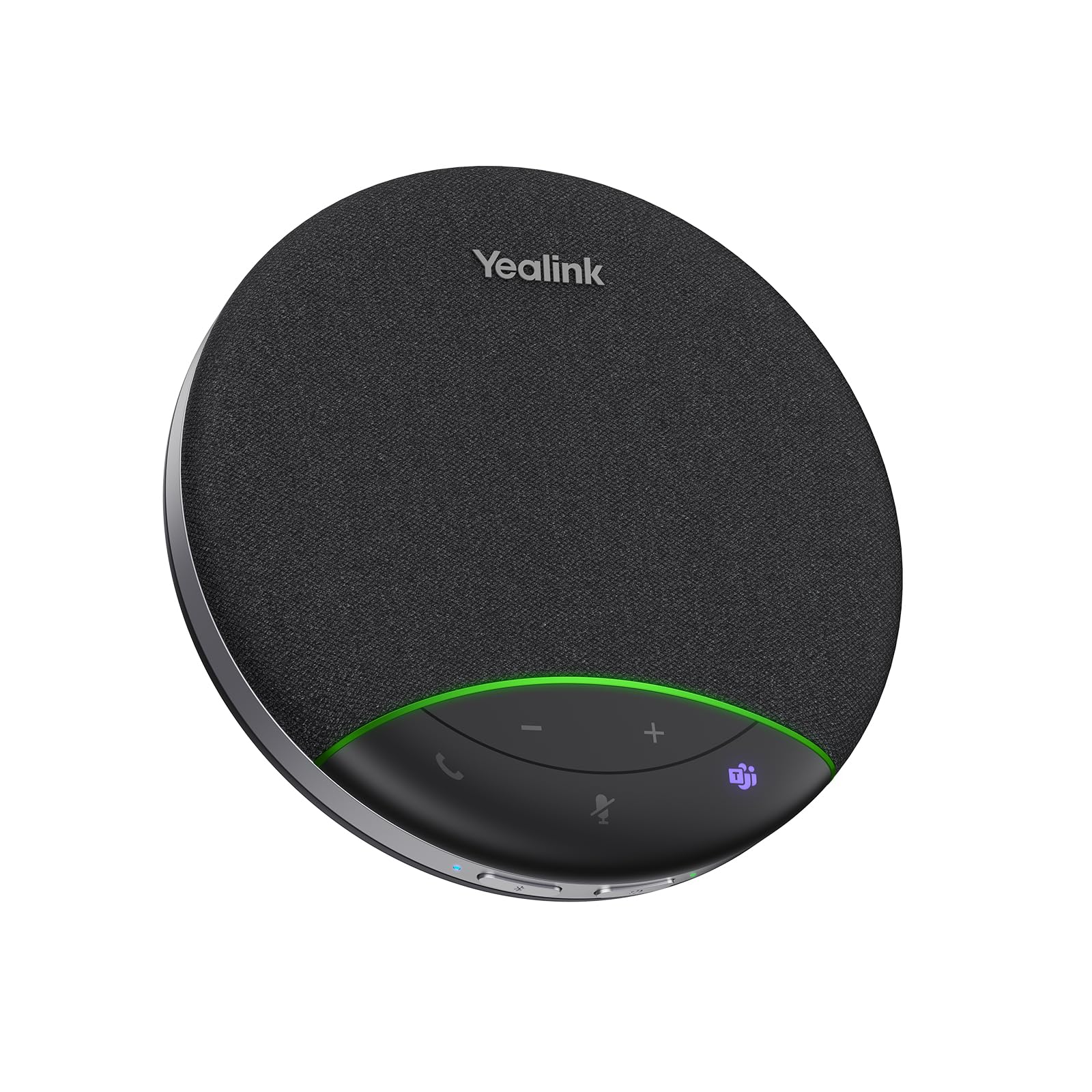
Yealink SP92

79 /100
Sound Score Very Good

Key details

Connectivity
Bluetooth 5.3, USB-C/A
Pickup Range
4 m
Microphone Array
360° omnidirectional
View on Amazon

Yealink's SP92 brings Microsoft Teams certification, 20-hour battery life, and Bluetooth 5.3/USB-C connectivity to the budget end of the meeting-room speakerphone market. It undercuts the top pick on price while covering the same basic 4-8 person room, and the 360-degree mic array keeps voices clear without a hub or dongle. Teams Rooms see it as a native endpoint, so joining a scheduled meeting is a one-button affair.

This is the right fit for Teams-first small rooms where calls stay on one USB-C laptop or a Teams Room device. The 20-hour battery makes it easy to move between tables, and the microphone handles a full group of four to eight people. Bluetooth can require a manual reconnect after interruptions, and mute state is clearest inside the Teams client, so keep that app open if you rely on the hardware button. Buyers with larger tables or mixed-platform needs will have an easier time with a six-mic unit.

Call quality is the SP92's strongest point: voices remain intelligible across the table, and the speaker carries a small room without strain. Music playback is secondary but usable, with more body than typical budget conference speakers. The unit feels solid on a table, and setup is genuinely plug-and-play once IT has approved it for the room.

Pros

  • Clear voice pickup and usable playback for small Teams meetings.
  • Teams certification with native call controls and plug-and-play USB-C.
  • Budget-friendly path to a Teams-certified speakerphone with 20-hour battery.
  • Simple USB-C connection works with laptops and Teams Rooms without extra drivers.

Cons

  • Mute state outside an active app can be unclear, so the hardware indicator may not match what remote participants hear.
  • Bluetooth can require a manual reconnect after audio interruptions; USB-C is the steadier link for call-critical meetings.
Our verdict

For a Microsoft-centric huddle room, the SP92 is the sensible value pick: Teams-grade calling and a 20-hour battery without the top pick's premium.

Check Latest Price
7

Budget Bluetooth Rooms

EMEET M0 Plus

84 /100
Sound Score Excellent

Key details

Connectivity
Bluetooth 5.0, USB-C
Pickup Range
3 m
Microphone Array
4 mics, 360°
View on Amazon

The M0 Plus brings four-mic 360-degree pickup, Bluetooth 5.0, and USB-C into a budget-friendly speakerphone, and the daisy-chain option extends it beyond a single small table. Call audio stays clear on both ends for huddle-room use. Setup is quick over USB-C, and the price undercuts the top pick. Connectivity can be unstable in some environments, and long-term durability can vary between units, so this sits a tier below the top pick for meeting-room fleets.

Pros

  • Four-mic 360-degree pickup keeps huddle-room voices clear for remote listeners.
  • Bluetooth 5.0 and USB-C give meeting rooms a flexible mix of connection options.
  • Daisy-chaining two units scales coverage beyond a single small-room device.

Cons

  • Mission-critical Windows 11 enterprise rollouts are outside the scope of this unit.
  • A single unit tops out around eight people; larger rooms need a second daisy-chained unit.
Our verdict

For small huddle rooms with a planned second unit, this budget-friendly speakerphone covers the essentials without the flagship price.

Check Latest Price
8

Low-Profile Desktop Setups

TONOR TM20 Boundary Mic

88 /100
Sound Score Excellent

Key details

Connectivity
USB 2.0
Pickup Range
16.4 ft
Microphone Array
360° omnidirectional
View on Amazon

The TONOR TM20 is a flat boundary microphone with 360-degree pickup up to 16.4 feet, giving a meeting room wide coverage without a bulky center unit. Build quality feels polished for the price, and the touch mute button has a blue/red LED. Voice pickup is clear on Zoom and Skype calls, though the wide range also captures more room noise. This is not a speakerphone, so remote audio needs separate speakers or a display. It fits rooms that already have sound output and need a discreet table-level mic for multi-person pickup, making it a specialized alternative to the conventional TONOR desktop microphone.

Pros

  • Captures voice clearly across a 16.4-foot radius, ideal for small conference tables.
  • Flat boundary design keeps desks visible and the microphone unobtrusive.
  • USB plug-and-play setup is simple, with touch mute and a visible status LED.

Cons

  • USB connection may not be recognized on first plug-in on some computers.
  • Occasional units may arrive without audio output; seller support can arrange refunds.
Our verdict

Buy it for a small meeting room that wants wide table pickup without a visible puck; the TM20 covers that at a budget-friendly price.

Check Latest Price
9

4-6 Person Small Rooms

ANSTEN OSM09

88 /100
Sound Score Excellent

Key details

Connectivity
USB Type-C
Pickup Range
10 ft
Microphone Array
Single omni capsule
View on Amazon

The ANSTEN OSM09 packs high-SNR omnidirectional pickup into a small USB-C puck, making it a fitting choice for 4–6 person rooms and travel-friendly dictation. It connects without driver fuss, and the smart noise-reduction chip keeps speech intelligible for online classes and court-reporting work. The compact single-capsule design can't match the room coverage of a multi-mic speakerphone, so this is best for close-table collaboration where participants sit within a few feet of the puck. Its small footprint leaves table space free for notes and laptops.

Pros

  • Clear voice pickup with effective noise reduction keeps speech intelligible in small rooms.
  • USB-C plug-and-play setup works across platforms with no extra drivers.
  • Compact, solid build is easy to pack and sits cleanly on a desk.

Cons

  • No built-in speaker, so rooms need external speakers or computer audio for remote talkers.
  • Talkers beyond 10 ft can fall outside the pickup range on long tables.
Our verdict

For court-reporting sessions and small online classes where you sit near the mic, the OSM09 is a cost-efficient companion.

Check Latest Price

How to Choose

Microphone Array

Microphone count directly determines room coverage. A single omni mic can capture voices in a circle, but it cannot distinguish a talker three feet away from a side conversation six feet away, so it works best for one to three close talkers.

Four-mic and six-mic arrays use multiple capsules with phase alignment and beam-forming to prioritize the dominant voice and suppress noise from other directions. For a 6-person huddle room, 4 mics are adequate; for an 8-12 person room, 6 mics give noticeably better pickup and fewer dropouts.

Connectivity

Wired USB is the most stable connection for computer-based meetings because it avoids Bluetooth codec negotiation, pairing handoffs, and interference from other office radios. If a meeting absolutely must not drop, USB is the safer choice.

Bluetooth adds freedom for laptop roamers and phone calls, but it is also the most common source of complaints across this category. A unit with both USB and Bluetooth lets you use USB for critical softphone meetings and Bluetooth for convenience when stability matters less.

Echo and Noise Cancellation

Echo cancellation stops remote participants from hearing themselves through the room's speakers. Some units do this with DSP algorithms, while others rely on acoustic echo cancellation (AEC) hardware that analyzes the speaker output and subtracts it from the microphone signal.

Noise cancellation in this category is not the same as ANC headphones. It reduces steady background hum and keyboard clatter, but it cannot remove a colleague talking loudly six feet away. The real-world test is whether the far end hears the dominant speaker clearly, not whether every background sound disappears.

Speaker Output

Speaker volume determines how many people can comfortably hear the far end. Small pucks with 3W drivers are fine for two to four listeners; 10W drivers and dual passive radiators handle six to ten.

A unit that sounds clear at low volume will still struggle in a noisy room or a long table, where the far end needs enough output to overcome both distance and ambient noise.

Battery Life

Battery life matters for portable and Bluetooth units because a speakerphone that dies mid-meeting disrupts everyone. A 10-hour battery covers a full workday of meetings; 20-24 hours gives multi-day buffer for travelers.

Wired USB speakerphones do not need batteries at all, which removes a failure mode and keeps the unit consistently powered. If the device sits on a conference table permanently, a wired unit is often the simpler and more dependable choice.

Mute Control

A mute button should give an immediate, honest state change that the user can see and trust. The most common problems are transmitted clicks when the button is pressed, LEDs that are hard to read from a seated position, and mute states that only apply to one app rather than the whole system.

Before buying, check whether the mute button is physical or touch-sensitive and whether the indicator light is visible from the user's angle. A small usability detail here can prevent an awkward meeting moment.

Pickup Range

Advertised 360-degree pickup usually means roughly 3-5 meters of real-world coverage, not the full length of a large room. A unit with a listed range of 16 feet will still struggle if talkers are seated at a normal volume beyond that radius.

For longer tables, consider a satellite microphone that can be placed near the far end or a daisy-chainable unit that links two speakerphones together. These options extend coverage more effectively than buying a single expensive mic with a longer claimed range.

Frequently Asked Questions