9 Best Studio Monitor Controller of 2026: Right Routing, No Noise

Find the studio monitor controller that fits your signal chain — from passive 2x2 switchers to full talkback control centers.

Most studios don't need a new audio interface or a mixer to fix their monitoring chain. They need a dedicated controller between the interface and speakers for volume, source selection, and monitor routing. The problem is that listings blur the line between true monitor controllers, passive preamps, and USB audio boxes, so a buyer can end up with a volume knob that can't switch between sources.

The real distinction is signal path and routing. Passive controllers add no power and no coloration, but they can lower maximum output with weak sources. Active or VCA units add talkback, USB audio, and gain while introducing power-related noise risks. Knowing which trade-off belongs to which design keeps you from buying the wrong tool for the job.

Match controller type to workflow: volume-only passives for single chains, 2x2 switchers for A/B, and full control centers for talkback and cue mixes. That keeps the purchase decision grounded in how your studio actually gets used.

About the Sound Score: This comparative score is calculated from a product's published customer rating and review volume. It is not a laboratory measurement or a hands-on test result.

1

Best Overall

Mackie Big Knob Passive

89 /100
Sound Score Excellent

Key details

Routing
2 sources, 2 monitors
Controls
Volume, mute, dim, mono
Signal & I/O
Passive, 1/4-inch TRS
Build & Knobs
All-metal construction
View on Amazon

The Big Knob Passive puts two audio sources and two monitor pairs behind a single large volume knob. Source A/B and monitor A/B buttons sit next to mute, dim, and mono controls, so switching between interfaces or speaker sets takes one hand and no menu. The source buttons let you keep a primary interface and a reference source connected at the same time; monitor A/B covers nearfields and a second pair without rewiring. Mono is there for quick phase and level checks, which is exactly where a small desktop controller earns its place.

The all-metal chassis is heavy enough to stay put when you turn the knob. The knob itself has a smooth sweep with a slight mechanical drag, and the source/monitor buttons click into place with clear detents. The knob's travel is long enough for fine adjustments and large enough to grab during quick level rides. The controls are spaced so you can hit mute or mono without looking after a session or two. No power supply or driver is required, so setup is cable routing and a quick level check.

This controller fits the home and project studio owner who needs one source A/B switch and one monitor A/B switch. Connections are 1/4-inch TRS only, so XLR patch points and RCA consumer gear are outside its reach. Studios that need talkback, cue routing, or a third input are better served by a fuller control room hub; within a simple TRS chain, the Big Knob Passive replaces interface-menu fiddling with a fixed, tactile monitor controller at an entry-level price.

Pros

  • All-metal chassis and heavy knob handle daily desk use without flex or movement.
  • Source A/B and monitor A/B switching covers the two-input/two-monitor routing jobs this controller is built for.
  • Plug-in-and-go setup needs no power supply or software.

Cons

  • In high-gain chains, hiss from upstream gear can stay audible in the signal path, especially during quiet passages.
  • Low-output sources may produce a lower maximum monitor level than expected, which can push setups to add extra source gain.
Our verdict

For a two-source/two-monitor TRS studio, the Big Knob Passive keeps source switching and volume where they belong: in front of you.

Check Latest Price
2

Best Control Center for Larger Studios

PreSonus Monitor Station V2

88 /100
Sound Score Excellent

Key details

Routing
4 sources, 3 monitor pairs
Controls
Source select, volume, mute, dim
Signal & I/O
Active, TRS, S/PDIF
Build & Knobs
Full-size desktop unit
View on Amazon

The Monitor Station V2 routes four stereo sources to three monitor pairs, with four independent headphone amplifiers and a built-in talkback microphone. Unlike the passive 2x2 switcher that leads this category, this is an active control-room hub: source selection, monitor switching, talkback, and separate cue feeds all sit within reach of the mix position. The S/PDIF input adds a digital path alongside the four analog pairs.

Front-panel level trims and labeled input switches keep the multi-source layout clear, so connecting several analog sources and a digital device does not require menu work. This is the hub for a studio that already owns an interface and routes several sources to multiple monitor pairs with talkback and cue mixes — the premium price makes sense only in that context.

The signal path stays free of audible noise while switching between sources and monitor pairs.

Pros

  • Four stereo sources, three monitor pairs, and four headphone amps put full studio routing on the desktop.
  • Front-panel level trims and labeled switches keep multi-input routing clear in session work.
  • Transparent signal path with solid component quality across the monitor section.

Cons

  • For a minimal desktop with one monitor pair, the multi-input routing and cue controls exceed the chain's needs.
  • No USB audio
Our verdict

The control-center feature set makes this the specialist choice — the passive 2x2 switcher remains the generalist's pick.

Check Latest Price
3

Best Feature-Packed Value

Behringer XENYX CONTROL2USB

89 /100
Sound Score Excellent

Key details

Routing
Multiple sources, outputs
Controls
Stepped VCA volume, dim, mono
Signal & I/O
Active VCA, balanced I/O
Build & Knobs
Large desktop unit
View on Amazon

The CONTROL2USB combines stepped VCA volume, monitor/source selection, talkback, dual headphone outputs, balanced I/O, and a USB audio path into one desktop unit at a mid-range price. That makes it a control hub rather than a simple volume knob, and it removes the need to reach behind gear when switching between sources, monitor pairs, or headphones.

The routing panel covers multiple inputs and output pairs, while input trims and meters help match levels before the stepped VCA. Dual headphone outputs support a second listener during tracking, and the talkback circuit lets the engineer communicate without tying up a separate mic channel.

This is a practical fit for project studios that want monitor routing, talkback, and USB audio in one box. The footprint is moderate rather than tiny, so very cramped desks will need to make room. It is not aimed at purists who need a completely passive signal path; the active circuitry is the tradeoff for the added functions. If your main concern is a transparent path between DAC and monitors, a passive volume-only control is the leaner route.

💡 Use the source unit's output trim rather than the VCA when you need fine level matching.

Pros

  • Source and monitor routing is the headline feature, with multiple inputs and output pairs accessible from the front panel.
  • Build quality and feature density hold up at this price, covering trims, meters, talkback, and USB audio in one box.
  • Dual headphone outputs plus talkback make recording sessions easier for engineers and performers.

Cons

  • The large stepped VCA knob changes level in jumps, which can feel less precise for fine volume matching.
  • Some units can emit a high-pitched processing whine after warming up, so a quiet listening test is worth doing.
Our verdict

Project studios that need monitor routing, talkback, and USB audio in one desktop unit get all of that here without paying a premium for a larger studio hub.

Check Latest Price
4

Best Compact Bluetooth Controller

PreSonus MicroStation BT

87 /100
Sound Score Excellent

Key details

Routing
Stereo in, monitor + sub
Controls
Volume, sub bypass
Signal & I/O
Powered, balanced TRS, Bluetooth
Build & Knobs
Stainless-steel chassis
View on Amazon

The MicroStation BT is a compact stainless-steel monitor controller that brings Bluetooth, balanced TRS monitor outputs, and a dedicated 2.1 subwoofer bypass to a small desktop. It switches between a wireless source, balanced quarter-inch TRS, and an eighth-inch aux input, so it works as a source-selection and volume control between an interface and powered monitors without replacing the interface. The steel enclosure keeps it solid on a crowded desk, and the one-handed volume knob covers level adjustments quickly.

This controller suits a desktop studio, content creator, or gamer with one monitor pair, a sub, and a Bluetooth source. The powered Bluetooth circuit can emit a faint high-pitched whine in some units, so a quiet near-field room should get a quick audition before purchase. It is not built for multi-monitor or talkback workflows; that role belongs to a larger control-room station.

Pros

  • Bluetooth pairing holds across typical desktop distances, with stable playback from a phone, tablet, or laptop.
  • The compact stainless-steel chassis keeps controls within reach on a crowded desk.
  • The subwoofer bypass lets you shift from 2.1 bass-managed monitoring to full-range satellites without cable changes.

Cons

  • The 1/8-inch aux/headphone jack is shared, so it can't drive an aux send and headphones at the same time.
  • A fully passive signal path isn't available because the Bluetooth receiver needs active electronics.
Our verdict

For a one-monitor-pair desktop with a sub, this is the Bluetooth-enabled controller that keeps source switching and bass management in arm's reach.

Check Latest Price
5

Best Simple Passive Volume Knob

Behringer MONITOR1

87 /100
Sound Score Excellent

Key details

Routing
No source switching
Controls
Volume, mute, mono
Signal & I/O
Passive, combo XLR, 3.5mm
Build & Knobs
Metal enclosure
View on Amazon

The MONITOR1 puts the volume control back on the desk with a large, smoothly damped knob. It sits between an interface and active monitors, adding mute and mono buttons while keeping the audio path completely passive. Unlike a multi-input control center, this unit does not try to route sources or listen through menus; it is a pure hand-controlled level for a single balanced monitor chain.

This is for a simple home studio chain: one interface, one pair of active monitors, and a desire to keep the desk tidy. There is no source or monitor switching here, so if you need to A/B multiple converters or speaker pairs, a dedicated switcher is the right tool. Within that single-chain boundary, the MONITOR1 delivers smooth level changes, consistent muting, and clean transparency.

Pros

  • Heavy, smooth knob makes precise level changes feel natural at the desk.
  • Fully passive circuit keeps the monitor signal transparent and uncolored.
  • Metal body and tactile mute/mono buttons hold up to everyday use.

Cons

  • The 3.5mm media input is unbalanced; longer cable runs are more susceptible to hum than the balanced XLR path.
  • Passive attenuation cannot add gain, so a low-output interface may not reach full monitor level.
Our verdict

This is the budget-friendly passive knob for a fixed one-source, one-pair chain; it keeps the signal clean and puts the level control under your hand.

Check Latest Price
6

Budget 2X2 Setups

DYNASTY PROAUDIO PMC-2

79 /100
Sound Score Very Good

Key details

Routing
2 sources, 2 monitors
Controls
Volume, dim, mute/mono
Signal & I/O
Passive, combo XLR/RCA
Build & Knobs
Metal chassis
View on Amazon

PMC-2 delivers a genuine 2x2 passive monitor controller at a budget price, with combo XLR/1/4-inch, RCA, and 3.5mm inputs in a compact metal chassis. The balanced XLR path suits proper studio cables, while RCA and 3.5mm work best on short runs. Passive attenuation adds no gain, so low-output sources may need extra level from the interface. It is a capable budget A/B controller, though the top pick remains the default in this category.

Pros

  • Balanced combo XLR/1/4-inch inputs plus RCA and 3.5mm cover studio and consumer sources in one box.
  • Metal chassis and passive switching keep the monitoring path simple without needing a power supply.

Cons

  • RCA and 3.5mm inputs are unbalanced, so they are best kept on short runs in a typical small studio.
Our verdict

For a budget studio with a short-cable setup, the PMC-2 is the cost-effective way to A/B two monitor pairs without adding an active circuit.

Check Latest Price
7

XLR/TRS A/B Switching

ESI MoCo

81 /100
Sound Score Excellent

Key details

Routing
2 sources, 2 outputs
Controls
Source switch, mono, mute, flip
Signal & I/O
Passive, TRS, RCA, XLR
Build & Knobs
View on Amazon

This passive 2x2 controller handles volume, mute, mono, and L/R flip without external power, and its XLR output makes it easy to drop into a balanced monitor chain. The L/R flip is a useful extra for checking stereo image in a small desktop setup. It is best treated as a basic A/B router rather than a full control-room center: no talkback, Bluetooth, or USB audio means it stays a compact, low-cost fit for desktop producers, not a multi-input hub.

Pros

  • Passive 2x2 routing with TRS, RCA, and XLR connectivity covers two sources and two monitor pairs without external power.
  • L/R flip, mono, mute, and a volume knob make stereo image checks quick in a small desktop setup.

Cons

  • With low-output sources into high-gain monitors, passive attenuation can trim usable level compared with an active controller.
Our verdict

If your setup is two balanced sources feeding one or two pairs of active monitors, this compact passive controller delivers A/B routing and stereo-check tools without adding power or menu layers. It fits that narrow workflow, not a multi-input control-room hub.

Check Latest Price
8

Passive XLR Control

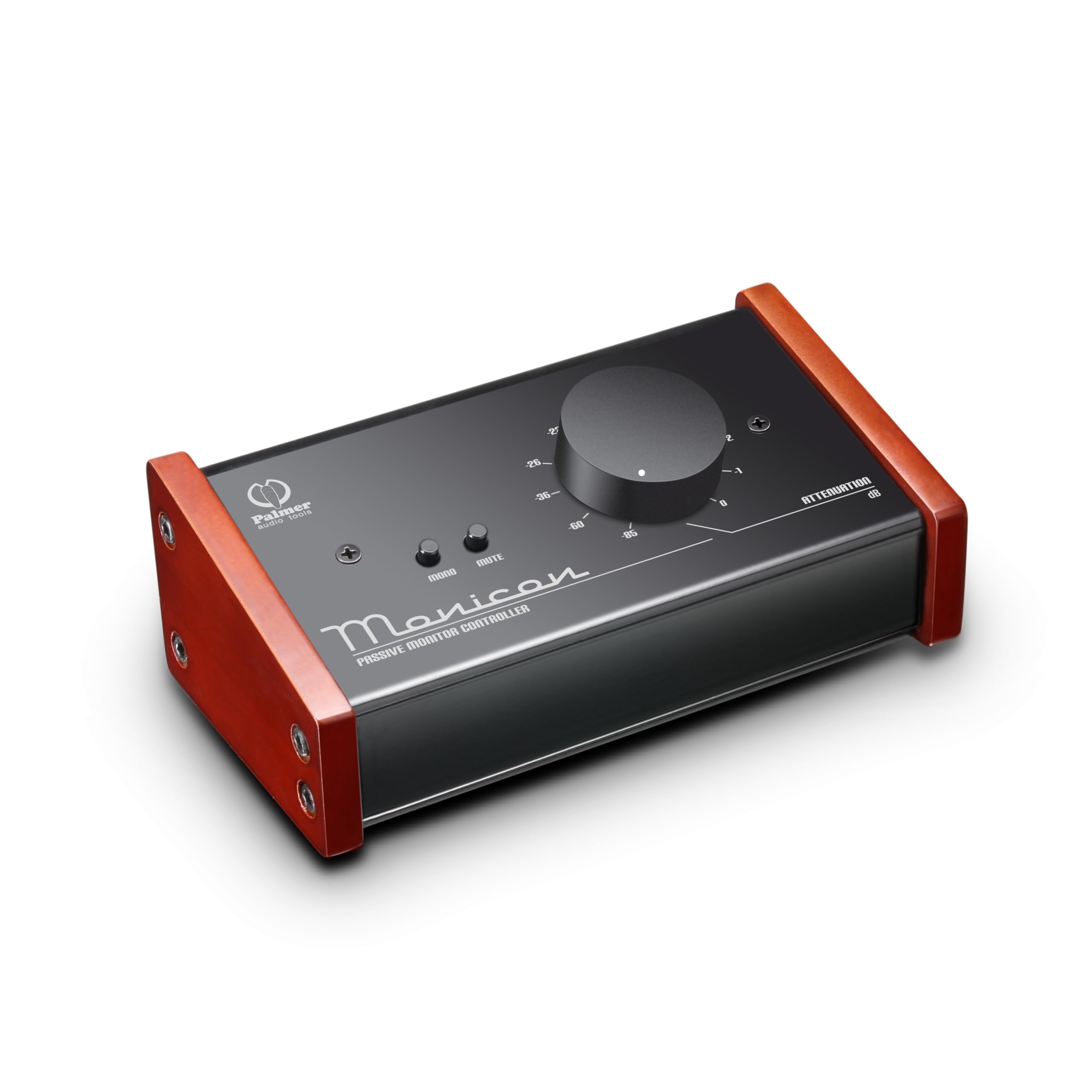
Palmer MONICON

87 /100
Sound Score Excellent

Key details

Routing
No source switching
Controls
Volume, mute, mono
Signal & I/O
Passive, XLR, 3.5mm
Build & Knobs
View on Amazon

The MONICON provides a no-power XLR volume path with mute and mono in a compact desktop unit, ideal for a single balanced source feeding one set of active monitors. It does not switch between multiple sources or monitor pairs, so re-patching is manual when the monitoring chain grows. The published spec sheet is lean, so confirm connector roles and expected level behavior before purchase; within that simple role, the MONICON delivers the core passive monitoring functions.

Pros

  • No-power XLR volume control with mute and mono fits between a DAC and active monitors.
  • Compact enclosure suits traveling engineers who need a level knob without a power supply.

Cons

  • No source or monitor switching
Our verdict

Choose the MONICON when the monitoring setup stays at one balanced source and one monitor pair and you want a no-power level control; for routing between multiple inputs or outputs, a switch-based controller fits better.

Check Latest Price
9

Volume-Only Attenuation

Nobsound Mini Passive Preamp

81 /100
Sound Score Excellent

Key details

Routing
No source switching
Controls
Volume only
Signal & I/O
Passive, XLR, RCA
Build & Knobs
ALPS quad pot
View on Amazon

The Nobsound Mini is a budget-friendly passive attenuator for balanced XLR or single-ended RCA chains. Its ALPS quad potentiometer provides clean, transparent level control between a DAC and powered monitors, with a smooth knob action. The feature set is volume-only: no source or monitor switching, mute, or talkback. In some units, low-level noise can appear at certain volume settings, so producers who need A/B routing or talkback will want a dedicated monitor controller.

Pros

  • Clean, transparent passive sound with no added coloration between a DAC and powered monitors.
  • Smooth volume knob, solid passive performance, and easy setup in a compact budget-friendly build.

Cons

  • Channel balance can shift between left and right at some volume settings in affected units.
Our verdict

This budget passive preamp fits a single-DAC, single-monitor-pair chain where transparent attenuation is all you need.

Check Latest Price

How to Choose

Routing: Sources and Monitor Pairs

Routing determines whether the box can switch between two interfaces or two monitor pairs without unplugging cables. A 2x2 controller handles the most common project-studio setup: one interface plus a second device, feeding a main pair and a nearfield pair.

If you plan to add a subwoofer, a second interface, or another monitor pair later, buy the routing now. Volume-only boxes are the most common upgrade regret because they force you to re-cable whenever the chain changes.

Balanced I/O and Signal Path

Balanced TRS or XLR connections reject the hum and interference that unbalanced RCA and 3.5mm cables pick up over longer runs. Most noise complaints in passive setups disappear when the unbalanced connection is replaced with a balanced one.

Passive controllers have no gain stage, so they can lower maximum level with weak sources. Active or VCA designs add gain, talkback, and USB features, but their powered circuits can introduce whine in some units; a passive path is still safer for purists.

Essential Controls

Volume, mute, dim, mono, and source select cover nearly every monitoring task in a session. Mute and dim are the controls you touch most, because they handle phone calls and quick level checks without reaching for the interface.

Mono sums left and right so you can check phase and hear how a mix behaves on a single speaker. If a controller lacks mono, you lose a simple troubleshooting tool.

Studio Extras

Talkback, headphone amps, USB audio, and cue sends turn a controller into a small studio hub. Talkback is worth paying for only if you record vocalists in another room; it needs a built-in microphone and a dedicated switch.

USB audio is convenient for a one-interface desktop, but a dedicated audio interface usually offers better converters and lower latency. Treat USB as a bonus, not the main reason to buy.

Build Quality and Knob Feel

The volume knob is the most-touched part of a monitoring setup, so its mechanical quality defines daily use. A smooth rotary pot in a metal chassis holds up for years; cheaper plastic pots develop crackles and loose shafts.

If the controller will sit on your desk for five years, build quality is a longevity decision, not a luxury. A heavier box also resists sliding when you hit mute or source select.

Frequently Asked Questions