11 Best USB Audio Interface 2026: Stable Drivers, Clean Gain

Find the best USB audio interface for your home studio, with picks that match preamp gain, inputs, and driver stability to the way you record.

Amazon listings lean hard on 192 kHz and bundled software, but the specs that decide whether a home recording setup actually works are preamp gain, driver stability, and noise floor. A quiet acoustic guitar track reveals hiss fast, and a Windows session can end early when a USB connection drops. The trick is matching the hardware to your operating system and your microphone.

The trade-off that matters most is channel count versus converter quality. A compact two-input interface with clean preamps can sound better than a multi-input unit with weak gain, while a two-microphone podcast needs simultaneous XLR inputs more than a 192 kHz label. Know your sources and the quietest gain level you actually need before you buy.

For solo singers and guitarists, a proven two-input unit is usually the safest buy; for duos and synth-heavy producers, I/O and MIDI matter more than spec-sheet extras. Buy the interface that stays quiet and connected at the levels you actually use.

About the Sound Score: This comparative score is calculated from a product's published customer rating and review volume. It is not a laboratory measurement or a hands-on test result.

1

Best Overall

Focusrite Scarlett Solo 3

95 /100
Sound Score Outstanding

Key details

Extras
Bus-powered
Build & Controls
Gain Halo, Air mode
Driver Stability
Windows dropouts reported
Simultaneous I/O
2-in / 2-out
View on Amazon

The Scarlett Solo 3rd Gen delivers 56 dB of mic gain, Air mode, and a bus-powered connection in a package that gets a first session running quickly. The front panel combines one XLR and one Hi-Z instrument input, so a vocal mic plus a direct guitar covers the most common solo tracking setup. Controls are basic and legible, and the Gain Halo catches clipping before it reaches the DAW.

It records at 24-bit/192 kHz, which is more resolution than streaming needs but does not complicate the workflow. Home studio owners use the Solo as a daily driver for voice, acoustic guitar, and podcasting duties. The 56 dB gain is enough for common dynamic mics, and Air mode adds a useful high-frequency lift for budget condensers. For one mic or one guitar, the sound is clean enough for practice, demos, and entry-level releases.

This is the right fit for solo musicians, entry-level podcasters, and streamers who need one clean channel. It works with macOS, Windows, and iPadOS, so a laptop setup is enough. Unit-to-unit consistency can vary, so if crackling or dropouts show up in the first week, use the warranty rather than troubleshooting endlessly.

Pros

  • Basic setup and gain staging are easy enough for a first-time recordist.
  • Entry-level price includes the preamp gain, Air mode, and clip protection most beginners need.
  • Single-mic vocal and guitar recordings come through with clarity and usable headroom.

Cons

  • Third-party app routing can require manual setup; the hardware itself remains functional.
  • Single XLR input limits the setup to one microphone, so two-mic podcasting or live duos are out.
Our verdict

The Solo 3rd Gen covers one mic and one instrument without adding friction to a first session. If two live mics are already in the plan, a two-input interface is the better place to start.
Check Latest Price
2

Best for Two-Mic Recording

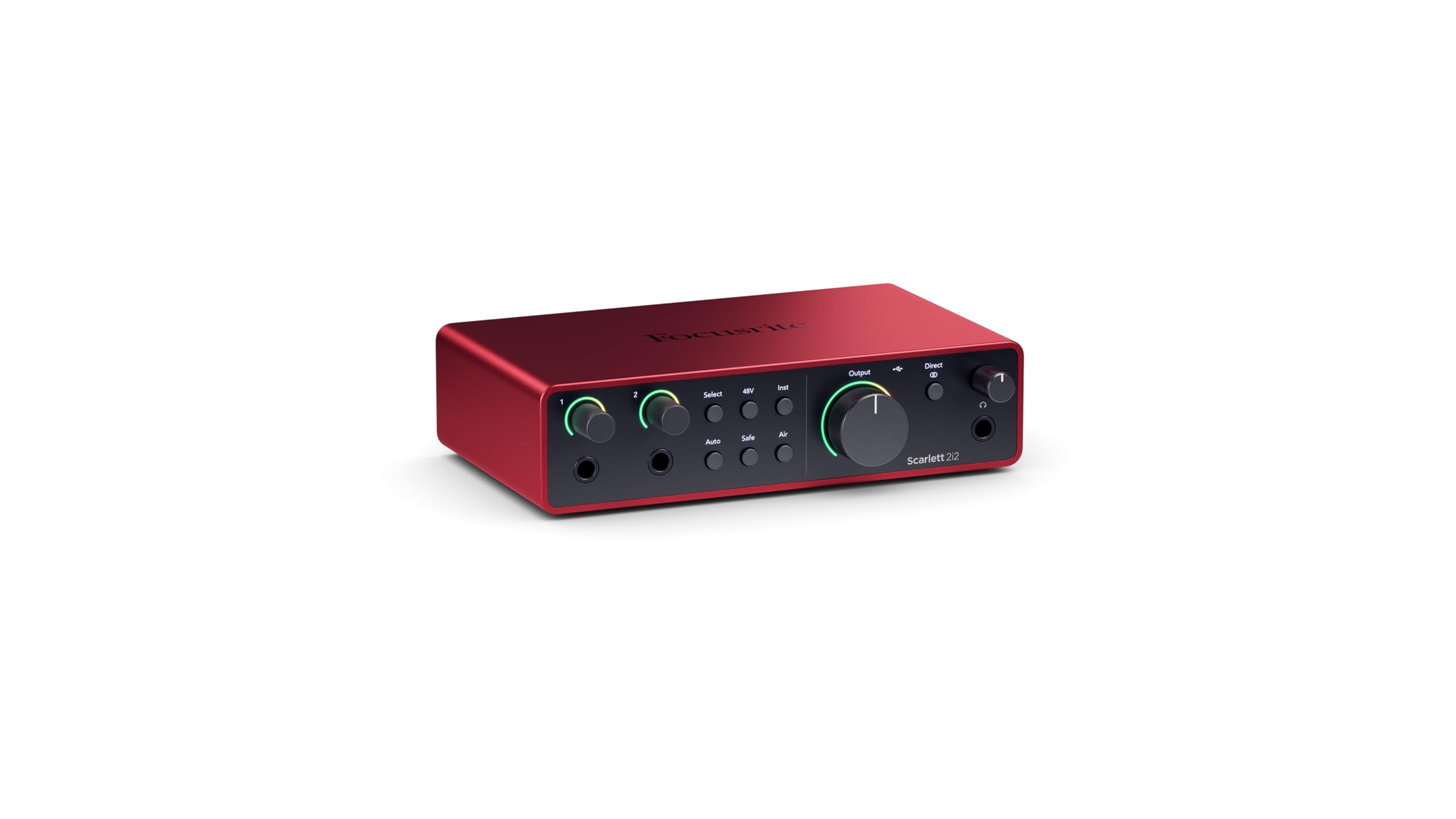
Focusrite Scarlett 2i2 4

92 /100
Sound Score Outstanding

Key details

Extras
Air mode
Build & Controls
Auto Gain, Clip Safe
Driver Stability
Windows dropouts reported
Simultaneous I/O
2-in / 2-out
View on Amazon

Auto Gain and Clip Safe define the 2i2 4th Gen: it sets input levels for two live sources and catches clipping without riding faders, so a voice-and-guitar take stays clean. The 120 dB dynamic range and updated Air mode give the preamps a genuinely clean, musical voice, and the two combo inputs handle mics, line signals, and instruments separately.

This is the Scarlett for duo podcasters, two-source streamers, and singer-songwriters recording voice and guitar at once. Windows driver or USB stability can be an issue on some machines, so Mac and iOS users will have an easier plug-and-play path; Windows buyers should confirm their USB setup before committing.

Pros

  • Auto Gain and Clip Safe keep two live inputs clean without manual gain riding.
  • Two combo inputs cover mic, line, and instrument channels with 120 dB of headroom.
  • Controls and setup are intuitive enough for first-time 4th-gen owners.

Cons

  • Windows driver or USB stability can be an issue on some machines.
Our verdict

Two simultaneous sources are where this Scarlett stands out; it is the upgrade to choose when Auto Gain and Clip Safe matter more than a smaller solo box.

Check Latest Price
3

Best Sound Quality in Compact 2X2

MOTU M2

91 /100
Sound Score Outstanding

Key details

Extras
Loopback
Build & Controls
LCD metering, monitoring
Driver Stability
Windows issues reported
Simultaneous I/O
2-in / 2-out
View on Amazon

The MOTU M2 combines sharp LCD metering, 192 kHz conversion, and transparent preamps in a bus-powered USB-C body, so solo producers get precise level feedback and a quiet signal path without external power. The level meters are more informative than the clip LEDs on entry-level rivals.

This makes it a natural fit for sound-critical home producers and Mac or Linux users who want low-latency desktop recording. Windows buyers should confirm current driver support before purchase. Musicians needing MIDI I/O should look at the four-input sibling. The two mic preamps handle voice and acoustic instrument sessions comfortably, and the loopback channel eases streaming capture.

Pros

  • Transparent preamps deliver clean voice and acoustic recordings without coloration.
  • LCD metering and loopback make level checks and streaming capture easy to manage.
  • Bus-powered USB-C setup draws power from the host, reducing desktop clutter.

Cons

  • Windows users can hit USB driver hiccups that may require a reboot or driver rollback.
Our verdict

A compact 2x2 with conversion and metering above the entry tier, built for sound-critical Mac/Linux desktop studios.

Check Latest Price
4

Best Budget Multi-Input

Behringer UMC404HD

92 /100
Sound Score Outstanding

Key details

Extras
MIDI I/O, direct monitor
Build & Controls
Metal chassis, inserts
Driver Stability
Dropouts reported
Simultaneous I/O
4-in / 4-out
View on Amazon

Four Midas preamps and true 4-in/4-out with MIDI I/O put this budget hub ahead of typical two-input interfaces in the same price range. The metal chassis, insert points, and direct monitoring keep it suited to home bands tracking multiple sources at once.

This is the right pick for podcasters, electronic musicians, or small studios that need multiple live inputs and MIDI without stepping up to a premium tier. It is not the cheapest one-mic starter in this set. Phantom power and USB connectivity can glitch on individual units, so verify those functions before a long session.

Pros

  • Four Midas preamps plus MIDI I/O and four simultaneous inputs deliver more routing than typical two-input interfaces at the same price.
  • Clean, warm Midas preamps keep multi-mic recordings quiet enough for home studios.
  • Metal chassis with insert points and direct monitoring makes multi-source sessions easy to manage.

Cons

  • The larger chassis with MIDI and four inputs needs more desk space than a compact two-input interface.
Our verdict

For anyone tracking more than two sources on a budget, the UMC404HD delivers the I/O and MIDI that pricier two-input units skip.

Check Latest Price
5

Best Software Bundle + MIDI

PreSonus Studio 24c

92 /100
Sound Score Outstanding

Key details

Extras
MIDI I/O, Studio One 6
Build & Controls
Mixer-style controls
Driver Stability
Stable in Studio One
Simultaneous I/O
2-in / 2-out
View on Amazon

Studio One 6 Artist, two XMAX-L preamps, and MIDI I/O come together in a compact USB-C interface, and the included C-to-C and C-to-A cables make setup quick on modern or older computers. It is not the pure-converter pick in this set, but the preamps stay quiet enough for typical vocal and guitar work.

This is for new producers who want a DAW and synth connectivity without assembling separate pieces: Studio One 6 Artist is a real DAW, not a stripped demo. Preamp gain is limited for low-output dynamics like the SM7B; an inline booster may be needed.

Pros

  • Bundles Studio One 6 Artist, two XMAX-L preamps, and MIDI I/O in one package.
  • Setup is quick and works with USB-C or USB-A computers.
  • Preamp noise stays low for clean vocal and acoustic takes.

Cons

  • Headphone amp output is modest; high-impedance headphones may need a separate amp.
Our verdict

The Studio 24c is the entry bundle for new producers who want the DAW and MIDI I/O included; it covers typical recording mics and instruments without extras.

Check Latest Price
6

Best Mobile/Portable XLR Interface

Shure MVX2U Gen 2

90 /100
Sound Score Outstanding

Key details

Extras
DSP denoiser, auto level
Build & Controls
App-based controls
Driver Stability
Class-compliant, MFi
Simultaneous I/O
1-in / 1-out
View on Amazon

MFi-certified XLR-to-USB-C conversion makes this the portable voice-capture option for one high-quality mic on a phone, tablet, or laptop. Auto Level, Real-Time Denoiser, and Digital Popper Stopper handle vocal cleanup before the signal reaches the recorder, and +60 dB of gain covers low-output dynamic mics.

This suits mobile podcasters and remote interviewees who want a single XLR mic that follows them across desktop and mobile; the MOTIV app is the control surface for gain and processing. Guitarists and musicians who need a direct instrument input should look at the top pick instead.

💡 Save a gain preset in the MOTIV app after dialing in your mic, then switch between phone and laptop without re-tuning levels.

Pros

  • Connects a single XLR mic to Mac, Windows, iOS, and Android over USB-C with minimal setup.
  • Auto Level, Real-Time Denoiser, and Digital Popper Stopper clean up voice before recording starts.
  • Compact, well-built enclosure suits mobile recording kits.

Cons

  • No tactile gain knob on the unit; all gain and processing adjustments require the MOTIV app.
Our verdict

The right fit is a solo creator who wants one XLR mic to sound clean on any device without carrying a full interface.

Check Latest Price
7

Synth-Heavy Producers

MOTU M4

90 /100
Sound Score Outstanding

Key details

Extras
MIDI I/O, monitoring
Build & Controls
LCD metering, loopback
Driver Stability
Windows issues reported
Simultaneous I/O
4-in / 4-out
View on Amazon

The M4's four inputs and MIDI I/O make it a natural hub for synth-heavy studios that need to keep multiple sources wired at once. Loopback routing handles streaming or podcast recording beside a DAW session. The premium price is worth it only when the extra I/O is in regular use; Windows-on-ARM and some macOS versions can have compatibility caveats.

Pros

  • Four inputs plus MIDI and loopback keep synths, drum machines, and outboard gear connected without repatching.
  • Solid metal construction and clear LCD metering give it a polished feel on a studio desk.

Cons

  • Driver or firmware quirks can surface over time, making an occasional reboot part of regular use.
Our verdict

Solo musicians and podcasters can stay with a 2x2; synth-based studios with outboard gear are the right home for the M4's I/O.

Check Latest Price
8

Budget Beginners

Behringer UMC22

91 /100
Sound Score Outstanding

Key details

Extras
+48V phantom
Build & Controls
Direct monitor switch
Driver Stability
Plug-and-play
Simultaneous I/O
2-in / 2-out
View on Amazon

A Midas-designed preamp, +48V phantom power, and direct monitoring make this a low-stakes entry for solo podcasters and home demo recording. The single preamp and a lower spec ceiling keep it behind the four-input UMC404HD for serious work, so treat it as a budget starter rather than a quiet-room capture tool.

Pros

  • Entry-level price puts a Midas-designed preamp within reach of first-time buyers.
  • Simple controls keep basic solo podcast and home demo sessions uncomplicated.

Cons

  • Budget preamp hiss can surface in quiet recordings when gain is turned up.
Our verdict

For one-mic podcast and demo sessions at the lowest entry price, this is a capable starting point; step up only when sessions demand more inputs or higher fidelity.

Check Latest Price
9

Beginner Podcasters

M-Audio M-Track Duo

89 /100
Sound Score Excellent

Key details

Extras
MPC Beats, Ableton Live
Build & Controls
USB/Direct switch
Driver Stability
Plug-and-play
Simultaneous I/O
2-in / 2-out
View on Amazon

Two combo XLR/line/instrument inputs with bundled software make this a low-cost way to record two mics at once. It is simple to use, although not for precise gain staging: the knob's final few degrees can jump. This fits beginner podcasters and home musicians on a strict budget.

Pros

  • Two combo XLR/line/instrument inputs at an entry-level price suit two-mic podcasters.
  • Simple controls, zero-latency monitoring, and bundled music software lower the startup barrier.

Cons

  • USB port durability can vary between units; a loose connection may appear with heavy use.
Our verdict

Best as an entry-level two-mic solution for home podcasters who want the lowest practical cost.

Check Latest Price
10

Premium Compact

Audient iD14 MKII

91 /100
Sound Score Outstanding

Key details

Extras
2 headphone outputs
Build & Controls
Monitor mix, metal chassis
Driver Stability
Windows issues reported
Simultaneous I/O
2-in / 2-out
View on Amazon

The iD14 MKII's Class-A preamps and monitor controls make it a compact desktop option for solo producers who value tone. It is competitively built but priced well above two-input rivals and capped at 96 kHz. Windows 11 buyers should confirm current driver compatibility before ordering; the sound quality is the main draw, not the feature count.

Pros

  • Class-A console preamps deliver clear, musical gain for vocals and instruments.
  • Solid metal chassis keeps the unit road-ready for mobile recording.

Cons

  • Phantom power can be inconsistent on some units, so condenser mics may need an early check.
Our verdict

The best fit is a solo producer who wants console-style preamp tone in a small footprint.

Check Latest Price
11

Tight Budgets

M-Audio M-Track Solo

88 /100
Sound Score Excellent

Key details

Extras
RCA outputs, 48V
Build & Controls
USB/Direct switch
Driver Stability
Plug-and-play
Simultaneous I/O
2-in / 2-out
View on Amazon

The M-Track Solo gets a mic or instrument into a DAW without a big investment. Ground-loop hum can appear in quiet rooms, the gain knob jumps near max, and long-term durability can vary between units — so it stays a fallback for hard-budget beginners rather than a confident recommendation.

Pros

  • Build feels solid at the price for a budget bus-powered unit.
  • The USB/Direct switch and +48V button are approachable for a first-time recordist.

Cons

  • Only one XLR input limits podcasters who need a second mic for guests.
Our verdict

If you need a cheap first interface for recording yourself with a mic and instrument, the M-Track Solo works in a casual practice room.

Check Latest Price

How to Choose

Mic Preamps & Gain

Mic preamp count determines how many microphones can record at once; gain determines whether quiet sources reach a usable level. A low-output dynamic like the Shure SM7B needs roughly 60 dB of clean gain; many budget interfaces fall short and push you toward an inline booster. Condenser mics with +48V phantom power are less demanding, but every preamp has a noise floor that gets more audible as gain rises.

Simultaneous I/O

The channel count on the box is not the same as how many mics you can record at once. A 2-in/2-out interface records two sources simultaneously; a 4-in/4-out with only two mic preamps records two mics plus line-level synths.

If you plan a duo podcast or voice and acoustic guitar, buy two XLR inputs now; swapping later costs more.

Driver Stability

Driver stability depends on the interface's own firmware, the host OS, and the USB chipset in your computer. Class-compliant devices use built-in OS drivers and are often the safest choice for Mac/iPad and budget Windows machines, while feature-heavy models rely on custom drivers that can drop audio during sleep cycles or OS updates.

Check the manufacturer's Windows 11/12 compatibility notes if your PC is not a standard Intel setup.

Build & Controls

Physical controls change how often a session stops. A dedicated gain knob and direct monitor switch let you adjust levels while playing; pads and LED meters help spot clipping before it hits the recording.

Plastic enclosures and tiny knobs are a budget compromise, but the long-term weak points on cheap interfaces are usually the USB port, the encoder, and the headphone jack.

Extras

MIDI I/O, loopback, DSP, and bundled software can make an interface feel like a studio hub, but they add cost and software complexity. Loopback is useful for streamers routing desktop audio into a call; MIDI matters for synth owners; DSP effects like the Shure MVX2U's denoiser clean up the signal.

Decide which extras you will use within a month, not which sound impressive on a spec sheet.

Frequently Asked Questions
